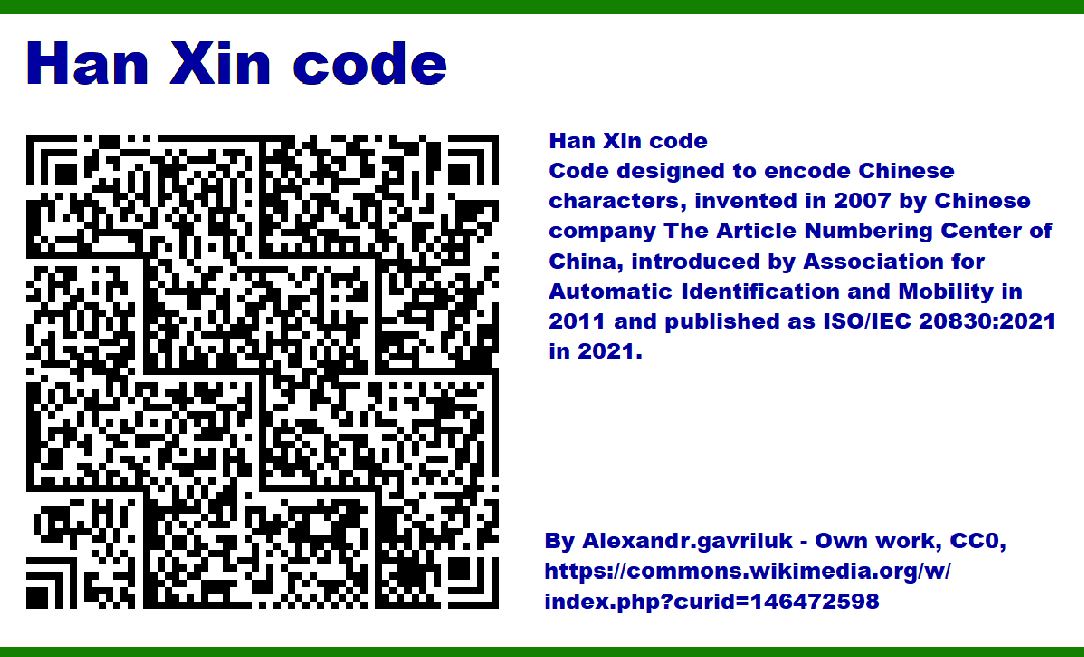
Han Xin Code is a two-dimensional barcode designed primarily for encoding Chinese characters efficiently. Developed in China, this barcode has unique characteristics that set it apart from other 2D codes like QR Code or Data Matrix. One of its critical features is the error correction capability, which ensures data integrity and readability even when the barcode is partially damaged or obscured. |
Error correction in Han Xin Code is implemented using Reed-Solomon error correction algorithms. Reed-Solomon codes are block-based error correction codes that work by adding redundant data to the message. This redundancy allows the barcode to be read correctly even if parts of it are missing or corrupted. |
|
Reed-Solomon Error Correction |
Reed-Solomon error correction works by treating each data block as a polynomial. By adding additional parity symbols, which are essentially redundant data, the code can detect and correct errors in the data. In the context of Han Xin Code, the process involves the following steps: |
1.Encoding the Message: The original data is encoded into a polynomial. 2.Generating Redundant Data: Redundant parity symbols are generated and appended to the data. 3.Error Detection and Correction: When the barcode is read, the system can detect and correct errors by analyzing the polynomial and redundant data. |

|
Example of Reed-Solomon Error Correction |
Let's walk through a simplified example of how Reed-Solomon error correction is applied in Han Xin Code: |
1.Message Encoding: Suppose we have a message that needs to be encoded into a Han Xin Code. The message is first converted into a series of numerical values based on a predefined character set. For simplicity, let's consider a message 'HELLO' which is converted to numerical values [8, 5, 12, 12, 15]. |
2.Polynomial Representation: The message is then treated as coefficients of a polynomial: P(x)=8+5x+12x2+12x3+15x4P(x) = 8 + 5x + 12x^2 + 12x^3 + 15x^4P(x)=8+5x+12x2+12x3+15x4 |
3.Generating Redundant Data: To generate the redundant data, the original polynomial is divided by a generator polynomial, which is specific to the Reed-Solomon code used in Han Xin Code. Let's assume a generator polynomial G(x)=x2+2x+3G(x) = x^2 + 2x + 3G(x)=x2+2x+3 for this example. Performing polynomial division, we get a quotient and a remainder. The remainder is the redundant data. |
4.Appending Redundant Data: The remainder obtained from the division is appended to the original data. Let's say the remainder is [1, 4]. The final encoded message becomes [8, 5, 12, 12, 15, 1, 4]. |
5.Error Detection and Correction: When the barcode is scanned, the reader calculates the polynomial based on the received data. If the received data is [8, 5, 12, 12, 15, 1, 4], it matches the encoded data, indicating no errors. If the received data has errors, for example [8, 5, 12, 0, 15, 1, 4], the reader uses the redundant data to reconstruct the original polynomial and correct the error. |

|
Levels of Error Correction |
Han Xin Code supports multiple levels of error correction, allowing the user to choose the amount of redundant data based on the application needs. These levels are: |
1.Level L (Low): Can correct up to 7% of the data codewords. 2.Level M (Medium): Can correct up to 15% of the data codewords. 3.Level Q (Quartile): Can correct up to 25% of the data codewords. 4.Level H (High): Can correct up to 30% of the data codewords. |
The choice of error correction level impacts the amount of redundant data added to the barcode. Higher levels of error correction provide better resilience to damage but also increase the size of the barcode. |

|
Example of Different Error Correction Levels |
Consider a Han Xin Code with different error correction levels: |
1.Level L: Message: 'DATA' Encoded Data: [4, 1, 20, 1] Redundant Data: Let's say [5, 2] for Level L Final Encoded Message: [4, 1, 20, 1, 5, 2] Can correct up to 7% errors. |
2.Level M: Message: 'DATA' Encoded Data: [4, 1, 20, 1] Redundant Data: Let's say [7, 6, 3, 1] for Level M Final Encoded Message: [4, 1, 20, 1, 7, 6, 3, 1] Can correct up to 15% errors. |
3.Level Q: Message: 'DATA' Encoded Data: [4, 1, 20, 1] Redundant Data: Let's say [10, 8, 4, 5, 3, 7] for Level Q Final Encoded Message: [4, 1, 20, 1, 10, 8, 4, 5, 3, 7] Can correct up to 25% errors. |
4.Level H: Message: 'DATA' Encoded Data: [4, 1, 20, 1] Redundant Data: Let's say [12, 11, 9, 6, 2, 4, 8, 10] for Level H Final Encoded Message: [4, 1, 20, 1, 12, 11, 9, 6, 2, 4, 8, 10] Can correct up to 30% errors. |
In each case, the redundant data is generated using the Reed-Solomon algorithm, ensuring that the barcode can be accurately read even if part of it is damaged. |

|
Error Correction Process |
The error correction process in Han Xin Code involves several steps: |
1.Scanning the Barcode: The barcode scanner captures the image of the Han Xin Code. |
2.Decoding the Data: The scanner decodes the data from the captured image, converting it back into numerical values representing the encoded message and redundant data. |
3.Error Detection: The scanner checks for errors by comparing the decoded data with the expected data structure. If discrepancies are found, it indicates the presence of errors. |
4.Error Correction: The scanner uses the redundant data to correct the errors. This involves solving polynomial equations to reconstruct the original data. The Reed-Solomon algorithm can correct a certain number of errors based on the level of error correction used. |
5.Output the Corrected Data: Once the errors are corrected, the scanner outputs the corrected data, ensuring accurate information retrieval. |

|
Practical Example |
Let's consider a practical example where a Han Xin Code is used to encode the message '汉信码': |
1.Message Encoding: The message '汉信码' is encoded into numerical values using a predefined character set. For simplicity, assume the message is converted to [201, 202, 203]. |
2.Generating Redundant Data: Using Reed-Solomon encoding, redundant data is generated. Let's assume the redundant data for a medium level of error correction (Level M) is [15, 30, 45, 60]. |
3.Final Encoded Message: The final encoded message with redundant data is [201, 202, 203, 15, 30, 45, 60]. |
4.Barcode Scanning: The barcode is printed and later scanned by a reader. |
5.Error Detection and Correction: If the scanned data is [201, 202, 0, 15, 30, 45, 60] (with an error in the third position), the scanner detects the error. Using the redundant data, the scanner reconstructs the original message, correcting the error. |
6.Output the Corrected Data: The corrected data [201, 202, 203] is output, representing the original message '汉信码'. |

|
Error Correction Capability |
Han Xin Code's error correction capability is robust, making it suitable for environments where barcodes are likely to be damaged or partially obscured. This includes manufacturing, logistics, and retail industries where barcodes might be subjected to wear and tear. |
The ability to correct errors ensures that data encoded in Han Xin Code is reliable and can be accurately read, even under adverse conditions. This reliability is crucial for applications requiring high data integrity, such as inventory management, product tracking, and identification. |

|
Summary |
Error correction in Han Xin Code is a vital feature that enhances the reliability and robustness of this barcode type. By utilizing Reed-Solomon error correction algorithms, Han Xin Code can detect and correct errors, ensuring accurate data retrieval even when the barcode is partially damaged. |
The flexibility of choosing different levels of error correction allows users to balance between data redundancy and barcode size, making Han Xin Code adaptable to various applications and environments. The detailed process of encoding, generating redundant data, and correcting errors highlights the sophisticated mechanism underlying Han Xin Code's error correction capability. |
In conclusion, Han Xin Code's error correction mechanism, supported by Reed-Solomon codes, provides a powerful tool for ensuring data integrity and reliability, making it a valuable asset in numerous industrial and commercial applications. |

|
 cs@easiersoft.com