Error Correction in TLC39 (Truncated Linear Code 39) Barcode |
Introduction to TLC39 |
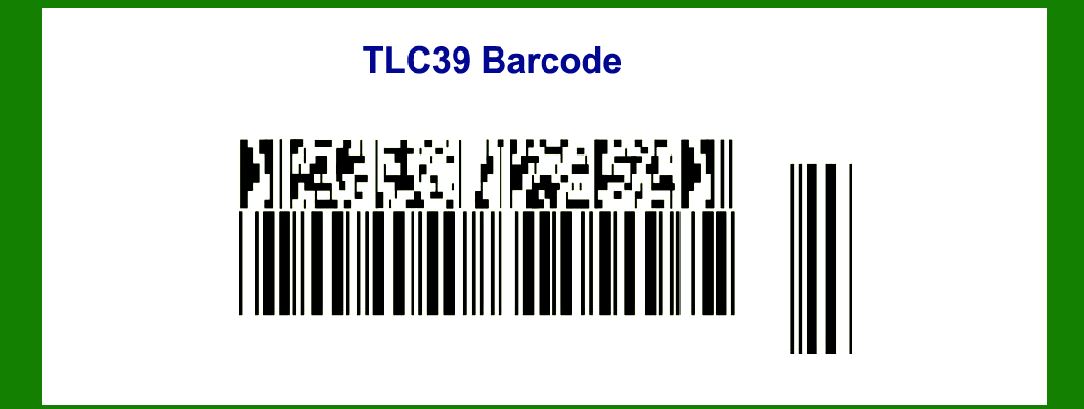
The Truncated Linear Code 39 (TLC39) is a variant of the traditional Code 39 barcode. Code 39, also known as 'Code 3 of 9,' is a linear barcode symbology that encodes alphanumeric characters. TLC39 maintains the basic encoding structure of Code 39 but modifies it to be more compact and suitable for specific applications, particularly where space constraints are critical. |
|
Error Correction Overview |
Error correction in barcodes is essential for ensuring data integrity during the scanning process. It allows the barcode to be accurately read even if it is partially damaged, obscured, or distorted. Traditional linear barcodes, like Code 39, do not inherently include sophisticated error correction mechanisms. However, various strategies can be employed to improve their robustness, such as redundancy, check digits, and encoding techniques. |

|
Error Detection in TLC39 |
Before diving into error correction, it's important to understand error detection, which is the first step. In TLC39, error detection can be facilitated using check digits. A check digit is an additional digit calculated from the data and appended to the barcode. This digit allows the scanner to verify the integrity of the data by recalculating the check digit and comparing it to the one in the barcode. |
Check Digit Calculation |
For TLC39, the check digit is calculated by assigning values to each character, summing these values, and then taking the modulo of the sum. Here's a simplified example: |
1.Assign values to each character in the data string (e.g., A=10, B=11, …, Z=35, 0=0, 1=1, …, 9=9). 2.Sum the values of all characters. 3.Calculate the sum modulo 43. 4.The result is the check digit. |
For example, if the data string is 'ABC123': |
A = 10, B = 11, C = 12, 1 = 1, 2 = 2, 3 = 3 Sum = 10 + 11 + 12 + 1 + 2 + 3 = 39 Check digit = 39 % 43 = 39 (which corresponds to a specific character in the Code 39 character set). |

|
Error Correction Strategies for TLC39 |
Although TLC39 itself does not inherently provide robust error correction, several strategies can be applied to enhance its error tolerance: |
1. Redundancy and Multiple Copies |
One straightforward method to increase error correction is to print multiple copies of the barcode. This redundancy allows a scanner to read different instances of the barcode and reconcile any discrepancies: |
If one copy is damaged or obscured, another copy may still be readable. |
This method is effective but increases the amount of space required for barcode printing. |
2. Check Digit Verification |
While primarily used for error detection, check digits can also serve a rudimentary error correction role: |
When a barcode scan fails the check digit verification, the system can prompt for a re-scan. This does not correct the error in the barcode itself but helps ensure the data is not accepted until it is correctly read. |
3. Reed-Solomon Error Correction |
Reed-Solomon codes are a type of error-correcting code commonly used in various data storage and transmission technologies. They can be adapted for use with linear barcodes like TLC39: |
Data is encoded into multiple codewords. Additional error correction codewords are generated and appended. When a barcode is scanned, the Reed-Solomon decoder can reconstruct the original data even if parts of the barcode are unreadable. |
Example of Reed-Solomon in TLC39: |
1.Data Encoding: Original data: 'ABC123' Convert to numerical values (e.g., A=10, B=11, etc.). Generate Reed-Solomon codewords based on the data. |
2.Error Correction Codewords: Append error correction codewords to the original data. The final encoded barcode might look like 'ABC123+XYZ' where 'XYZ' are the error correction codewords. |
3.Decoding and Error Correction: During scanning, if parts of the barcode are damaged, the Reed-Solomon algorithm uses the error correction codewords to reconstruct the original data. |
4. Interleaving |
Interleaving involves rearranging the data sequence to distribute potential errors across different parts of the barcode. This method helps mitigate localized damage: |
Data characters are interleaved before encoding into the barcode. For example, the original data 'ABC123' might be interleaved as 'A1B2C3'. This distributes errors more evenly, increasing the chance of successful error correction. |
Example of Interleaving: |
1.Original Data: 'ABC123' |
2.Interleaved Data: 'A1B2C3' |
3.Barcode Encoding: Encode the interleaved data into the barcode. If a section of the barcode is damaged, the non-contiguous nature of the data may still allow for partial reconstruction and correction. |

|
Practical Considerations |
Implementing error correction in TLC39 requires careful consideration of several factors: Space Constraints: Adding error correction codewords or multiple barcode copies increases the space required for printing. Scanning Environment: The choice of error correction method may depend on the typical conditions in which the barcode is scanned (e.g., clean environments vs. dirty or damaged surfaces). Cost: More sophisticated error correction techniques, such as Reed-Solomon codes, may increase implementation complexity and cost. |

|
Summary |
Error correction in TLC39, while not inherently part of the barcode's design, can be enhanced through various strategies. By employing redundancy, check digits, Reed-Solomon error correction, and interleaving, the robustness of TLC39 barcodes can be significantly improved. These methods help ensure that data integrity is maintained even in the presence of damage or distortion, making TLC39 more reliable for applications where space constraints and data accuracy are critical. |

|
Example Walkthrough |
Let's walk through a detailed example to illustrate how these error correction techniques can be applied to TLC39. |
Original Data: 'TEST123' |
1.Step 1: Assign Character Values T = 29, E = 14, S = 28, T = 29, 1 = 1, 2 = 2, 3 = 3 |
2.Step 2: Calculate Check Digit Sum = 29 + 14 + 28 + 29 + 1 + 2 + 3 = 106 Check digit = 106 % 43 = 20 (corresponding to 'K' in Code 39 character set) |
3.Step 3: Generate Reed-Solomon Codewords For simplicity, assume we generate 2 error correction codewords (actual implementation may require more complex calculations). Let's denote these codewords as 'X' and 'Y'. |
4.Step 4: Interleave Data Original data + check digit: 'TEST123K' Interleave with error correction codewords: 'T1E2S3T-KX' |
5.Step 5: Encode into TLC39 Barcode The final encoded barcode will contain the interleaved and error-corrected data. |
Scanning and Error Correction |
1.Damaged Barcode Example Suppose the barcode is damaged and part of 'S3T-' is unreadable. |
2.Reed-Solomon Decoding The scanner reads the partial data 'T1E2-KX'. Using Reed-Solomon error correction, the missing data 'S3T-' can be reconstructed from the error correction codewords. |
3.Verify Check Digit Recalculate the check digit from the reconstructed data to ensure accuracy. |

|
Conclusion |
Error correction in TLC39 is a multifaceted approach that involves enhancing traditional linear barcode robustness through redundancy, check digits, advanced error correction codes like Reed-Solomon, and data interleaving. By applying these techniques, TLC39 can achieve higher reliability and data integrity, making it suitable for environments where barcode damage or distortion is a concern. The detailed example demonstrates how these methods work in practice, providing a clear understanding of the process and benefits of error correction in TLC39 barcodes. |

|
 cs@easiersoft.com