VOICEYE 2D barcode, a visually-accessible barcode system, is designed to store large amounts of data and be easily readable by people with visual impairments. A crucial feature of the VOICEYE barcode is its robust error correction capabilities. This makes the barcode highly reliable, even when parts of the code are damaged or obscured. Here, we delve into the error correction mechanisms employed by VOICEYE 2D barcodes, explaining their principles and providing examples to illustrate how they work in practice. | 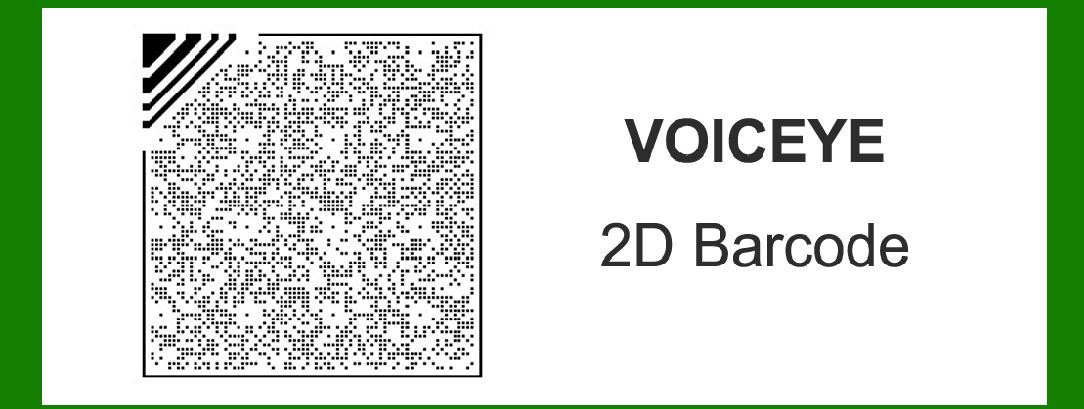
| Overview of Error Correction | Error correction in barcodes is essential to ensure data integrity and reliability, especially in real-world conditions where barcodes might be subject to physical damage, dirt, or printing imperfections. VOICEYE employs sophisticated error correction techniques to achieve this robustness. The primary method used is based on Reed-Solomon error correction, a widely-used algorithm in digital communications and storage systems. | 
| Reed-Solomon Error Correction | Reed-Solomon (RS) error correction is a form of block coding that adds redundant data to a message. This redundancy allows the system to detect and correct errors without needing retransmission. The fundamental concept is to represent the data as a polynomial and then encode it by adding redundant coefficients. These additional coefficients help to correct errors by providing multiple points of reference. | Working Principle | 1.Data Encoding: The original data is divided into blocks. Each block is treated as coefficients of a polynomial over a finite field (Galois Field). Redundant symbols (check symbols) are generated using polynomial division. The number of redundant symbols determines the error correction capability. | 2.Data Decoding: Upon scanning, the VOICEYE reader interprets the barcode and retrieves the data blocks along with the redundant symbols. If the barcode is damaged, some of the data might be incorrect or missing. The RS algorithm uses the redundant symbols to solve the polynomial equations and correct errors up to a certain limit. | 
| Error Correction Capacity | The error correction capacity of Reed-Solomon codes depends on the number of redundant symbols added to the original data. For a code with nnn total symbols and kkk data symbols, the number of redundant symbols (n?k)(n - k)(n?k) determines the maximum number of errors that can be corrected. Specifically, it can correct up to (n?k)/2(n - k) / 2(n?k)/2 symbols of errors. | In the context of VOICEYE, different levels of error correction can be implemented depending on the desired balance between data capacity and error correction capability. Higher levels of error correction reduce the amount of usable data space but increase robustness. | 
| Implementation in VOICEYE 2D Barcodes | VOICEYE 2D barcodes apply Reed-Solomon error correction in a structured manner. The barcodes are designed to be highly resilient, making them suitable for environments where damage is likely. Here's how VOICEYE integrates error correction: | Data Structure | VOICEYE barcodes consist of a matrix of cells, each representing a bit of information. The data is organized into modules that include both the data symbols and redundant symbols for error correction. | Error Correction Process | 1.Encoding: The original data is divided into several blocks. Each block is encoded using Reed-Solomon error correction, generating redundant symbols. These blocks are then assembled into the VOICEYE barcode, ensuring that the redundant symbols are evenly distributed to maximize correction potential. | 2.Decoding: The VOICEYE reader scans the barcode, capturing the matrix of cells. The data blocks, along with their redundant symbols, are extracted. If errors are detected (e.g., due to missing or altered cells), the Reed-Solomon algorithm uses the redundant symbols to correct the errors and reconstruct the original data. | 
| Example Scenarios | To illustrate the error correction capabilities of VOICEYE 2D barcodes, let's consider a few scenarios: | Example 1: Minor Damage | Suppose a VOICEYE barcode contains 100 data symbols and 20 redundant symbols, allowing it to correct up to 10 symbols of errors. | Original Data: [D1, D2, ..., D100] Redundant Symbols: [R1, R2, ..., R20] | If 8 symbols are damaged or unreadable due to a scratch or dirt: | Scanned Data: [D1, D2, ..., Dx, Dx+1, ..., D92, _, _, _, _, _, _, _, _, _, R1, R2, ..., R20] | The RS algorithm detects the missing or altered symbols and uses the redundant symbols to correct them, restoring the original data accurately. | Example 2: Significant Damage | In a more severe case, suppose the barcode is partially obscured, with 15 symbols damaged: | Original Data: [D1, D2, ..., D100] Redundant Symbols: [R1, R2, ..., R20] Scanned Data: [D1, _, D3, D4, _, _, D7, ..., D90, _, _, _, R1, _, R3, R4, ..., R20] | Since 15 symbols are damaged, which exceeds the correction capacity of 10, the barcode cannot be fully corrected. However, the RS algorithm can still correct as many errors as possible, potentially recovering some of the data and indicating the extent of the damage. | 
| Practical Applications | The error correction feature of VOICEYE 2D barcodes makes them highly practical for various applications: | Documents for the Visually Impaired: Printed materials like books, magazines, and brochures can include VOICEYE barcodes, ensuring that even if the document is slightly damaged, the barcode remains readable. Public Signage: VOICEYE barcodes on public signs, maps, and informational displays can withstand vandalism or environmental wear, ensuring accessibility for visually impaired individuals. Healthcare: Patient records, prescription labels, and medical equipment can utilize VOICEYE barcodes, ensuring data integrity in critical settings where damage might occur. | Example in Healthcare | Consider a hospital setting where patient records are labeled with VOICEYE barcodes. These labels are frequently handled, increasing the risk of damage. Suppose a barcode on a patient's wristband includes 150 data symbols and 30 redundant symbols, providing the capacity to correct up to 15 symbols of errors. | Original Data: [D1, D2, ..., D150] Redundant Symbols: [R1, R2, ..., R30] | If the wristband gets partially scratched, resulting in 10 damaged symbols: | Scanned Data: [D1, D2, ..., D140, _, _, _, _, _, _, _, _, R1, R2, ..., R30] | The RS algorithm detects the damaged symbols and corrects them using the redundant data, ensuring that the patient's information remains intact and accessible. | 
| Advanced Error Correction Features | VOICEYE barcodes may also employ additional techniques to enhance error correction: | Interleaving | Interleaving is a technique where data and redundant symbols are arranged in a non-sequential manner. This helps to mitigate the impact of burst errors (consecutive symbols being damaged). | Original Sequence: [D1, D2, ..., D100, R1, R2, ..., R20] Interleaved Sequence: [D1, R1, D2, R2, ..., D50, R10, ..., D100, R20] | Interleaving spreads out the data and redundant symbols, so even if a section of the barcode is damaged, the errors are more likely to be distributed rather than concentrated, making correction easier. | Error Detection | In addition to error correction, VOICEYE barcodes can also detect errors. Error detection mechanisms like checksums or cyclic redundancy checks (CRC) can identify if the data has been tampered with or corrupted beyond the correction capacity. | Checksum: A value calculated from the data symbols and stored in the barcode. Upon scanning, the checksum is recalculated and compared to the stored value to detect errors. | Example with Interleaving and Error Detection | Consider a VOICEYE barcode with 120 data symbols and 24 redundant symbols, with interleaving and a checksum for error detection. | Original Data: [D1, D2, ..., D120] Redundant Symbols: [R1, R2, ..., R24] Interleaved Sequence: [D1, R1, D2, R2, ..., D60, R12, ..., D120, R24] | If 12 symbols are damaged due to a spill: | Scanned Data: [D1, _, D2, _, ..., D58, R10, ..., D120, _] | The interleaved sequence spreads the damage, and the RS algorithm uses the redundant symbols to correct the errors. The checksum confirms the integrity of the corrected data. | 
| Conclusion | The error correction capabilities of VOICEYE 2D barcodes are a critical component of their design, ensuring that data remains accessible even in the presence of physical damage. By employing Reed-Solomon error correction, interleaving, and error detection techniques, VOICEYE barcodes achieve a high level of robustness. These features make VOICEYE an ideal solution for applications where data integrity and accessibility are paramount, particularly for assisting visually impaired individuals in accessing printed information. | 
|
|
 cs@easiersoft.com