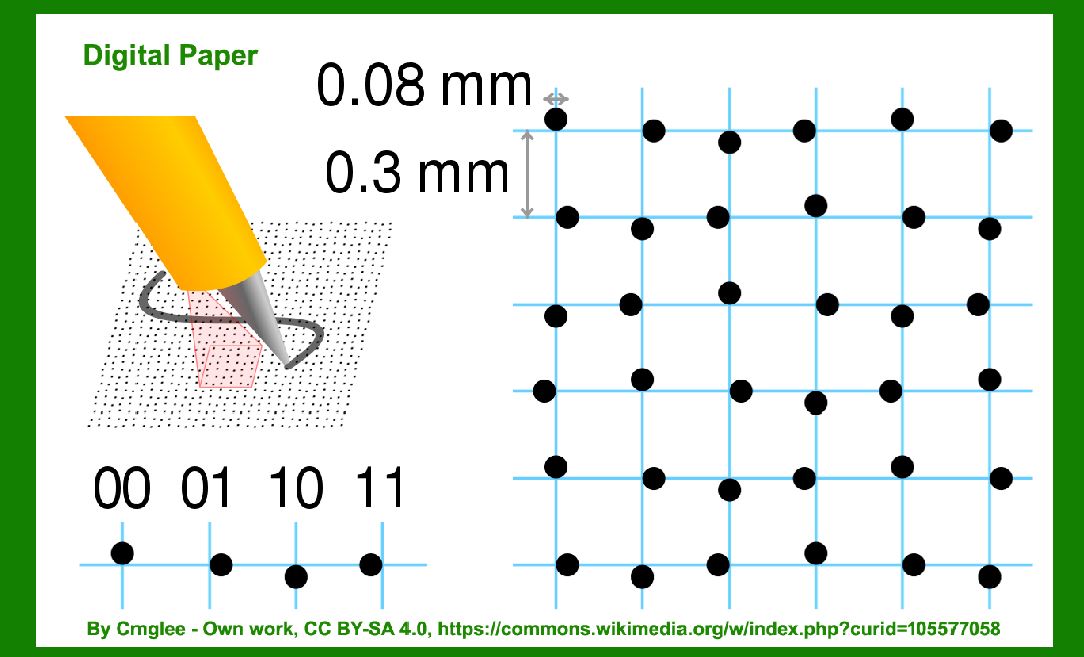
The Anoto dot pattern and digital paper technology form a sophisticated system designed primarily for digital pen and paper interactions. |
Here's a detailed exploration of their format, structure, and applications: |
|
Introduction to Anoto Technology |
Anoto technology integrates physical writing surfaces with digital capture capabilities, revolutionizing the way handwritten information is digitized and utilized. It consists of two main components: |
1.Anoto Dot Pattern: A unique, near-invisible dot pattern printed on paper that enables precise tracking of pen movements. 2.Digital Pen: A specialized pen equipped with a camera or sensor that reads and interprets the dot pattern as the user writes. |

|
Anoto Dot Pattern |
Structure and Format |
The Anoto dot pattern is characterized by the following key features: |
Microscopic Dots: Dots are printed on paper at a very fine scale, typically less than 0.3 mm in diameter. These dots are arranged in a grid pattern across the page. Unique Positioning: Each dot has a unique position within the grid, allowing for precise identification of its location on the page. Pattern Variants: Anoto technology supports different variants of dot patterns, each tailored for specific applications such as forms, notebooks, or large-format surfaces. |
Printing Process |
The dot pattern is printed using specialized printers capable of high-resolution output. This printing process ensures accuracy and consistency of dot placement across the paper surface. |

|
Digital Paper |
Composition and Characteristics |
Digital paper refers to the physical substrate (paper) integrated with the Anoto dot pattern. It is designed to mimic the look and feel of traditional paper while incorporating digital functionalities: |
Material: Typically, digital paper is made from high-quality paper suitable for writing and printing. It must be compatible with the printing process required for the Anoto dot pattern. Invisible Technology: Despite the presence of the dot pattern, digital paper appears visually indistinguishable from regular paper to the naked eye. |
Applications |
Digital paper finds applications in various sectors where handwritten input needs to be digitized efficiently: |
Forms and Surveys: Used extensively for capturing data from filled forms and surveys. The dot pattern facilitates accurate capture of form responses and handwriting. Note-taking: Enables digital capture of handwritten notes in real-time, offering a seamless transition from analog to digital workflows. Education: Used in interactive educational tools where student work can be instantly digitized and shared with teachers. |

|
Digital Pen Technology |
Components and Functionality |
Digital pens are integral to the Anoto system, functioning as the interface between analog writing and digital capture: |
Camera or Sensor: Equipped with a camera or sensor capable of detecting and interpreting the Anoto dot pattern. Wireless Connectivity: Often includes Bluetooth or USB connectivity options for transmitting captured data to external devices. Battery and Power Management: Designed to operate for extended periods without recharging, ensuring continuous use in various environments. |
Operation |
Pen-Page Synchronization: The digital pen continuously captures its position relative to the Anoto dot pattern on the paper. Real-time Data Capture: As the user writes, the pen records strokes and coordinates, which are then translated into digital format. |

|
Integration and Software Support |
Software Ecosystem |
Anoto technology is supported by a robust software ecosystem that enhances its usability and functionality: |
Digital Pen Software: Includes applications for capturing, storing, and managing digital ink data. Integration APIs: Enables developers to integrate Anoto functionality into custom applications and systems. Cloud Connectivity: Supports synchronization of captured data with cloud services for storage and collaboration. |

|
Advantages and Considerations |
Advantages |
Efficiency: Streamlines data capture and processing, reducing manual entry errors. Integration: Easily integrates with existing digital workflows and systems. Versatility: Supports various paper sizes and formats, adapting to diverse application needs. |
Considerations |
Cost: Initial setup costs for printers, paper, and digital pens can be significant. Learning Curve: Users may require training to maximize the benefits of digital pen and paper interactions. |

|
Future Trends |
Technological Advancements |
Enhanced Sensors: Continued improvements in pen sensors for higher accuracy and responsiveness. AI Integration: Utilization of artificial intelligence for advanced data interpretation and handwriting recognition. IoT Connectivity: Integration with Internet of Things (IoT) devices for broader connectivity and functionality. |

|
Conclusion |
The Anoto dot pattern and digital paper represent a convergence of analog and digital technologies, offering a versatile platform for capturing, storing, and utilizing handwritten information. With applications spanning education, healthcare, finance, and creative industries, Anoto technology continues to innovate and expand its capabilities in digital pen and paper interactions. |
 cs@easiersoft.com