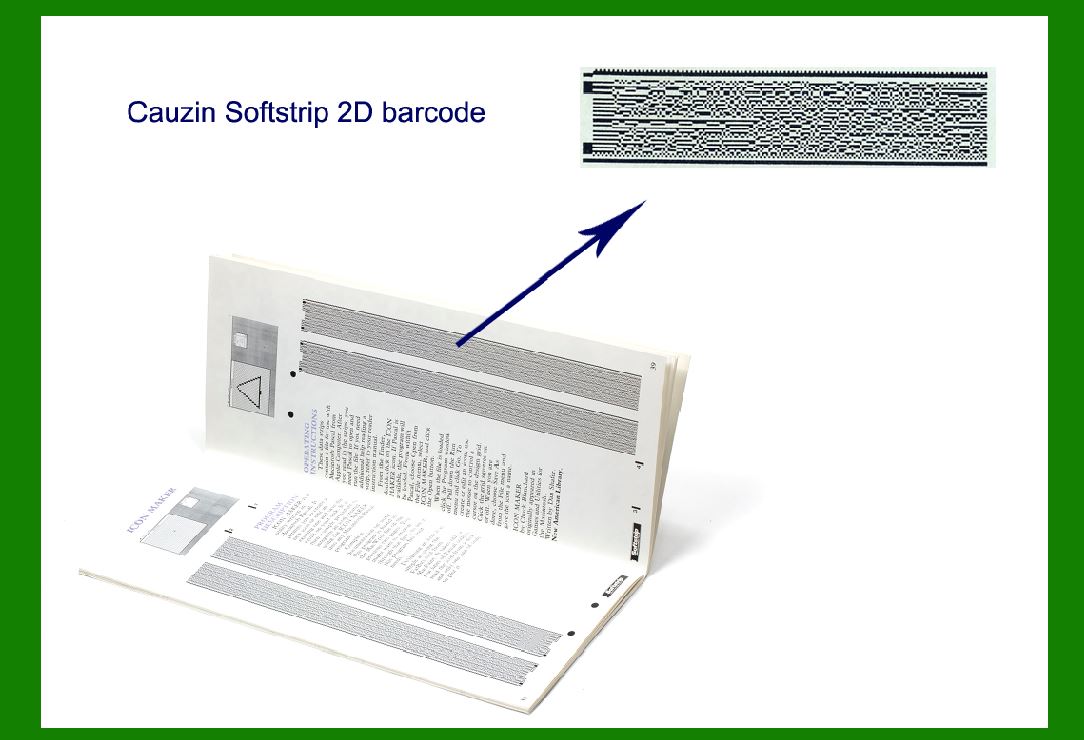
The Cauzin Softstrip barcode, also known simply as Softstrip, is a unique type of 2D barcode designed by Jean-Marie Cauzin in the 1990s. |
It was developed as a high-density, high-capacity barcode that could store large amounts of data in a small space. Unlike traditional linear barcodes that encode data horizontally, Softstrip uses a two-dimensional layout, allowing information to be stored both horizontally and vertically. This design significantly increases data capacity while maintaining a compact size suitable for various applications. |
|
Structure and Components of Cauzin Softstrip Barcode |
1. Basic Layout and Structure |
Softstrip is visually distinctive due to its grid-like appearance, composed of a series of dark and light squares arranged in a checkerboard pattern. This pattern consists of alternating modules, each representing a binary state (typically dark for '1' and light for '0'). |
Grid Layout: The barcode is structured in a grid format, typically with modules arranged in a 10x10 or 20x20 matrix, though variations can occur based on specific application requirements. Quiet Zone: Similar to other barcodes, Softstrip includes a quiet zone around its perimeter to ensure reliable scanning. This zone is free of any data patterns and helps scanners distinguish the barcode from its surroundings. |

|
2. Encoding Scheme |
Softstrip uses a unique encoding scheme that allows it to store data in a binary format. Each module in the grid represents a binary value, where the presence (dark module) or absence (light module) of a module encodes specific data. |
Data Encoding: Information is encoded by the presence or absence of dark modules within the grid. The arrangement of these modules across the grid determines the encoded data, which can range from alphanumeric characters to binary data. Error Correction: Softstrip includes built-in error correction capabilities to ensure data integrity. This feature enables the barcode to withstand minor damage or distortion during printing or scanning, enhancing reliability. |

|
3. Data Capacity |
One of Softstrip's key advantages is its high data capacity relative to its size. The barcode's ability to store data both horizontally and vertically within its grid structure allows it to encode significantly more information than traditional linear barcodes. |
Capacity Comparison: While specific data capacities can vary depending on the exact dimensions and configuration of the Softstrip used, it generally offers a much higher data capacity than linear barcodes like UPC or Code 128. |

|
4. Applications and Usage |
Softstrip barcodes find applications in various industries where high-density data storage and compact size are crucial. Some common applications include: |
Transportation: Used for ticketing and boarding passes in public transport systems due to their ability to store passenger information securely and efficiently. Healthcare: Employed in patient identification wristbands and medical records to store detailed patient information securely and accessibly. Retail: Utilized for product tracking and inventory management, offering enhanced data capacity for detailed product information and logistics. Identification and Access Control: Integrated into ID cards and security badges for personnel identification and access control in corporate and government facilities. |

|
5. Printing and Scanning Considerations |
Softstrip barcodes are designed to be printed using standard printing technologies such as thermal or inkjet printing on a variety of surfaces. However, careful consideration of printing quality and resolution is essential to ensure accurate scanning and data retrieval. |
Scanning Technology: Softstrip barcodes are scanned using specialized barcode readers capable of interpreting the grid-based data format. These scanners utilize imaging technology to capture and decode the barcode's grid pattern accurately. Durability and Resilience: To maintain readability over time, Softstrip barcodes should be printed on durable materials and stored in conditions that prevent physical damage or exposure to environmental factors. |

|
6. Security Features |
Softstrip includes features to enhance data security and prevent unauthorized access or tampering. These may include encryption of sensitive data stored within the barcode and integration with secure authentication protocols. |

|
7. Future Developments and Adaptations |
As technology advances, Softstrip barcode technology continues to evolve to meet new challenges and requirements in data storage and management. Future developments may focus on improving data capacity, enhancing scanning speed and accuracy, and expanding compatibility with emerging digital platforms and applications. |

|
Conclusion |
The Cauzin Softstrip barcode represents a significant advancement in barcode technology, offering high data capacity, compact size, and versatility across various industries. Its grid-based structure and unique encoding scheme enable efficient data storage and retrieval, making it well-suited for applications ranging from transportation and healthcare to retail and security. As technology continues to evolve, Softstrip barcode technology remains a robust solution for encoding and managing large volumes of data securely and efficiently. |
 cs@easiersoft.com