The High Capacity Color Barcode (HCCB) is a type of 2D barcode technology developed by Microsoft and introduced in 2007. |
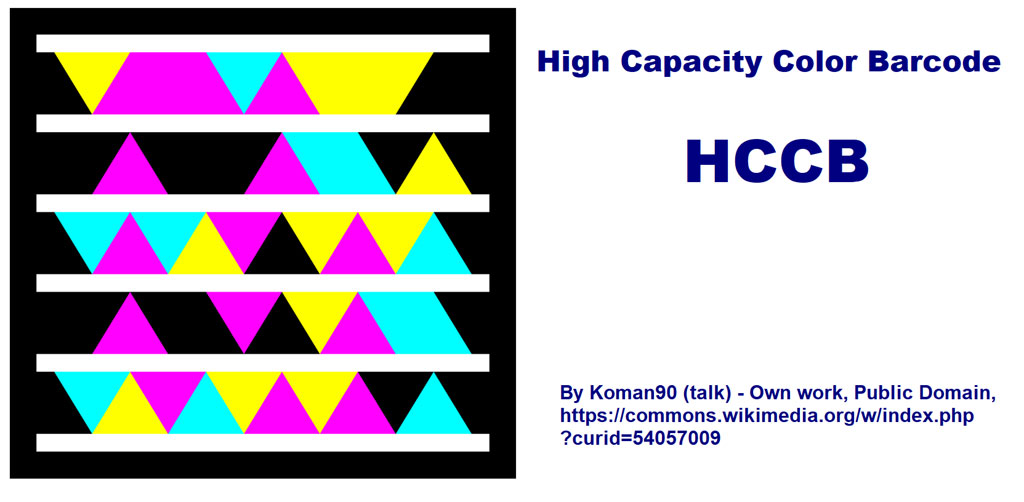
It differs from traditional black-and-white barcodes by utilizing colored triangles arranged in a hexagonal grid pattern. This unique design allows for a significant increase in data capacity and enhanced error correction capabilities compared to conventional barcodes. Here's a detailed exploration of the structure, encoding principles, applications, and technical specifications of the HCCB barcode system. |
|
Structure of HCCB Barcode |
1. Hexagonal Grid Pattern |
HCCB barcodes are composed of colored triangles arranged in a hexagonal grid. Each hexagon contains one of four colors: black, white, red, or green. The triangles within each hexagon are positioned in one of seven possible orientations, allowing for precise encoding of data. |
2. Color Representation |
Black: Represents data bits with a value of '0'. White: Represents data bits with a value of '1'. Red and Green: Used for orientation and position markers within the barcode. |

|
3. Data Encoding |
HCCB encodes data by varying the orientation of colored triangles within each hexagon. Each hexagon can encode up to four bits of data, depending on the color and orientation of its triangles. The arrangement and color of triangles within a hexagon determine the encoded value. |
4. Error Correction |
HCCB incorporates advanced error correction algorithms, such as Reed-Solomon error correction, to ensure accurate data retrieval even in cases of partial damage or obstruction. Error correction allows the barcode to maintain readability under challenging conditions, such as smudging or partial obscuration. |
5. Quiet Zone |
Similar to other barcode standards, HCCB requires a quiet zone around the barcode to prevent interference from surrounding elements. The quiet zone ensures reliable scanning and decoding by providing a clear boundary between the barcode and its environment. |

|
Encoding Process |
1. Data Input |
Before encoding, data is formatted according to HCCB specifications, including start and stop markers, data content, and error correction codes. Various data types, such as numeric, alphanumeric, and binary data, can be encoded using HCCB. |
2. Color and Orientation Assignment |
Each data segment is mapped to a sequence of colored triangles and their orientations within the hexagonal grid. The encoding process ensures that data integrity is maintained through the use of error correction codes and redundancy. |
3. Generating the Barcode |
Specialized software and algorithms convert encoded data into a graphical representation of the HCCB barcode. The software ensures compliance with HCCB standards and optimizes the barcode for printing or digital distribution. |

|
Technical Specifications |
1. Data Capacity |
HCCB supports significantly higher data capacity compared to traditional barcodes. Depending on factors such as module size and error correction level, HCCB can encode several kilobytes of data per square inch. |
2. Printing and Scanning |
HCCB barcodes can be printed using standard digital printing technologies, including inkjet and laser printers. High print contrast and precise registration are critical for ensuring reliable scanning and decoding of HCCB barcodes. |
3. Standards Compliance |
HCCB conforms to international barcode standards, ensuring interoperability with barcode scanners and software systems worldwide. Compliance with standards facilitates seamless integration of HCCB technology into existing business processes and applications. |

|
Advantages of HCCB Barcode |
High Data Capacity: Enables storage of extensive data within a compact barcode format. Enhanced Error Correction: Ensures reliable data retrieval even under adverse conditions. Color Coding: Provides additional information through color representation within the barcode. Versatile Applications: Suitable for a wide range of industries, including retail, logistics, healthcare, and digital media. |

|
Future Trends and Developments |
Integration with IoT: HCCB barcodes may integrate with Internet of Things (IoT) platforms for real-time tracking and monitoring. Enhanced Security Features: Future advancements may include embedded encryption and authentication capabilities within HCCB barcodes. Augmented Reality Integration: HCCB could be used in conjunction with augmented reality (AR) technologies to deliver interactive user experiences. |

|
In conclusion, the High Capacity Color Barcode (HCCB) represents a significant advancement in barcode technology, offering enhanced data capacity, robust error correction, and versatile applications across various industries. Its unique hexagonal grid pattern and color coding scheme distinguish it from traditional barcodes, making it well-suited for modern data-intensive applications in retail, logistics, document management, and digital media. |
 cs@easiersoft.com