Barcode Technology

Barcode History

Barcode Label Paper

Barcode Printer

Barcode Application

Inventory Management

AI Barcode QRCode

Barcode Scanner

Barcode Software

Barcode Software B

Barcode Software C

Barcode Software D

Barcode Software E

New Technology A

New Technology B

Robot Technology

Barcode Types

Barcode Types B

Barcode Types C

Barcode Types D

Barcode Types E

Barcode Types F

Electronic Technology

Psychology at Work

Barcode Technology and Barcode Software Related   <<< Back to Directory <<<

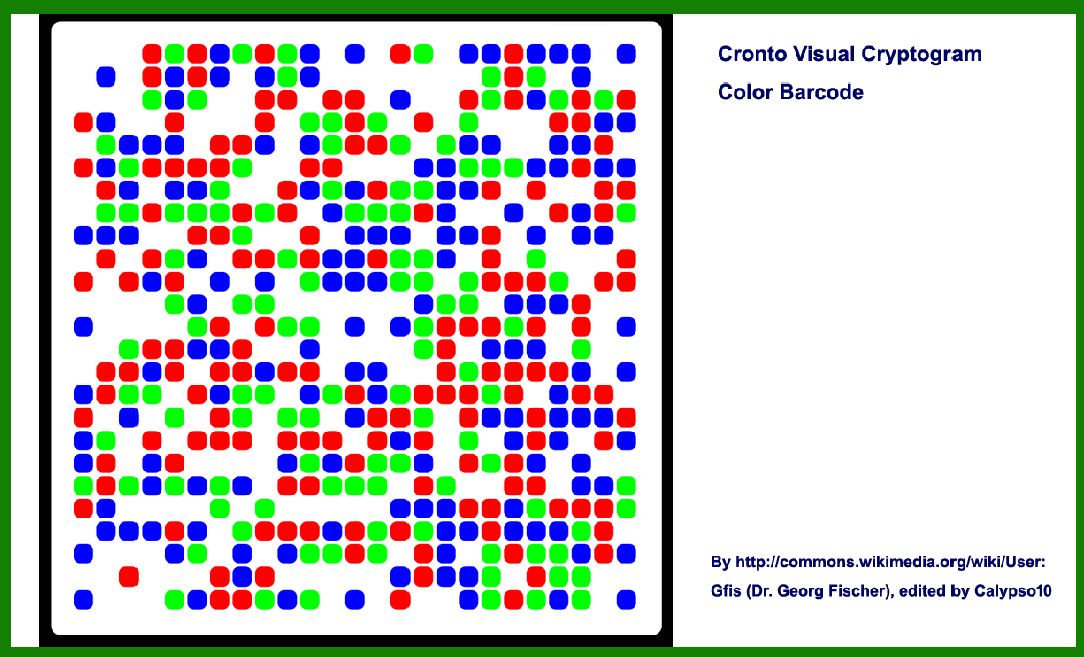
Structure of Visual Cryptogram barcode

Creating a detailed description of the Visual Cryptogram barcode format and structure requires a comprehensive overview.

Visual Cryptogram barcodes are an intriguing form of 2D barcode that embeds information in visually appealing patterns. These barcodes leverage cryptography to secure data, making them suitable for applications requiring both data encoding and security. Let's delve into the format, structure, encoding principles, and applications of Visual Cryptogram barcodes.

Introduction to Visual Cryptogram Barcodes

Visual Cryptogram barcodes combine the functionality of traditional 2D barcodes with cryptographic techniques to embed data. Unlike conventional barcodes that rely solely on machine-readable patterns, Visual Cryptogram barcodes incorporate visually discernible elements, making them both functional and aesthetically versatile.

Format and Structure

1. Visual Composition

Visual Cryptogram barcodes are designed to be visually appealing while maintaining robust data encoding capabilities. They often feature intricate patterns or designs that integrate the encoded data seamlessly. These designs can vary widely, from geometric shapes to artistic motifs, depending on the application and aesthetic preferences.

2. Data Encoding

The encoding process of Visual Cryptogram barcodes involves several key elements:

Data Segmentation: Similar to other 2D barcodes, data is segmented into manageable chunks or layers for encoding.

Encryption: Data segments are encrypted using cryptographic algorithms such as AES (Advanced Encryption Standard) or RSA (Rivest-Shamir-Adleman). Encryption ensures that the encoded information remains secure and resistant to unauthorized access.

Embedding Techniques: Encrypted data is embedded into the visual pattern of the barcode. This embedding process ensures that the encoded data blends seamlessly with the barcode's design elements, making it visually appealing while maintaining data integrity.

3. Decoding Mechanism

Decoding Visual Cryptogram barcodes involves the following steps:

Visual Recognition: Initially, the barcode is scanned or photographed using a compatible device equipped with decoding software.

Pattern Recognition: Software algorithms analyze the visual pattern of the barcode to identify and extract encoded data segments.

Decryption: Extracted data segments are decrypted using corresponding decryption keys or algorithms. This process reverses the encryption applied during encoding, revealing the original data.

4. Error Correction and Redundancy

To ensure reliability in data retrieval, Visual Cryptogram barcodes may incorporate error correction techniques. Redundancy in data encoding allows for partial data recovery even if the barcode is partially obscured or damaged, enhancing overall robustness.

Advantages and Limitations

Advantages:

Data Security: Encryption ensures that sensitive information remains secure from unauthorized access.

Aesthetics: Visual appeal enhances usability in applications where barcode visibility is essential.

Versatility: Suitable for a wide range of applications due to customizable design options and robust encoding capabilities.

Limitations:

Complexity: Encoding and decoding processes may require specialized software or hardware, limiting accessibility in some environments.

Scanning Variability: Visual design elements may affect scanning accuracy, requiring optimized scanning conditions for reliable data retrieval.

Conclusion

Visual Cryptogram barcodes represent a sophisticated blend of data encoding and visual design, catering to applications demanding both functionality and aesthetic appeal. By leveraging cryptographic techniques, these barcodes ensure data security while offering versatility in design and application. As technology advances, Visual Cryptogram barcodes continue to evolve, finding new uses in diverse industries ranging from art and design to healthcare and security.

In summary, Visual Cryptogram barcodes epitomize the fusion of technology and creativity, offering an ultimate solution for applications where visual aesthetics and data security are paramount.


EasierSoft Barcode Label Design & Bulk Printing Software

---- Use Excel Data to Batch Print Barcodes on Label Sheets or Roll Labels  

---- How to use this barcode software

Download:  Free Barcode Software + Barcode Label Designer

Download Free Barcode Software at Softonic

     Download at CNET

Once you obtain a GS1/UPC/EAN barcode, or other barcode type and QR code, you can use our free software to batch print barcode labels onto Roll label paper using a professional label printer, or to batch print barcodes onto Avery 5160 label sheets using a regular laser or inkjet printer. Our software has free and paid versions.

The free version fully meets your needs for batch printing GS1/UPC/EAN barcodes. The paid version can import data from Excel and databases to batch print barcode labels with different values.

How to Start

Input Data

Import Excel Data

Print Barcode

Barcode Format

Label Designer

All Screen Shot

Export Barcode Image

Save Template

Output Word Excel

How to Use & FAQ:

Edit imported barcode data

Input data (Pro)

Label Designer

Edit data in Label designer

Label Designer - Add new label

Label Designer - Printing

Set the barcode label format to be printed

Other Barcode Label Format Settings

Barcode types supported by this program

Barcode Label Font Settings

Configuring the Barcode Print Rotation

Text Alignment for Barcode Labels

Automatically Adjusting Barcode Width

Text Beneath the Barcode

Configuring Barcode Size

Auto Calculate the Barcode Size

Export Barcode images

Export Barcode Image Format

File Names for Exported Barcode

Resolution of Exported Barcode Images

Fixed Folder for Exporting Barcode

Default Barcode Image Export Format

Print bulk barcodes quickly

Print barcodes to Avery 5160 label

How to bulk Barcode Printing

Sample - Avery 5162 (2x7) Label Sheet

Example: Print barcodes to 5*3cm roll

Example: Print barcodes to 5161 label

Example: Print barcodes to 5162 label

Example: Print barcodes to 5163 label

Example: Print barcodes to 5164 label

Example: Print portrait orientation 5164

Example: Print barcodes to 5167 label

Example: Print barcodes to 5168 label

Example: Print portrait orientation 5168

Example: Print barcodes to 5169 label

Example: Print barcodes to 5660 label

Example: Print barcodes to 5661 label

Example: Print barcodes to 5662 label

Example: Print barcodes to 5663 label

Example: Print barcodes to 5664 label

Example: Print portrait orientation 5664

Example: Print barcodes to 5873 label

Example: Print barcodes to 5874 label

Two ways to import Excel data

Import Excel Data - Pro Edition

Import Excel Data - Std Edition

Import Data from Excel - Detail

Load Data From Excel File

Data Editing Table

Highlights

Excel integration: Import data directly from Excel to generate and print barcodes in bulk.

Label designer: Create complex labels with multiple barcodes, text, logos, and shapes.

Batch printing: Print thousands of barcodes at once using standard inkjet/laser printers or professional barcode printers.


Flexible editions:

Standard Edition: Simple batch printing with Excel data.

Professional Edition: Adds command-line automation for workflow integration.

Label Designer Edition: Advanced design features for complex labels.


Why Choose Our Barcode Solutions?

Cost-effective: Free online generator and permanent free desktop version available.

Easy to use: No technical expertise required—just input data and print.

Versatile: Supports nearly all 1D and 2D barcode types, including QR codes.

Trusted: Recommended by CNET and widely downloaded by users worldwide.


Suitable Use Cases

Small businesses and startups needing quick barcode labels for products.

Retailers and online sellers managing inventory with batch barcode printing.

Manufacturers requiring sequential or custom barcode labels for packaging.

Educational and testing environments where barcodes are used for tracking.


CONTACT

cs@easiersoft.com

If you have any question, please feel free to email us.


https://free-barcode.com


<<< Back to Directory <<<     Barcode Generator     Barcode Freeware     Privacy Policy