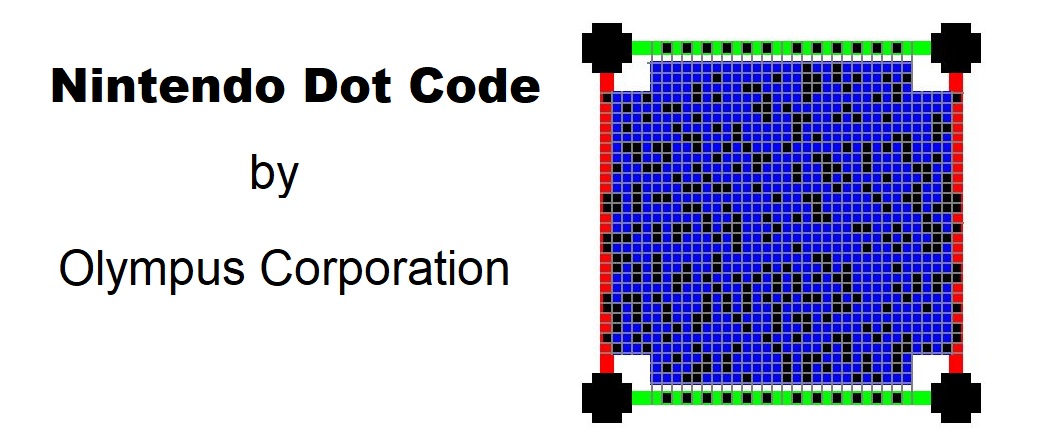
The Nintendo Dot Code, also known simply as Dot Code, is a proprietary 2D barcode technology developed by Nintendo. Initially introduced for use with Nintendo's Wii U console, Dot Codes have been utilized primarily in the context of the Nintendo eShop and Miiverse services. These barcodes are unique in their design and function, tailored specifically to enhance user interaction and experience within Nintendo's digital ecosystem. |
|
Overview of Nintendo Dot Code Technology |
Nintendo Dot Codes are distinct from other 2D barcodes like QR codes or DataMatrix codes. They are designed to be visually recognizable and can store digital information in a format that is efficiently read by Nintendo's hardware and software systems. Here are the key technological aspects of Nintendo Dot Code: |
1.Visual Design: Dot Codes are characterized by their grid-like appearance, consisting of black and white square dots arranged in a specific pattern. This visual design is crucial for their readability by Nintendo consoles and devices. 2.Data Encoding: Similar to other 2D barcodes, Dot Codes encode digital information. The encoding scheme is proprietary to Nintendo, allowing them to store specific types of data relevant to their applications, such as game data, user profiles, or downloadable content. 3.Error Correction: Dot Codes incorporate error correction techniques to ensure reliable data retrieval even in less-than-ideal conditions, such as low-quality prints or minor damages to the barcode itself. 4.Application Integration: Nintendo Dot Codes are integrated into various aspects of Nintendo's digital services. This includes linking physical products (like game discs or merchandise) to digital content, accessing online services, and facilitating interactions within Nintendo's gaming ecosystem. |

|
Technical Specifications and Standards |
While specific technical details regarding the encoding and decoding algorithms of Nintendo Dot Codes are proprietary and not publicly disclosed by Nintendo, the general functionality and application scenarios provide insight into their capabilities: |
1.Capacity: Dot Codes are capable of storing a moderate amount of data relative to their size. This includes URLs, digital keys for unlocking content, or unique identifiers that link physical products to digital content. 2.Scanning Technology: Nintendo consoles and devices equipped with cameras or specialized sensors are capable of scanning Dot Codes. This technology ensures compatibility and seamless integration into the user experience without requiring additional hardware. 3.Security Features: As with any digital technology handling user data and digital purchases, Dot Codes likely incorporate security measures to protect against tampering and unauthorized access. |

|
Applications of Nintendo Dot Code |
Nintendo Dot Codes are primarily utilized in the following applications within Nintendo's ecosystem: |
1.Digital Content Distribution: Dot Codes are used to link physical game discs, cartridges, or merchandise to digital content available on Nintendo's online stores (such as the Nintendo eShop). Users can scan Dot Codes to redeem game downloads, unlock additional content, or access special features tied to physical purchases. 2.User Interaction and Engagement: Within online communities like Miiverse (Nintendo's now-discontinued social network for Wii U and Nintendo 3DS), Dot Codes were used to share user-generated content, such as screenshots, artwork, or messages. Scanning these codes allowed users to directly access and interact with shared content. 3.Marketing and Promotions: Nintendo employs Dot Codes in marketing campaigns and promotional materials. These codes can be used to distribute exclusive content, offer discounts, or provide early access to game demos and previews. 4.Accessibility Features: While specific implementations vary, Dot Codes have potential applications in enhancing accessibility features for users with disabilities. This could include providing audio descriptions, alternative text, or additional instructions linked through scanned codes. |

|
Example Use Cases |
1. Digital Purchases and Content Unlocking |
Users purchasing physical copies of Nintendo games often find Dot Codes included in packaging or promotional materials. Scanning these codes using a compatible Nintendo device allows users to redeem digital copies of games, downloadable content (DLC), or in-game items. This integration simplifies the process of accessing digital content associated with physical purchases, enhancing convenience and user satisfaction. |
2. Miiverse Integration |
Miiverse, Nintendo's former social network, utilized Dot Codes to facilitate content sharing among users. For instance, players could create and share custom levels in games like Super Mario Maker by generating a Dot Code representing their level design. Other users could then scan this code to play or modify the shared level directly from within the game, fostering community interaction and creativity. |
3. Promotional Campaigns and Events |
Nintendo frequently incorporates Dot Codes into promotional campaigns and events. These codes might be distributed through physical advertisements, product packaging, or at special events like gaming conventions. By scanning these codes, participants can unlock exclusive in-game items, access limited-time offers, or participate in contests and giveaways organized by Nintendo and its partners. |

|
Future Developments and Potential Applications |
As Nintendo continues to innovate in digital distribution and user engagement, Dot Codes may evolve to support new features and functionalities. Potential future developments could include: |
Expanded Content Integration: Enhancing the scope of content accessible through Dot Codes, such as integrating with streaming services, virtual reality (VR) experiences, or augmented reality (AR) applications. Enhanced Security Measures: Implementing advanced encryption techniques or biometric authentication to bolster security and protect user privacy when interacting with Dot Codes. Cross-Platform Compatibility: Increasing compatibility across Nintendo's current and future gaming platforms, ensuring seamless integration and consistent user experience across devices. |

|
Conclusion |
Nintendo Dot Codes represent a tailored approach to leveraging 2D barcode technology within Nintendo's gaming ecosystem. By integrating seamlessly with hardware and software systems, these codes enhance user engagement, simplify digital content distribution, and facilitate community interaction. While proprietary in nature, the general principles and applications of Nintendo Dot Codes illustrate their role in enhancing the user experience and expanding the functionality of Nintendo's digital services. |
 cs@easiersoft.com