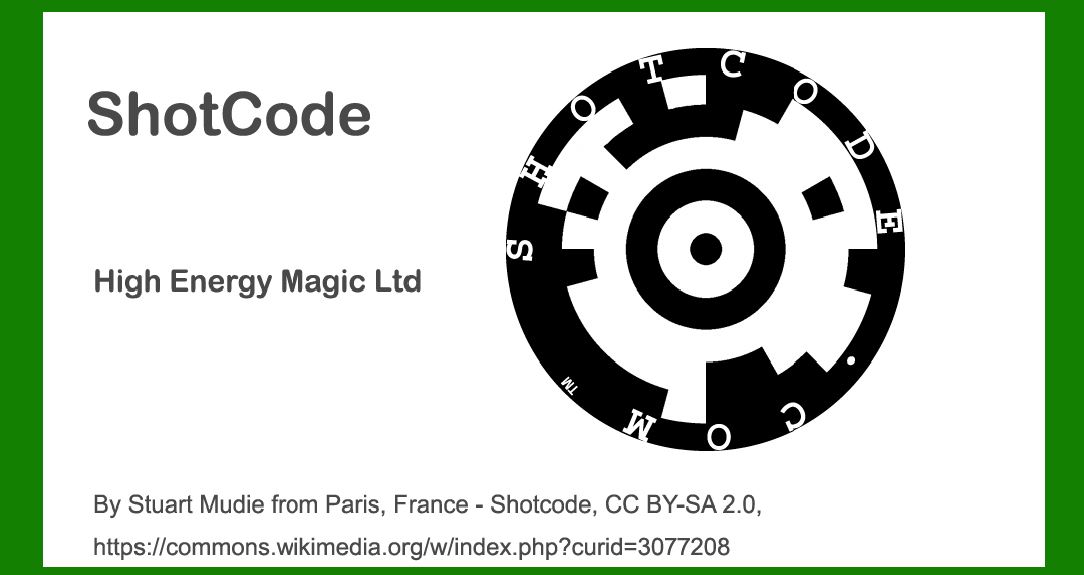
ShotCode, originally known as Spotcode, represents a significant advancement in visual barcode technology, specifically designed to be read by camera phones. This innovative approach aimed to bridge the physical and digital worlds seamlessly, enabling quick access to information or interactive content through a simple scan. In this detailed exploration, we'll delve into the technology behind ShotCode, its applications, and the impact it has had on various industries. |
|
Technology Behind ShotCode |
ShotCode is characterized by its circular pattern, distinct from traditional square or rectangular barcodes. This design choice was pivotal in making the code easily recognizable and aesthetically adaptable to different surfaces and media. Here's a breakdown of the key technological aspects of ShotCode: |
1.Circular Pattern: ShotCode utilizes a circular arrangement of data points or modules. This design not only distinguishes it visually but also enhances its readability when captured by cameras. 2.Encoding Scheme: Similar to other 2D barcodes, ShotCode employs an encoding scheme where information is stored both horizontally and vertically within the circular layout. This dual-axis storage allows for more data to be embedded compared to traditional 1D barcodes. 3.Data Redundancy: To ensure robustness against potential errors or distortions during scanning, ShotCode incorporates error correction mechanisms. These redundancies enable the code to be decoded accurately even if parts of it are obscured or damaged. 4.Decoding Algorithm: The software algorithms used for decoding ShotCode play a crucial role in its functionality. These algorithms interpret the circular pattern captured by the camera, extract the encoded data, and reconstruct the intended information or action associated with the code. 5.Integration with Mobile Devices: ShotCode was specifically designed to be compatible with the cameras of mobile phones. This integration facilitated widespread adoption as smartphones became ubiquitous, making it convenient for users to interact with ShotCodes without the need for specialized scanning equipment. |

|
Application Examples of ShotCode |
ShotCode found diverse applications across various industries due to its versatile nature and ease of integration with mobile technology. Here are some notable examples of how ShotCode has been utilized: |
1. Advertising and Marketing |
ShotCode was initially popularized in advertising and marketing campaigns where interactive engagement with consumers was paramount. Examples include: |
Print Media: ShotCodes embedded in print advertisements, posters, and magazines allowed users to scan and instantly access product information, promotional offers, or multimedia content. Product Packaging: Consumer goods companies used ShotCodes on packaging to provide product details, recipes, promotional videos, or loyalty program links directly to consumers. Billboards and Outdoor Displays: ShotCodes on billboards enabled passersby to engage with brands by scanning for discounts, event invitations, or more information about advertised products. |
2. Retail and E-commerce |
In retail environments, ShotCode enhanced the shopping experience by bridging the gap between physical products and digital information: |
Point-of-Sale (POS) Displays: Retailers utilized ShotCodes on POS displays to offer instant access to product reviews, instructional videos, or additional purchasing options. Product Tags and Labels: ShotCodes on merchandise tags provided shoppers with detailed product specifications, care instructions, and cross-selling opportunities. |

|
3. Entertainment and Media |
ShotCode expanded into the entertainment industry, transforming how audiences interacted with content: |
Movie Posters and Trailers: Film studios embedded ShotCodes on posters and promotional materials to direct moviegoers to trailers, ticket bookings, and exclusive behind-the-scenes content. Music Albums and Events: ShotCodes on album covers or event flyers enabled fans to access music previews, concert schedules, ticket purchases, and artist interviews. |
4. Tourism and Hospitality |
In tourism and hospitality sectors, ShotCode enhanced visitor experiences and service efficiency: |
Tourist Attractions: ShotCodes placed at landmarks or tourist spots provided visitors with historical facts, audio guides, and interactive maps. Hotel Services: Hotels used ShotCodes on key cards and informational brochures to offer guests quick access to room service menus, local attractions, and booking spa appointments. |

|
5. Education and Information |
ShotCode found applications in educational settings and disseminating information efficiently: |
Educational Materials: ShotCodes in textbooks, worksheets, and educational posters linked students to supplementary resources, interactive quizzes, and video tutorials. Museum Exhibits: Museums integrated ShotCodes into exhibits to offer visitors detailed exhibit descriptions, audio guides, and multimedia content related to artifacts. |
6. Healthcare and Pharmaceuticals |
In healthcare, ShotCode facilitated better patient engagement and medication management: |
Medical Packaging: ShotCodes on prescription labels provided patients with dosage instructions, refill reminders, and access to online health records. Health Campaigns: Public health campaigns utilized ShotCodes on informational brochures and posters to disseminate vaccination schedules, disease prevention tips, and clinic locations. |

|
Impact and Future Developments |
ShotCode's impact extended beyond its initial adoption phase, influencing subsequent developments in barcode technology and digital engagement strategies. Its circular design inspired new approaches to visual codes, emphasizing aesthetics alongside functionality. Future developments may focus on enhancing data security, expanding compatibility with augmented reality (AR) applications, and integrating with emerging technologies such as blockchain for enhanced traceability and authenticity verification. |

|
In conclusion, ShotCode revolutionized digital interaction by leveraging mobile camera technology and innovative design principles. Its applications across advertising, retail, entertainment, education, healthcare, and beyond illustrate its versatility and enduring relevance in a digitally connected world. As technology continues to evolve, ShotCode remains a testament to the transformative power of visual codes in enhancing user engagement and accessibility to information. |
 cs@easiersoft.com