MaxiCode is a two-dimensional (2D) barcode symbology originally developed by United Parcel Service (UPS) in 1992. It was designed specifically for efficient encoding and decoding of large amounts of data in a compact format. MaxiCode has found widespread adoption primarily within the logistics and shipping industries, where it serves a crucial role in managing and tracking packages and shipments across the supply chain. This detailed exploration will cover the following aspects of MaxiCode: |
1.Introduction to MaxiCode 2.Technical Specifications 3.Structure and Encoding 4.Applications in Logistics and Shipping 5.Advantages and Limitations 6.Comparison with Other Barcodes 7.Future Trends and Innovations |
|
1. Introduction to MaxiCode |
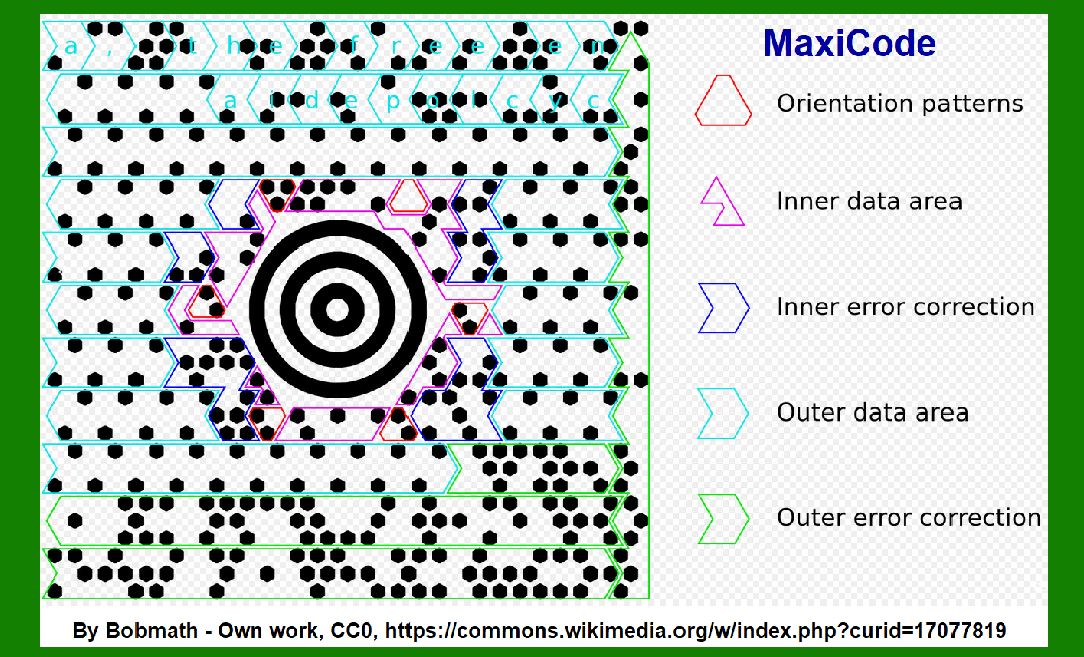
MaxiCode is a matrix-style barcode that consists of a pattern of hexagonal modules arranged around a central bullseye. It was initially developed by UPS to improve the efficiency of sorting and tracking packages within their vast global logistics network. Unlike linear barcodes, which can only store limited amounts of data, MaxiCode is capable of encoding up to 93 alphanumeric characters, making it suitable for encoding large volumes of information related to shipment details. |
2. Technical Specifications |
Matrix Structure: MaxiCode consists of a 2D matrix with a unique central bullseye pattern surrounded by hexagonal modules. Module Size: The barcode can be printed in different sizes, typically ranging from 1.11 inches to 2.52 inches in diameter. Error Correction: MaxiCode includes built-in error correction mechanisms, allowing it to remain readable even if parts of the code are damaged or obscured during scanning. Encoding: It uses a combination of Reed-Solomon error correction and structured append to ensure robust data integrity. |

|
3. Structure and Encoding |
MaxiCode is structured into several layers: |
Finder Pattern: The central bullseye serves as a unique finder pattern that helps scanners locate and decode the barcode quickly. Message Data: This contains the actual encoded information, such as shipment details, destination address, and tracking numbers. Error Correction: Embedded error correction codes ensure that the barcode remains readable despite minor damage or distortion. |
4. Applications in Logistics and Shipping |
MaxiCode's primary application is in logistics and shipping management. It is used extensively by UPS and other courier services worldwide for: |
Package Tracking: Each package shipped by UPS is assigned a unique MaxiCode barcode that contains essential details like sender information, recipient address, package weight, and tracking number. Automated Sorting: Automated sorting systems at UPS hubs and distribution centers use MaxiCode to quickly identify and route packages to their respective destinations. Delivery Confirmation: Couriers use handheld scanners to read MaxiCode barcodes upon delivery, updating the status of each shipment in real-time. |

|
5. Advantages and Limitations |
Advantages: |
High Capacity: MaxiCode can encode large amounts of data in a relatively small space. Error Correction: Built-in error correction ensures reliable scanning even under less-than-ideal conditions. Universal Use: Widely adopted in logistics and shipping industries globally, ensuring compatibility across different systems and countries. |
Limitations: |
Size Limitation: Although versatile, MaxiCode may not be suitable for applications requiring ultra-high data density like some other 2D barcodes. Reader Dependence: Requires specialized scanners capable of decoding 2D barcodes, which may not be universally available. |

|
6. Comparison with Other Barcodes |
QR Code: QR codes are more versatile for general-purpose applications and can be read by smartphones. However, they may not offer the same level of error correction and data capacity as MaxiCode. DataMatrix: Similar in structure to MaxiCode, DataMatrix barcodes are used for small-scale applications where space is limited, such as on electronic components. |

|
7. Future Trends and Innovations |
Integration with IoT: MaxiCode and other barcodes are increasingly integrated with Internet of Things (IoT) platforms for real-time tracking and inventory management. Enhanced Security: Future iterations may incorporate enhanced security features to prevent tampering and counterfeiting. |

|
In conclusion, MaxiCode continues to play a vital role in the logistics and shipping industry, providing a robust solution for encoding and managing large volumes of data related to package tracking and delivery. Its efficient design, coupled with built-in error correction, ensures reliable performance across diverse operational environments, making it a preferred choice for global courier services like UPS. As technology evolves, MaxiCode is likely to adapt and innovate further, staying relevant in an increasingly interconnected and data-driven logistics landscape. |
 cs@easiersoft.com