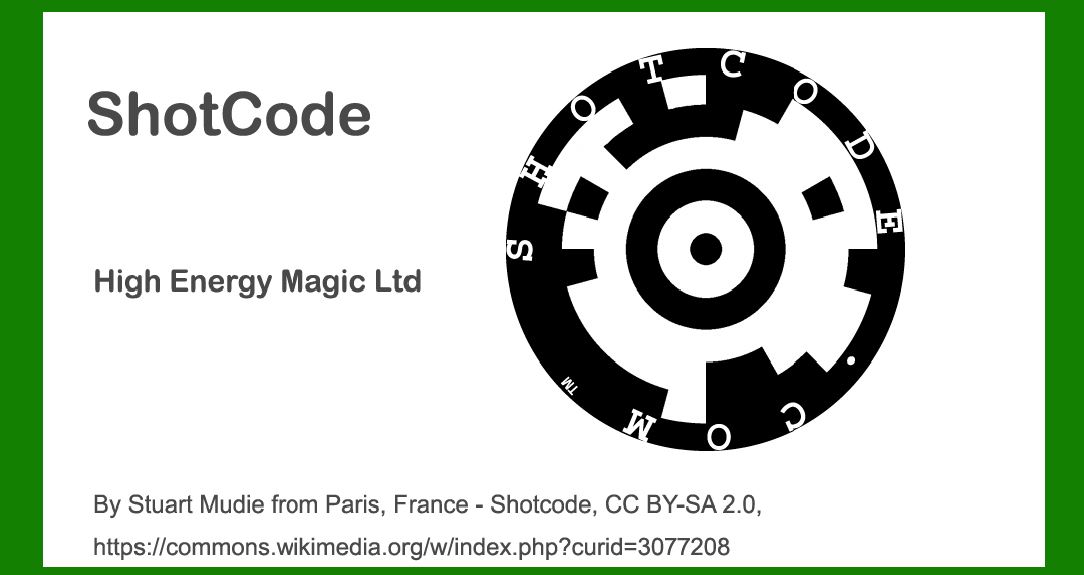
ShotCode, originally known as Spotcode, represents an innovative advancement in visual barcode technology designed specifically for camera phones. Developed by High Energy Magic Ltd., ShotCode was introduced to enable easy access to digital content via mobile devices. This barcode type stands out due to its circular shape and the ability to encode information in a visually appealing manner, combining aesthetics with functionality. |
|
Encoding Structure of ShotCode |
ShotCode utilizes a circular grid pattern to encode information. Unlike traditional linear or matrix barcodes, ShotCode's encoding is structured around concentric rings and sectors within the circular format. Each ShotCode is divided into several key components: |
1.Outer Ring and Sectors: The ShotCode starts with an outer ring that defines the overall boundary of the code. Inside this ring, sectors are formed, typically ranging from 4 to 32 sectors, depending on the specific ShotCode version and encoding requirements. |
2.Grid Pattern: Within each sector, a grid pattern is used to encode binary data. This grid is organized in a radial manner, spreading from the center towards the outer edges of the sector. The grid is where the actual data bits are encoded, allowing for the representation of alphanumeric characters, URLs, or other types of data. |
3.Data Encoding: ShotCode employs a form of binary encoding within its grid structure. This encoding mechanism transforms data into a binary format that can be visually represented within the circular grid. Each cell within the grid can either be 'on' or 'off', representing binary 1s and 0s respectively. |

|
Example of ShotCode Encoding |
Let's delve into an example to illustrate how ShotCode encodes information: |
Example: Encoding a URL |
Suppose we want to encode the URL 'https://www.example.com' into a ShotCode. Here's how the encoding process might look: |
1.Prepare the Data: Convert the URL into a format that can be encoded using ShotCode. This typically involves converting characters into their binary representations according to the encoding scheme specified for ShotCode. |
2.Determine the Number of Sectors: Decide on the number of sectors based on the amount of data to be encoded. More sectors allow for more data to be encoded but require more space. |
3.Generate the Grid: Divide the ShotCode into sectors. Each sector contains a radial grid where data bits will be placed. |
4.Binary Encoding: Encode each character of the URL into binary format. For instance, the letter 'A' might be encoded as 01000001 in ASCII. |
5.Placement in the Grid: Place the binary representation of each character into the corresponding cells of the radial grid within each sector. The placement within the grid is crucial as it determines the visual representation of the ShotCode. |
6.Error Correction and Masking: ShotCode may incorporate error correction techniques to ensure readability even if parts of the code are obscured or distorted. Masking techniques can also be applied to enhance contrast and readability. |
7.Final Visualization: Once encoded, the ShotCode can be visualized as a circular pattern of sectors, each with a distinct grid layout. This visual pattern is what a camera phone would interpret and decode when capturing the ShotCode image. |

|
Benefits of ShotCode Encoding |
Visual Appeal: ShotCode's circular design allows for creative integration into various media types, enhancing aesthetics while conveying information. |
Robust Encoding: The use of a radial grid structure enhances data density and allows for efficient encoding of complex information such as URLs, contact information, or multimedia content links. |
Mobile Accessibility: Designed for mobile devices, ShotCode can be easily captured and decoded using camera phones, making it suitable for applications requiring quick access to digital content. |
Error Resilience: Incorporation of error correction mechanisms ensures reliable decoding even under suboptimal conditions such as poor lighting or partial obstruction. |

|
Conclusion |
ShotCode, or Spotcode, represents a significant evolution in barcode technology, leveraging circular design and radial encoding to enable seamless interaction between physical media and digital content via mobile devices. Its encoding methodology, characterized by concentric rings, radial grids, and binary data representation, underscores its versatility and utility in modern applications requiring dynamic, visually engaging forms of data transmission. |

|
 cs@easiersoft.com