MaxiCode is a 2D matrix barcode developed by United Parcel Service (UPS) primarily for package tracking and automated sorting. Its error correction capabilities are essential to ensure data integrity and readability in various conditions. Here's a detailed look at the error correction mechanisms used in MaxiCode: |
|
1. Error Correction Overview |
MaxiCode employs a robust error correction scheme that ensures accurate data retrieval despite damage, distortion, or poor printing conditions. The error correction is based on the Reed-Solomon error correction algorithm, which is widely used in various digital communication and storage systems. The Reed-Solomon algorithm is capable of detecting and correcting multiple errors, making it highly effective for MaxiCode's application. |

|
2. Reed-Solomon Error Correction |
2.1 Algorithm Basics |
The Reed-Solomon error correction algorithm is a block error-correcting code that operates on data blocks of a fixed size. It adds redundant data to the original data to form a codeword. If errors occur, the algorithm can correct these errors using the redundant information. MaxiCode utilizes this algorithm to provide error correction for each symbol within the code. |
2.2 Error Correction Capability |
MaxiCode uses a Reed-Solomon code with a specific configuration for error correction. The standard MaxiCode symbol includes a fixed number of data words and error correction words. The error correction capability is determined by the number of error correction words added to the symbol. Specifically, MaxiCode uses the Reed-Solomon (31, 20) code, where 31 is the total number of codewords (data plus error correction), and 20 is the number of data codewords. |
2.3 Error Correction Details |
In MaxiCode, the Reed-Solomon error correction allows for the correction of up to 5 symbol errors or 3 burst errors. This means that if up to 5 symbols within a MaxiCode symbol are damaged or misread, the Reed-Solomon algorithm can correct these errors to recover the original data. For burst errors, which affect a continuous sequence of symbols, the algorithm can correct up to 3 errors. |

|
3. MaxiCode Symbol Structure |
3.1 Symbol Components |
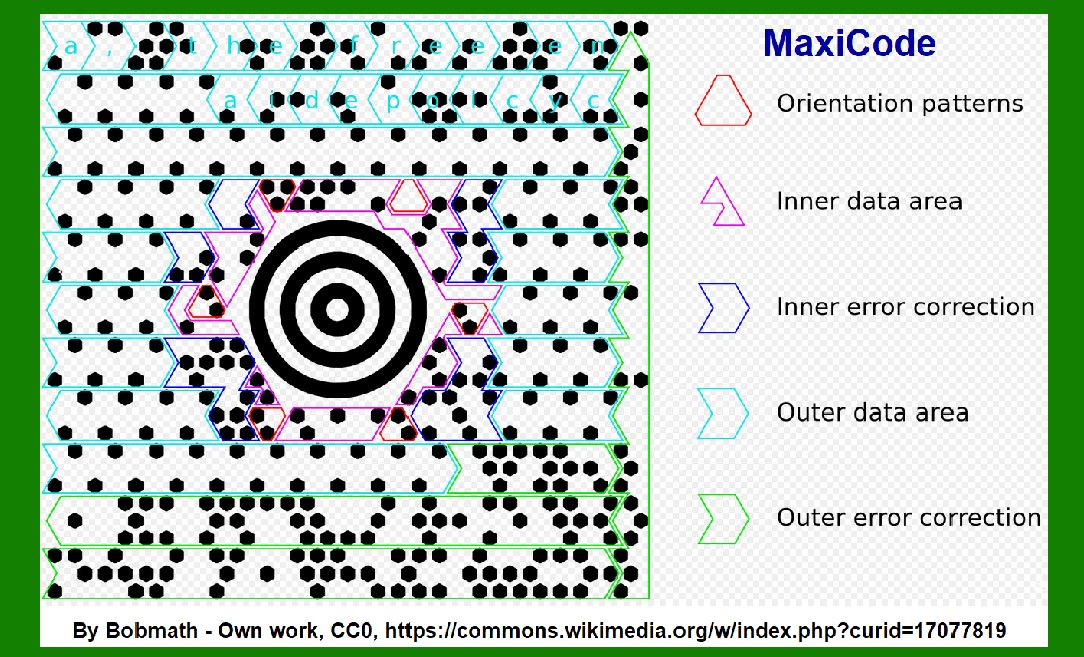
MaxiCode symbols are structured into a matrix format consisting of 30 rows and 30 columns. The symbol includes several components: |
Finder Pattern: Located at the top of the symbol, this pattern helps scanners locate and orient the MaxiCode symbol. Data Regions: The central portion of the symbol where the actual data is encoded. Mode Indicator: A region that indicates the mode of data encoding, which can affect how the error correction is applied. |
3.2 Error Correction Regions |
The data within a MaxiCode symbol is divided into regions, with specific regions dedicated to error correction. The Reed-Solomon algorithm is applied to these regions to ensure that data errors can be corrected. The symbol is divided into smaller segments, and error correction codes are distributed throughout these segments to enhance reliability. |

|
4. Error Detection and Correction Examples |
4.1 Example Scenario 1: Single Symbol Error |
Consider a MaxiCode symbol that has a single symbol error due to a smudge. The Reed-Solomon error correction can detect this error and correct it using the redundant information embedded in the error correction words. The correction process involves identifying the erroneous symbol and using the surrounding data to reconstruct the original value. |
4.2 Example Scenario 2: Burst Error |
Imagine a MaxiCode symbol where a burst of symbols is damaged, possibly due to a printing defect. The Reed-Solomon algorithm can correct up to 3 consecutive symbol errors within this burst. The process involves identifying the burst error pattern and using the redundant information to recover the data. |
4.3 Example Scenario 3: Multiple Errors |
In a situation where a MaxiCode symbol experiences multiple scattered errors, such as from a dirty scanner or damaged label, the Reed-Solomon algorithm can correct up to 5 symbol errors. The algorithm analyzes the errors and uses the redundant error correction codes to reconstruct the correct data. |

|
5. Error Correction in Practice |
5.1 Real-World Application |
In practice, MaxiCode's error correction ensures reliable package tracking and sorting even in adverse conditions. For example, packages handled by UPS might undergo various environmental conditions that could affect the barcode. MaxiCode's error correction capability ensures that the data can still be accurately read and processed by scanners, even if the barcode is partially damaged. |
5.2 Quality Control |
To maintain high readability and error correction performance, UPS and other users of MaxiCode implement quality control measures for printing and scanning. This includes ensuring high-quality print conditions and using scanners capable of handling MaxiCode's error correction. |
5.3 Error Correction Efficiency |
The efficiency of MaxiCode's error correction is demonstrated by its ability to handle real-world scenarios where barcodes are subjected to wear and tear. The error correction mechanism helps in maintaining the integrity of tracking and sorting processes, which is crucial for logistics and package delivery. |

|
6. Conclusion |
MaxiCode's error correction system, based on the Reed-Solomon algorithm, provides robust and reliable data recovery even in challenging conditions. The algorithm's ability to correct multiple symbol errors and burst errors ensures that MaxiCode remains effective for its primary use in package tracking and sorting. By employing this sophisticated error correction mechanism, MaxiCode achieves high reliability and accuracy, crucial for UPS and other logistics operations. |

|
 cs@easiersoft.com