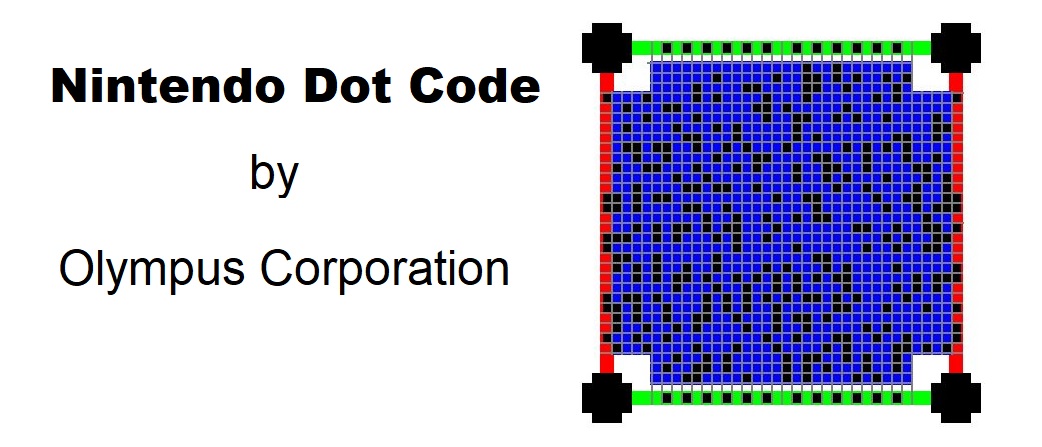
The Nintendo Dot Code, used predominantly in the late 20th century for various gaming and interactive applications by Nintendo, is a unique barcode system that relies heavily on robust error correction mechanisms to ensure data integrity and readability. This document will detail the error correction techniques used in the Nintendo Dot Code, with structured numbering for clarity and examples to illustrate key points. |
|
1. Introduction to Error Correction |
Error correction is a critical component in any barcode system, ensuring that data remains accurate even when the barcode is subjected to distortions, damage, or printing errors. The Nintendo Dot Code utilizes sophisticated error correction algorithms to achieve this reliability. |

|
2. Error Correction Techniques |
2.1 Reed-Solomon Error Correction |
The Nintendo Dot Code employs Reed-Solomon (RS) error correction, a powerful and widely used method in digital communications and storage. RS error correction is particularly effective in dealing with burst errors, which are common in barcode scanning. |
2.1.1 Overview of Reed-Solomon |
Reed-Solomon error correction works by adding redundant data, known as parity symbols, to the original data. These parity symbols allow the system to detect and correct errors. The RS code is specified by two parameters: (n,k)(n, k)(n,k), where nnn is the total number of symbols (data + parity) and kkk is the number of data symbols. The difference n*kn - kn*k determines the number of parity symbols. |
2.1.2 Polynomial Representation |
In RS coding, data is represented as polynomials over a finite field (Galois field, GF). Each symbol in the data corresponds to a coefficient in the polynomial. For example, a data sequence D=[d0,d1,…,dk*1]D = [d_0, d_1, \ldots, d_{k-1}]D=[d0,d1,…,dk*1] can be represented as: |
D(x)=d0+d1x+d2x2+*+dk*1xk*1D(x) = d_0 + d_1x + d_2x^2 + \cdots + d_{k-1}x^{k-1}D(x)=d0+d1x+d2x2+*+dk*1xk*1 |
Parity symbols are generated by evaluating this polynomial and creating a new polynomial that includes both the original data and the redundant parity symbols. |
2.1.3 Encoding Process |
To encode the data using RS error correction: |
1.Data Polynomial: Represent the original data as a polynomial D(x)D(x)D(x). 2.Generator Polynomial: Define a generator polynomial G(x)G(x)G(x), which is predetermined for a given RS code. 3.Parity Calculation: Divide D(x)D(x)D(x) by G(x)G(x)G(x) to obtain the remainder R(x)R(x)R(x). The remainder forms the parity symbols. 4.Codeword Formation: Append the parity symbols to the original data to form the codeword C(x)C(x)C(x): C(x)=D(x)*xn*k+R(x)C(x) = D(x) \cdot x^{n-k} + R(x)C(x)=D(x)*xn*k+R(x) |
2.1.4 Decoding Process |
Decoding RS codes involves: |
1.Receive Polynomial: Represent the received codeword as a polynomial R′(x)R'(x)R′(x). 2.Syndrome Calculation: Calculate syndromes by evaluating R′(x)R'(x)R′(x) at specific points in the Galois field. Syndromes indicate the presence of errors. 3.Error Location: Use the Berlekamp-Massey algorithm or the Euclidean algorithm to find the error locator polynomial. 4.Error Correction: Determine error magnitudes and correct the errors in the received polynomial. |
2.2 Example of Reed-Solomon Encoding and Decoding |
Consider a simple RS code with parameters (7,3)(7, 3)(7,3): |
1.Data Polynomial: Suppose the original data is [2, 7, 3], represented as D(x)=2+7x+3x2D(x) = 2 + 7x + 3x^2D(x)=2+7x+3x2. 2.Generator Polynomial: Assume G(x)=x4+1G(x) = x^4 + 1G(x)=x4+1. 3.Parity Calculation: Divide D(x)*x4D(x) \cdot x^4D(x)*x4 by G(x)G(x)G(x): D(x)*x4=2x4+7x5+3x6D(x) \cdot x^4 = 2x^4 + 7x^5 + 3x^6D(x)*x4=2x4+7x5+3x6 Divide by G(x)G(x)G(x) to find the remainder R(x)=r0+r1x+r2x2+r3x3R(x) = r_0 + r_1x + r_2x^2 + r_3x^3R(x)=r0+r1x+r2x2+r3x3. |
4.Codeword Formation: The codeword C(x)=2+7x+3x2+r0x3+r1x4+r2x5+r3x6C(x) = 2 + 7x + 3x^2 + r_0x^3 + r_1x^4 + r_2x^5 + r_3x^6C(x)=2+7x+3x2+r0x3+r1x4+r2x5+r3x6. |
Decoding this codeword would involve syndrome calculation and error correction steps as outlined. |

|
3. Error Correction Implementation in Nintendo Dot Code |
3.1 Data Layout and Redundancy |
The Nintendo Dot Code incorporates redundant data within its layout, interspersed among the original data symbols. This layout ensures that localized damage affects both data and redundancy, facilitating error detection and correction. |
3.2 Error Detection |
Before correcting errors, the Nintendo Dot Code system first detects errors by evaluating the syndromes. If all syndromes are zero, the received codeword is considered error-free. Non-zero syndromes indicate the presence of errors. |
3.3 Error Location and Correction |
The error correction process involves locating and correcting errors within the codeword. The steps are as follows: |
1.Syndrome Calculation: Evaluate the received polynomial at specified points to obtain syndromes. 2.Error Locator Polynomial: Use the Berlekamp-Massey algorithm to determine the error locator polynomial, which identifies the positions of errors. 3.Error Magnitude Polynomial: Calculate the error magnitudes using the Forney algorithm. 4.Error Correction: Correct the errors by subtracting the error magnitudes from the corresponding positions in the received polynomial. |
3.4 Example of Error Correction |
Consider a codeword received with errors: |
1.Received Polynomial: R′(x)=2+7x+3x2+e0+e1x+e2x2R'(x) = 2 + 7x + 3x^2 + e_0 + e_1x + e_2x^2R′(x)=2+7x+3x2+e0+e1x+e2x2 where eie_iei are the errors. 2.Syndrome Calculation: Calculate the syndromes Si=R′(xi)S_i = R'(x_i)Si=R′(xi). 3.Error Locator Polynomial: Find the error locator polynomial using the syndromes. 4.Error Magnitudes: Calculate the error magnitudes at the error locations. 5.Corrected Codeword: Subtract the error magnitudes from the received polynomial to obtain the corrected codeword. |

|
4. Practical Considerations |
4.1 Noise and Distortion Handling |
The Nintendo Dot Code's error correction capabilities are designed to handle various types of noise and distortion, including: |
Print Defects: Imperfections in the printing process can cause dot smudges or misalignments. Physical Damage: Scratches or tears on the barcode can disrupt the data. Scanning Errors: Variations in scanner quality and lighting conditions can introduce errors. |
4.2 Limitations and Performance |
While RS error correction is robust, it has limitations: |
Error Correction Capability: The maximum number of correctable errors depends on the code parameters (n,k)(n, k)(n,k). Complexity: Decoding algorithms like Berlekamp-Massey and Forney can be computationally intensive. Redundancy Overhead: Adding parity symbols increases the data length, affecting storage and transmission efficiency. |
4.3 Optimization Strategies |
To optimize error correction performance, several strategies can be employed: |
Parameter Selection: Choose optimal (n,k)(n, k)(n,k) parameters based on the expected error rate and application requirements. Efficient Algorithms: Implement efficient decoding algorithms to reduce computational overhead. Adaptive Schemes: Use adaptive error correction schemes that dynamically adjust redundancy based on real-time error conditions. |

|
5. Advanced Error Correction Techniques |
5.1 Interleaving |
Interleaving is an advanced technique used to enhance error correction by rearranging the data and parity symbols. This process spreads out burst errors, making them appear as random errors, which are easier to correct. |
5.1.1 Interleaving Process |
1.Data Matrix: Arrange the data and parity symbols into a matrix. 2.Row-wise Interleaving: Read and transmit the matrix row-wise. 3.De-interleaving: At the receiver, reconstruct the original matrix by reading row-wise. |
5.2 Concatenated Codes |
Concatenated codes combine multiple error correction codes to improve performance. For example, using an inner RS code with an outer convolutional code can enhance error correction capability. |
5.2.1 Implementation |
1.Inner Code: Encode data using RS error correction. 2.Outer Code: Apply an outer convolutional code to the RS encoded data. 3.Decoding: Decode the outer code first, followed by the inner RS code. |

|
6. Conclusion |
The Nintendo Dot Code's error correction system, primarily based on Reed-Solomon algorithms, ensures data integrity and reliability under various conditions. By incorporating robust error detection and correction techniques, it effectively handles errors due to noise, distortion, and physical damage. Advanced techniques like interleaving and concatenated codes further enhance error correction capabilities, making the Nintendo Dot Code a resilient and efficient barcode system. |

|
 cs@easiersoft.com