Error Correction of ShotCode - Circular Pattern Codes |
1. Introduction to Error Correction in ShotCode |
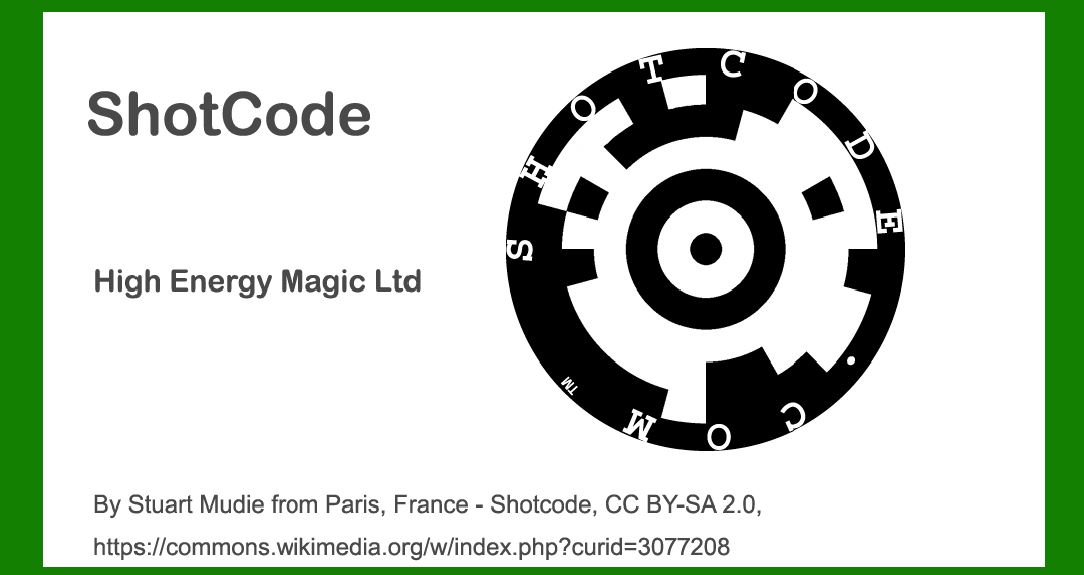
ShotCode, initially known as Spotcode, is a circular pattern barcode technology developed for mobile phone scanning. This technology uses a circular design that encodes data in a pattern of dots arranged around a central point. The error correction mechanism is a crucial aspect of ShotCode's robustness, allowing it to maintain readability even when the code is damaged or partially obscured. |
|
2. Error Correction Overview |
Error correction in ShotCode involves mechanisms that detect and correct errors that may occur during scanning. The key elements of ShotCode's error correction include: |
Redundancy: Extra data is included in the code to allow for error detection and correction. Error Detection and Correction Algorithms: Specific algorithms are used to identify and fix errors in the scanned data. |

|
3. Structure of ShotCode Error Correction |
ShotCode's error correction system is built into its circular pattern, which is divided into several components: |
3.1. Data Encoding and Redundancy |
Data Segments: ShotCode divides the encoded data into segments that are distributed around the circular pattern. This segmentation helps in distributing the data and redundancy evenly. Redundant Information: Each segment includes redundant information to help in correcting errors. This redundancy is achieved by encoding additional bits of data that are not part of the original information but are used for error detection and correction. |
3.2. Error Correction Codes |
Error Detection Codes: These codes are used to identify errors within the ShotCode. The most common codes used are based on polynomial functions. Error Correction Codes: Error correction codes can correct errors once they are detected. These are typically based on advanced algorithms like Reed-Solomon codes. |

|
4. Error Correction Algorithms |
ShotCode uses several algorithms to handle error correction: |
4.1. Reed-Solomon Codes |
Principle: Reed-Solomon codes are a type of non-binary cyclic error-correcting code that is effective in correcting multiple errors within a block of data. Application in ShotCode: Reed-Solomon codes are applied to the redundant information in ShotCode to provide error correction capabilities. This involves encoding the data in a way that errors can be identified and corrected based on the patterns in the code. |
4.2. Polynomial-Based Error Detection |
Principle: Polynomial-based error detection involves using polynomial functions to represent the data and check for errors. Application in ShotCode: In ShotCode, polynomial functions are used to generate error detection codes. These codes help in identifying discrepancies in the scanned data compared to the expected polynomial values. |

|
5. Examples of Error Correction in Practice |
5.1. Example 1: Minor Damage |
Scenario: Suppose a ShotCode is partially obscured or scratched but is still scannable. Error: The damage results in some data segments being unreadable. Correction: The Reed-Solomon codes included in the ShotCode allow the scanning system to use the redundant information to reconstruct the missing data segments. For instance, if 3 out of 10 segments are unreadable, the error correction algorithm can still reconstruct the original data by analyzing the remaining segments and applying the Reed-Solomon decoding process. |
5.2. Example 2: Misalignment or Rotation |
Scenario: A ShotCode is scanned at an angle or with slight misalignment. Error: This causes some of the dots to be misinterpreted. Correction: The error detection algorithms identify discrepancies between the expected and actual data patterns. The Reed-Solomon codes help correct these errors by comparing the scanned data against the redundant information to correct misinterpreted dots. |

|
6. Error Correction Performance and Limitations |
6.1. Performance |
Efficiency: ShotCode's error correction algorithms are efficient in handling common types of damage and misalignment, ensuring that the code remains readable under various conditions. Robustness: The use of Reed-Solomon codes provides a high level of robustness, allowing ShotCode to maintain readability even with significant damage or distortion. |
6.2. Limitations |
Complex Damage: Extremely severe damage or distortion may exceed the correction capabilities of ShotCode's algorithms. Scalability: The error correction performance can vary based on the size and complexity of the ShotCode. Larger codes with more redundant information generally offer better error correction capabilities. |

|
7. Conclusion |
The error correction mechanism of ShotCode, particularly its use of Reed-Solomon codes and polynomial-based detection, provides robust protection against errors that may occur during scanning. By including redundant data and applying sophisticated algorithms, ShotCode ensures high reliability and readability even in less-than-ideal conditions. Understanding these error correction principles is crucial for optimizing the performance of ShotCode in various applications. |

|
 cs@easiersoft.com