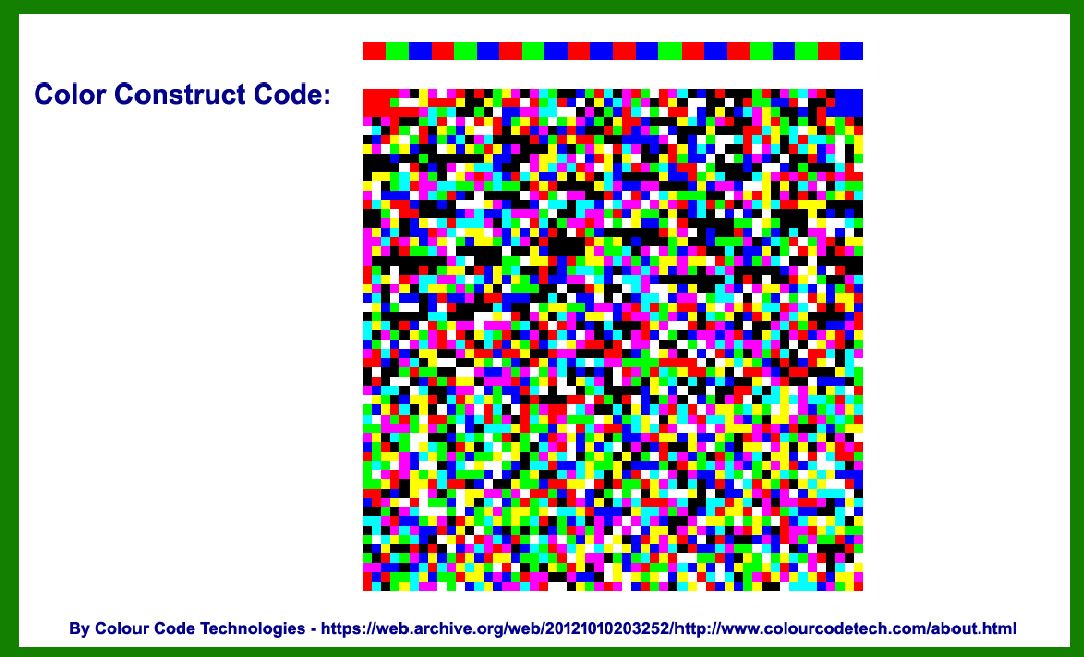
The Color Construct Code (CCC), developed by Colour Code Technologies Co., Ltd., is an advanced form of barcode technology that leverages color to encode data. This innovative approach allows CCC to store significantly more information compared to traditional black-and-white barcodes, making it suitable for various applications where space efficiency and data capacity are crucial. Below, I'll delve into the detailed components and structure of the Color Construct Code, exploring its technology, encoding methods, applications, and more. |
|
Introduction to Color Construct Code (CCC) |
The Color Construct Code (CCC) represents a breakthrough in barcode technology by using color to encode data. Unlike traditional barcodes that rely on variations in black and white patterns, CCC utilizes a palette of colors to achieve higher data density and robustness. Developed by Colour Code Technologies Co., Ltd., CCC is designed to be both versatile and efficient, catering to industries and applications requiring high-capacity data encoding and reliable scanning capabilities. |

|
Components of Color Construct Code |
1. Color Palette and Encoding Scheme |
Color Spectrum: CCC utilizes a predefined spectrum of colors, typically ranging from primary colors (e.g., red, green, blue) to secondary and tertiary colors. Each color in the palette corresponds to a specific data value or sequence. Encoding Logic: Data encoding in CCC involves mapping sequences of colors to alphanumeric characters or binary data. The encoding scheme ensures that each color combination represents a unique data pattern, optimizing data density and readability. |
2. Grid Structure |
Grid Layout: CCC employs a grid-based structure similar to other 2D barcodes, such as QR codes. The grid consists of modules arranged in rows and columns, forming a matrix that accommodates the encoded data. Module Size: The size of each module within the CCC grid can vary depending on the application and scanning requirements. Larger modules may be used for applications where scanning distance or printing size is a concern, while smaller modules increase data density. |
3. Error Correction |
Error Correction Capability: To enhance reliability and readability, CCC integrates error correction techniques similar to those used in QR codes and other 2D barcodes. Error correction algorithms allow CCC to withstand partial damage or distortion during printing or scanning, ensuring accurate data retrieval. |
4. Quiet Zone and Format Information |
Quiet Zone: Similar to traditional barcodes, CCC includes a quiet zone around the perimeter of the code. This blank space ensures that the barcode remains distinct from surrounding graphics or text, facilitating accurate scanning. Format Information: CCC incorporates format information within the barcode structure, specifying details such as encoding method, data capacity, and error correction level. This information assists scanning devices in correctly interpreting and decoding the barcode. |

|
Structure of Color Construct Code |
1. Basic Structure Overview |
Matrix Format: CCC is structured as a 2D matrix, consisting of rows and columns of colored modules. The matrix format allows for efficient encoding and decoding of data, supporting both linear and omnidirectional scanning. Data Regions: Within the CCC matrix, distinct regions are allocated for different types of data, including payload data, error correction codes, and format information. This segmentation enhances data organization and retrieval efficiency. |
2. Color Encoding Mechanism |
Color Mapping: Each color in the CCC palette is assigned a specific numeric or alphanumeric value, forming the basis of data encoding. Color sequences within the barcode matrix correspond to binary or alphanumeric data sequences, facilitating seamless translation between visual representation and digital information. Data Capacity: CCC's use of color enables it to achieve higher data capacity compared to traditional monochromatic barcodes. The precise number of characters or bytes that CCC can encode depends on factors such as module size, grid dimensions, and color palette complexity. |
3. Error Correction and Redundancy |
Error Correction Levels: CCC supports multiple error correction levels, allowing users to balance data capacity with robustness against printing defects or scanning errors. Higher error correction levels allocate more space for redundancy data, improving fault tolerance without sacrificing significant data capacity. Redundancy Techniques: In addition to error correction codes embedded within the barcode matrix, CCC may employ redundancy techniques such as data duplication or parity checks. These redundancies further enhance data integrity and reliability during barcode scanning and decoding processes. |

|
Applications of Color Construct Code |
1. Retail and Product Packaging |
Inventory Management: CCC facilitates efficient inventory tracking and product identification in retail environments. Its high data capacity accommodates extensive product information, including SKU numbers, batch codes, and expiration dates. Consumer Engagement: Brands utilize CCC for interactive marketing campaigns, incorporating links to product websites, promotional videos, or customer feedback surveys directly into barcode designs. |
2. Logistics and Supply Chain |
Shipping Labels: CCC serves as an alternative to traditional shipping labels, encoding shipment details, destination addresses, and handling instructions in a compact format. Its error correction capabilities ensure accurate data capture during transit and delivery processes. Warehouse Management: CCC optimizes warehouse operations by encoding product locations, storage conditions, and order fulfillment instructions. Real-time scanning updates streamline inventory control and replenishment tasks. |
3. Healthcare and Pharmaceutical |
Medical Records: CCC securely stores patient information, medical histories, and treatment protocols within healthcare facilities. Its color-based encoding enhances data privacy and compliance with health data protection regulations. Medication Packaging: CCC codes on pharmaceutical packaging encode drug information, dosage instructions, and expiration dates, supporting medication safety and adherence initiatives. |
4. Event Ticketing and Access Control |
Digital Tickets: CCC barcodes embedded in event tickets streamline venue access and attendee registration processes. Dynamic encoding capabilities enable real-time updates to ticket status and seating assignments. Visitor Management: CCC facilitates secure access control at conferences, exhibitions, and corporate events by encoding attendee credentials and session schedules. Scanning devices validate permissions and track attendance metrics efficiently. |

|
Conclusion |
The Color Construct Code (CCC) developed by Colour Code Technologies Co., Ltd., represents a significant advancement in barcode technology, leveraging color to enhance data capacity, reliability, and application versatility. By integrating a spectrum of colors into its encoding scheme, CCC accommodates diverse industry requirements, from retail and logistics to healthcare and event management. Its structured grid layout, error correction mechanisms, and format information ensure efficient data encoding, decoding, and real-time information retrieval across various scanning environments. As CCC continues to evolve, its impact on digital transformation and operational efficiency underscores its relevance in modern data-centric ecosystems. |

|
 cs@easiersoft.com