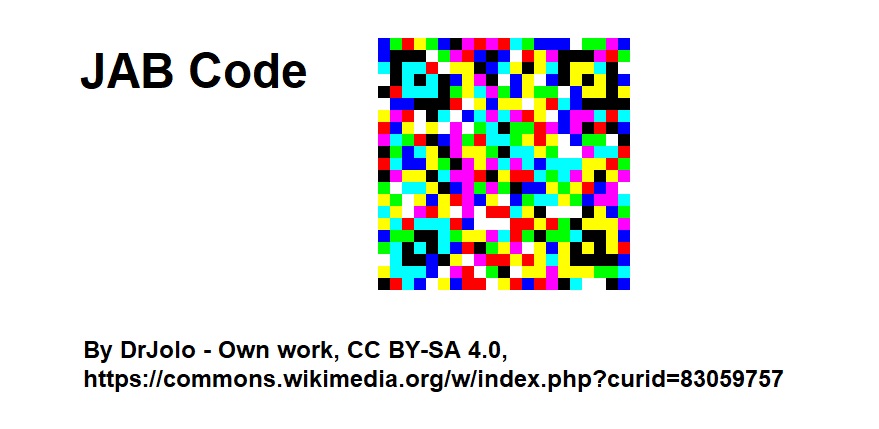
The JAB Code, developed by Japan Auto-ID Laboratory Ltd., is a prominent 2D barcode technology designed primarily for mobile applications, offering robust encoding capabilities suitable for various data types and environments. Here's a comprehensive overview of its components, structure, and functionalities. |
|
Introduction to JAB Code |
JAB Code stands for Japan Article Number (JAN) 2D Barcode. It was developed to provide a versatile and compact means of encoding information, particularly suited for applications requiring high-density data storage and mobile device compatibility. The technology was created by Japan Auto-ID Laboratory Ltd., a pioneer in barcode and Auto-ID technologies, known for its contributions to the field of automatic identification and data capture (AIDC). |

|
Components of JAB Code |
1. Data Encoding Scheme |
JAB Code employs a sophisticated encoding scheme optimized for efficient data representation and decoding reliability. Unlike traditional linear barcodes, which encode data in one-dimensional sequences of bars and spaces, JAB Code utilizes a two-dimensional matrix structure. This matrix allows for the encoding of significantly larger amounts of data while maintaining a compact physical footprint. |
2. Format Information |
Similar to other 2D barcode formats, JAB Code includes format information within its structure. This information specifies details such as the version of the barcode format used, error correction level, and other metadata necessary for accurate decoding. This ensures that even if parts of the barcode are damaged or obscured, the encoded data can still be reliably recovered. |
3. Error Correction |
One of the critical features of JAB Code is its robust error correction capabilities. Error correction algorithms are integrated into the encoding process, enabling the barcode to sustain damage or distortion without compromising the readability of the encoded data. This is particularly advantageous in environments where barcode labels may be exposed to wear, tear, or adverse conditions. |
4. Quiet Zone |
Like all barcode technologies, JAB Code incorporates a quiet zone around its perimeter. The quiet zone is a clear space that surrounds the barcode, ensuring that there are no visual obstructions or interference that could hinder the barcode scanning process. Maintaining an adequate quiet zone is essential for reliable and accurate barcode scanning. |

|
Structure of JAB Code |
1. Matrix Arrangement |
JAB Code is structured as a two-dimensional matrix of black and white modules (cells). These modules are arranged in a grid pattern, where each module represents a binary digit (bit) of encoded data. The matrix structure allows for the efficient packing of data into a relatively small area, making JAB Code suitable for applications requiring high data density. |
2. Alignment Patterns |
To facilitate accurate decoding, JAB Code includes alignment patterns strategically placed within the barcode matrix. Alignment patterns assist barcode readers in determining the orientation and size of the barcode, thereby optimizing the decoding process. These patterns also contribute to the barcode's resilience against distortion and misalignment. |
3. Timing Patterns |
Timing patterns are another essential component of JAB Code's structure. These patterns consist of alternating black and white modules arranged in specific sequences along the edges of the barcode matrix. Timing patterns serve as reference points for barcode readers, helping them synchronize their scanning mechanisms with the barcode's grid structure. This synchronization ensures precise data extraction from the encoded matrix. |
|
4. Data Region |
The central area of the JAB Code matrix is designated as the data region. This region contains the actual encoded information, organized into data codewords according to the specified encoding scheme. Each codeword represents a segment of data, such as alphanumeric characters, numeric digits, or binary data, depending on the application requirements. |
5. Quiet Zone and Format Information Region |
Surrounding the data region, JAB Code includes a quiet zone and a format information region. The quiet zone ensures that there are no visual distractions or print artifacts that could interfere with the barcode scanning process. The format information region contains metadata essential for barcode decoding, such as error correction level and barcode version information. |

|
Functionality and Applications |
1. High-Density Data Encoding |
JAB Code excels in applications requiring high-density data storage. Its two-dimensional matrix structure allows for the encoding of substantial amounts of information within a compact physical space. This makes JAB Code suitable for product labeling, document management, and other scenarios where space-efficient data encoding is crucial. |
2. Mobile Device Compatibility |
Designed with mobile applications in mind, JAB Code is optimized for reliable scanning using smartphone cameras and dedicated mobile barcode scanners. Its robust error correction capabilities ensure that data can be accurately retrieved even under challenging conditions, such as varying lighting conditions or imperfect scanning angles. |
3. Versatility in Data Types |
JAB Code supports a wide range of data types, including alphanumeric characters, numeric digits, and binary data. This versatility makes it adaptable to diverse application requirements, from inventory management and retail product tracking to digital ticketing and mobile payment systems. |
4. Security and Traceability |
In addition to data storage, JAB Code can incorporate security features such as encryption and digital signatures to enhance data integrity and traceability. These features are particularly valuable in industries where secure data transmission and authentication are paramount, such as pharmaceuticals, logistics, and supply chain management. |

|
Conclusion |
JAB Code, developed by Japan Auto-ID Laboratory Ltd., represents a significant advancement in 2D barcode technology, offering high-density data encoding, robust error correction, and versatile application capabilities. Its structured matrix arrangement, coupled with advanced encoding algorithms, ensures reliable data capture and decoding across various environments and mobile devices. As barcode technology continues to evolve, JAB Code remains at the forefront of innovations in automatic identification and data capture, supporting a wide range of industrial and consumer applications worldwide. |
 cs@easiersoft.com