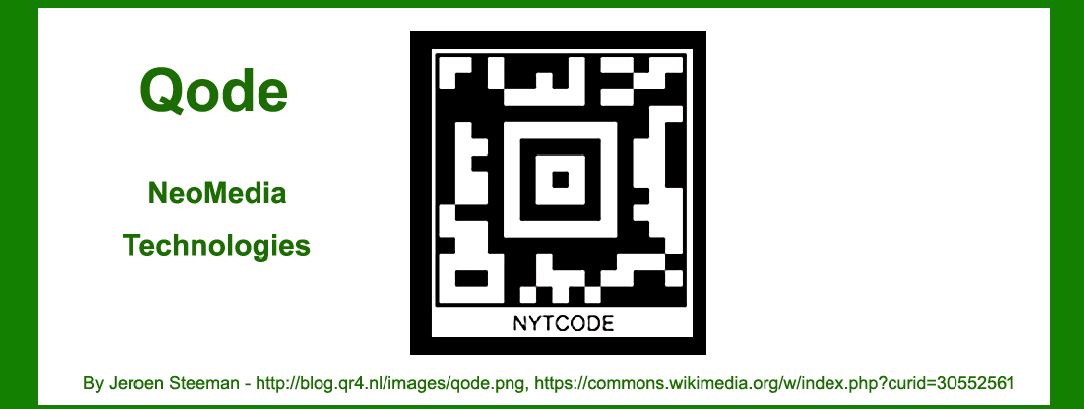
NeoMedia Qode, also known simply as Qode, is a 2D barcode technology developed by NeoMedia Technologies. In this detailed exploration, we'll delve into the components, structure, encoding principles, applications, and historical context of NeoMedia Qode. |
|
Introduction to NeoMedia Qode |
NeoMedia Qode is a matrix barcode technology designed to store information both vertically and horizontally, enabling high-density data encoding. Originally developed by NeoMedia Technologies, Qode gained prominence in the early 2000s for its potential applications in mobile marketing, advertising, and consumer engagement. The technology was positioned to leverage the increasing adoption of camera-equipped mobile phones, transforming traditional barcodes into interactive gateways for accessing digital content. |

|
Components of NeoMedia Qode |
1. Matrix Structure |
NeoMedia Qode employs a matrix or grid-based structure composed of black and white modules arranged in a square or rectangular pattern. This structure allows for efficient encoding and decoding of data. |
2. Quiet Zone |
Similar to other barcode technologies, NeoMedia Qode includes a quiet zone-a blank space surrounding the barcode-to prevent interference from surrounding graphics or printing artifacts. This ensures accurate scanning and decoding. |
3. Position Detection Patterns |
Position detection patterns (PDPs) are essential elements within NeoMedia Qode. These patterns, often located at specific corners or edges of the barcode, assist scanners in locating and orienting the barcode for accurate reading. PDPs typically consist of unique configurations of black and white modules. |
4. Data Encoding |
NeoMedia Qode uses a variety of encoding techniques to store data within its matrix structure. Common methods include: |
Byte Encoding: Data is encoded using byte values, allowing for the representation of alphanumeric characters, symbols, and binary data. Error Correction Coding: To enhance robustness against data loss or corruption, NeoMedia Qode integrates error correction coding techniques. These include Reed-Solomon codes or similar algorithms, which add redundant data to facilitate error detection and correction during scanning. |
5. Format Information |
Embedded within the barcode is format information that specifies parameters such as data encoding scheme, error correction level, and barcode version. This information is crucial for scanners to interpret and decode the barcode accurately. |
|
Structures and Variants of NeoMedia Qode |
1. Basic Structure |
The fundamental structure of NeoMedia Qode comprises a grid of modules arranged in rows and columns. Each module can be either black (typically represented by solid squares) or white (represented by empty squares), forming a binary representation of data. |
2. Versioning |
NeoMedia Qode is available in different versions or sizes, characterized by the number of rows and columns of modules. Larger versions accommodate greater data storage capacity but require larger printing areas. |
3. Color Variants |
While traditionally black and white, NeoMedia Qode supports color variants where modules can be represented in different colors. Color can be used for aesthetic purposes or to encode additional information beyond the standard binary data. |
4. Micro Qode |
Micro Qode is a variant of NeoMedia Qode designed for applications requiring smaller barcodes with reduced data capacity. It optimizes the use of space while maintaining compatibility with standard Qode readers. |

|
Encoding Principles of NeoMedia Qode |
NeoMedia Qode utilizes several key principles for data encoding: |
1. Binary Representation |
Each module within the Qode grid represents a binary value-black for '1' and white for '0'. This binary representation forms the basis for encoding alphanumeric characters, symbols, and binary data. |
2. Data Compression |
Efficient data compression techniques are employed to maximize data storage within the limited space of the barcode. Compression algorithms reduce redundancy and optimize the representation of data. |
3. Error Correction |
To ensure reliability in data transmission and scanning, NeoMedia Qode incorporates error correction capabilities. Error correction codes are embedded within the barcode, allowing scanners to recover data even if parts of the barcode are damaged or obscured. |

|
Applications of NeoMedia Qode |
1. Mobile Marketing |
NeoMedia Qode gained early traction in mobile marketing and advertising campaigns. Marketers used Qode barcodes to link physical advertisements or products directly to digital content such as websites, videos, or promotional offers. |
2. Retail and Product Tracking |
In retail, NeoMedia Qode facilitated product tracking, inventory management, and supply chain visibility. Barcodes were printed on merchandise to streamline checkout processes and monitor stock levels. |
3. Authentication and Security |
Qode found applications in authentication and security systems, where barcodes were used to verify identities, access control, or authenticate product authenticity. |
4. Document Management |
Within document management systems, NeoMedia Qode enabled efficient tracking and retrieval of documents. Barcodes were printed on documents to categorize, archive, and retrieve information digitally. |
5. Consumer Engagement |
NeoMedia Qode enhanced consumer engagement by enabling interactive experiences. Consumers scanned Qode barcodes to access product information, participate in contests, or receive personalized offers. |

|
Historical Context and Evolution |
NeoMedia Qode emerged during a pivotal period marked by the rise of mobile technology and digital connectivity. Its development paralleled advancements in mobile phone capabilities, particularly the integration of cameras capable of capturing and interpreting barcodes. |

|
Conclusion |
NeoMedia Qode represents a significant advancement in barcode technology, leveraging matrix-based encoding to enable high-density data storage and interactive functionalities. Its applications span diverse industries, from marketing and retail to security and document management, enhancing efficiency and consumer engagement. As technology continues to evolve, NeoMedia Qode remains a relevant tool for connecting physical and digital realms through innovative barcode solutions. |
 cs@easiersoft.com