MaxiCode is a two-dimensional (2D) barcode symbology developed by United Parcel Service (UPS) primarily for high-speed, automated sorting and tracking of packages. It is widely used in logistics and transportation industries due to its high data capacity, robust error correction capabilities, and suitability for rapid scanning. This comprehensive guide will delve into the components, structures, encoding methods, applications, and technical specifications of MaxiCode. |
|
Components and Structures of MaxiCode |
1. Basic Structure |
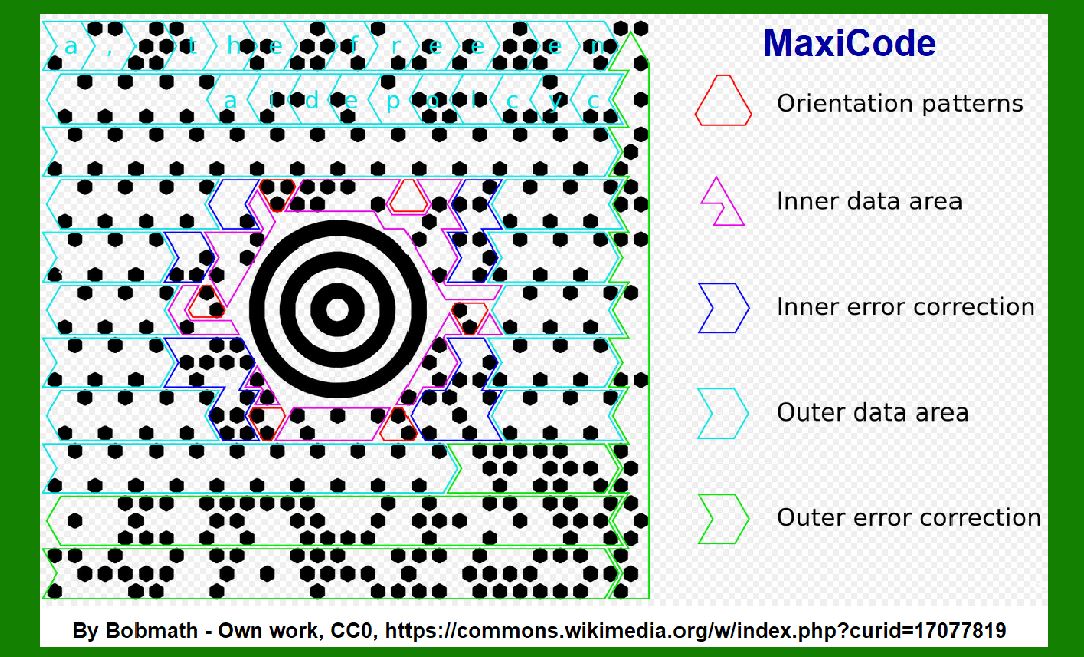
MaxiCode is a matrix symbology, consisting of a grid of hexagonal modules arranged in a unique circular pattern known as a bullseye or 'target' shape. Unlike traditional linear barcodes, which encode data horizontally, MaxiCode uses a concentric ring structure that encodes information in both radial and angular dimensions. |
2. Symbol Layout |
Bullseye Pattern: The core of MaxiCode consists of a central bullseye pattern with concentric circles, resembling a dartboard. This bullseye pattern helps scanners quickly locate and decode the barcode, even when partially obscured or damaged. Data Region: Surrounding the bullseye are several layers of concentric squares forming a data region. This area encodes the actual data and includes timing patterns and synchronization bits for accurate scanning. |

|
3. Data Encoding |
MaxiCode encodes data using a combination of binary data and Reed-Solomon error correction codes, ensuring reliable data retrieval even in adverse conditions such as partial damage or poor printing quality. |
Modes of Data Encoding: Binary Encoding: Raw data is converted into binary format. Error Correction: Reed-Solomon error correction codes are applied to enhance reliability. |
4. Data Capacity |
High Data Density: MaxiCode can store up to 93 alphanumeric characters or 138 numeric characters within its compact structure. This high data density makes it ideal for encoding large amounts of information such as shipping addresses, tracking numbers, and other logistical data. |
5. Symbol Size and Dimensions |
Fixed Size: MaxiCode symbols have a fixed size of 1 inch by 1 inch (25.4 mm × 25.4 mm), ensuring uniformity and compatibility across different scanning systems and applications. |

|
6. Scanning and Decoding |
Scanning Technology: MaxiCode can be scanned omnidirectionally, meaning it can be read from any orientation without needing precise alignment with the scanner. This feature is crucial for high-speed logistics applications where packages are rapidly moving through sorting and distribution centers. Decoding Process: Scanners interpret the arrangement of black and white modules within the bullseye pattern to extract encoded information. Advanced algorithms handle error correction and data reconstruction to ensure accurate decoding even under challenging conditions. |
7. Applications |
MaxiCode is extensively used in logistics and shipping operations, particularly by UPS for package sorting, tracking, and delivery management. Its robust design and high data capacity make it suitable for: |
Package Identification: Each package can be uniquely identified and tracked throughout the shipping process. Logistics Automation: Enables automated sorting and routing of packages based on destination and other criteria. Data Integrity: Ensures accurate transmission and retrieval of shipping information, reducing errors and improving efficiency. |

|
8. Technical Specifications |
ISO/IEC Standardization: MaxiCode conforms to ISO/IEC 16023, which specifies the structure, encoding methods, and decoding algorithms for 2D barcodes used in logistics and transportation. Encoding Standards: Defines how data elements such as postal codes, country codes, and shipment identifiers are formatted and encoded within the MaxiCode symbol. |
9. Usage Guidelines |
Printing Requirements: MaxiCode symbols should be printed with high contrast and precision to ensure readability by scanners under various lighting conditions. Environmental Considerations: Suitable for use in both indoor and outdoor environments, resistant to damage from moisture, dust, and physical handling. |

|
10. Future Developments |
As logistics technology evolves, MaxiCode continues to adapt to new challenges and requirements. Potential future developments include enhancements in data capacity, improved error correction algorithms, and integration with IoT (Internet of Things) and cloud-based logistics platforms for real-time tracking and analytics. |
|
Conclusion |
MaxiCode by United Parcel Service (UPS) represents a pinnacle in barcode technology for logistics and transportation applications. Its innovative design, robust error correction capabilities, and high data capacity make it indispensable for automated package sorting, tracking, and management. By understanding its components, structures, and applications, stakeholders in the logistics industry can leverage MaxiCode to optimize efficiency, accuracy, and customer satisfaction in the delivery of goods and services globally. |
 cs@easiersoft.com