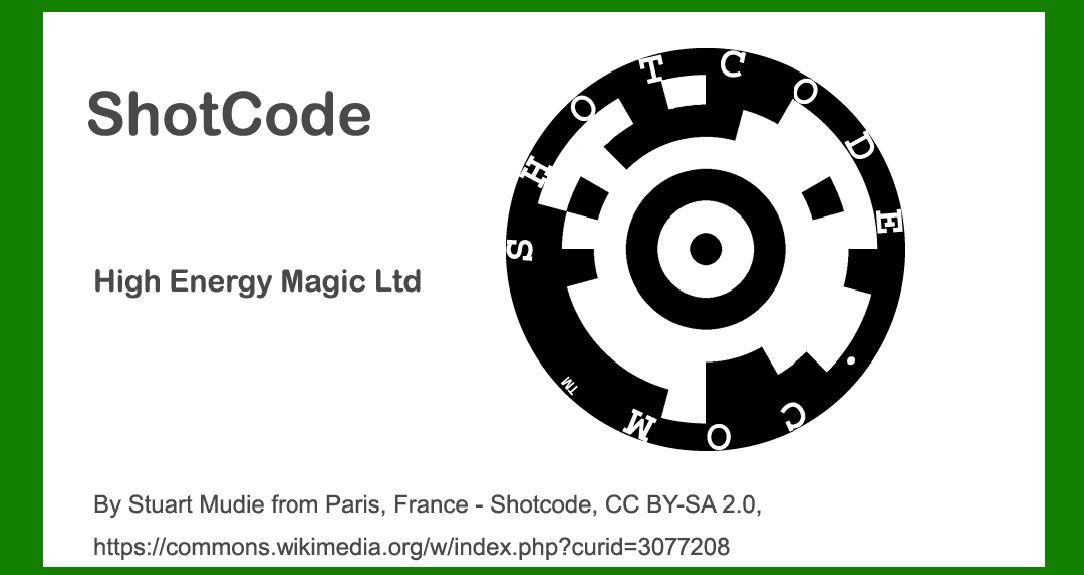
ShotCode, a circular pattern code, represents a pioneering advancement in barcode technology specifically designed for camera phones. Developed by High Energy Magic Ltd., it aims to facilitate rapid and reliable scanning via mobile devices, supporting various applications from marketing to augmented reality. This detailed exploration covers its components, structure, encoding principles, decoding process, and practical applications, offering a comprehensive view of ShotCode's technology and its impact. |
|
Introduction to ShotCode |
ShotCode emerged in the early 2000s as a response to the growing integration of camera phones and the demand for quick, efficient data access through visual codes. Unlike traditional linear or 2D barcodes, ShotCode utilizes a circular pattern that enhances readability and allows for rapid scanning from varying angles. This section introduces the concept of ShotCode and its significance in mobile technology. |

|
Components of ShotCode |
Circular Pattern Design |
ShotCode's distinctive circular pattern is fundamental to its functionality. The code's design consists of concentric rings and sectors, forming a visually distinct structure that encodes information. Each sector within the code plays a specific role in data representation and error correction, ensuring robust performance even under challenging conditions. |
Positioning Markers |
Positioning markers serve as reference points within the ShotCode, facilitating accurate alignment during scanning. These markers are strategically placed to assist mobile cameras in recognizing and decoding the code efficiently. Their placement enhances the code's resilience to orientation changes and varying distances, optimizing usability across different devices. |
Data Modules |
Data modules within ShotCode encode information through spatial variations in the circular pattern. These modules represent binary data through the presence or absence of elements within designated sectors. The arrangement and density of these modules determine the code's capacity and readability, accommodating diverse data types ranging from URLs to multimedia content. |

|
Structure of ShotCode |
Circular Format |
ShotCode adopts a circular format, maximizing space utilization within a compact design. The code's circular layout supports scalable information encoding, enabling seamless integration into print media, digital displays, and physical objects. This structure enhances visibility and accessibility, catering to both static and dynamic content requirements. |
Encoding Scheme |
ShotCode employs an encoding scheme that leverages spatial positioning and sector-based data allocation. This scheme optimizes data density while ensuring minimal redundancy, enhancing the code's efficiency and scanning speed. The encoding process involves mapping binary data onto predefined sectors, adhering to standardized protocols for compatibility and interoperability. |
Error Correction |
Error correction mechanisms are integral to ShotCode's reliability and resilience. The code utilizes sophisticated algorithms to embed redundancy and parity data within its structure, enabling real-time error detection and correction during scanning. This feature mitigates potential distortions or environmental factors, ensuring accurate data retrieval across diverse operating conditions. |

|
Encoding and Decoding Principles |
Data Representation |
ShotCode encodes data through a combination of binary values and positional markers within its circular framework. Each sector corresponds to specific data segments, allowing for sequential retrieval and interpretation by scanning devices. The code's encoding principles prioritize clarity and precision, accommodating variable data lengths and multimedia content formats. |
Decoding Algorithm |
The decoding algorithm of ShotCode involves iterative sector analysis and pattern recognition. Mobile applications and dedicated scanning software utilize image processing techniques to identify positioning markers and extract encoded data. This algorithm integrates error correction protocols to validate data integrity, ensuring reliable information retrieval from ShotCode-enabled media. |

|
Practical Applications of ShotCode |
Marketing and Advertising |
ShotCode revolutionizes marketing and advertising strategies by embedding interactive content within printed materials and digital displays. Brands utilize ShotCode to deliver product information, promotional offers, and multimedia experiences directly to consumers' mobile devices. This application enhances engagement and facilitates seamless transition from offline to online interactions. |
Authentication and Security |
In sectors such as retail and finance, ShotCode serves as a secure authentication tool for verifying product authenticity and transaction integrity. The code's unique structure and encryption capabilities enable encrypted data transmission and identity validation, safeguarding against counterfeit activities and unauthorized access. |
Augmented Reality Integration |
ShotCode integrates seamlessly with augmented reality (AR) platforms to overlay digital content onto physical environments. AR applications interpret ShotCode's spatial data representation to superimpose interactive graphics, videos, and real-time information onto users' camera views. This integration enhances user engagement and enriches immersive experiences across gaming, education, and industrial training domains. |

|
Conclusion |
ShotCode represents a paradigm shift in barcode technology, leveraging circular patterns and advanced encoding techniques to facilitate mobile-centric data access and interaction. Its components, structure, encoding principles, and practical applications demonstrate versatility and innovation in enhancing connectivity between physical and digital realms. As mobile technology continues to evolve, ShotCode remains at the forefront of enabling seamless integration and interactive engagement across diverse industries and consumer experiences. |
This comprehensive exploration provides a detailed overview of ShotCode's components, structure, and operational principles, highlighting its transformative impact on mobile technology and digital interaction landscapes. |
 cs@easiersoft.com