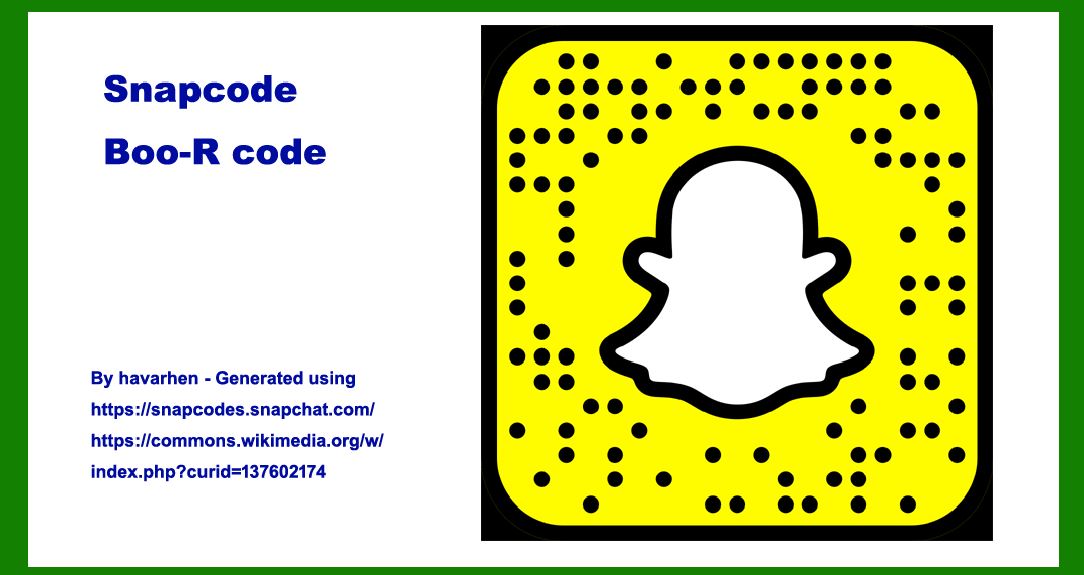
Snapcodes, also known as Boo-R codes, are a unique form of augmented reality (AR) marker used primarily within the Snapchat platform. Developed by Snap Inc., these codes serve as a bridge between physical objects and digital content, enabling users to unlock various experiences and features within the Snapchat app. This comprehensive exploration will delve into the components, structures, functionality, and applications of Snapcodes. |
|
Introduction to Snapcodes |
Snapcodes are a form of matrix barcode designed to be easily recognizable and scannable using the Snapchat camera. They blend elements of traditional QR codes with Snapchat's branding, making them distinctively recognizable to Snapchat users. Snapcodes function as a direct link to augmented reality experiences, lenses, filters, websites, and other digital content within the Snapchat ecosystem. |

|
Components of Snapcodes |
Snapcodes consist of several key components that collectively enable their functionality: |
1.Outer Circle: This is a defining feature of Snapcodes, consisting of a circle that encloses the central elements. It serves both aesthetic and functional purposes, making Snapcodes instantly recognizable. 2.Ghost Logo: Positioned at the center of the Snapcode, the Ghost Logo is the iconic Snapchat logo-a white ghost on a yellow background. This logo is crucial for brand recognition and ensures that users immediately associate the Snapcode with Snapchat. 3.Dots: Surrounding the Ghost Logo are a series of dots arranged in a circular pattern. These dots are essential for encoding data and ensuring that the Snapcode can be accurately scanned and decoded by the Snapchat app. 4.Color Scheme: Snapcodes typically use a yellow and black color scheme, aligning with Snapchat's brand colors. This consistent color choice reinforces brand identity and makes Snapcodes visually appealing and easy to spot. |
|
Structure of Snapcodes |
Snapcodes are structured in a way that optimizes scanning and decoding while maintaining aesthetic appeal: |
Grid Matrix: Like QR codes, Snapcodes are based on a grid matrix. This matrix contains encoded data represented by black and white modules arranged in a square grid pattern. Quiet Zone: Surrounding the grid matrix is a quiet zone-a margin of white space that ensures there is no interference with the scanning process. This space is essential for reliable scanning and decoding of the Snapcode. Error Correction: Snapcodes incorporate error correction techniques to ensure robustness against damage or distortion. This allows the code to remain scannable even if part of it is obscured or damaged. |
|
Functionality of Snapcodes |
Snapcodes serve multiple functions within the Snapchat ecosystem: |
1.Augmented Reality (AR) Experiences: By scanning a Snapcode, users can unlock AR lenses and filters that overlay digital elements onto the real world through their Snapchat camera. 2.Website Links: Snapcodes can direct users to specific websites or landing pages within the Snapchat app, facilitating seamless navigation from physical to digital content. 3.Profile Additions: They can also be used to quickly add friends on Snapchat by scanning their Snapcode, simplifying the process of connecting with new contacts. 4.Promotional Tools: Businesses and creators use Snapcodes as promotional tools, embedding them in physical advertisements, products, and packaging to drive engagement and interaction. |

|
Applications of Snapcodes |
Snapcodes find extensive use across various domains and industries: |
Marketing and Advertising: Brands leverage Snapcodes in marketing campaigns to deliver interactive and engaging content directly to consumers. For example, scanning a Snapcode on a product package might unlock exclusive offers or product information. Entertainment and Media: Celebrities, artists, and entertainment entities use Snapcodes to promote new releases, merchandise, or interactive experiences such as behind-the-scenes content or exclusive previews. Education and Training: Educational institutions and trainers use Snapcodes to link students to supplementary resources, virtual tours, or interactive lessons embedded within Snapchat. Events and Activations: Event organizers use Snapcodes on event materials to provide attendees with real-time updates, event schedules, and interactive experiences such as photo filters or geo-specific AR features. |

|
Evolution and Future Trends |
Since their inception, Snapcodes have evolved to incorporate advanced AR capabilities, improved scanning technologies, and enhanced integration with Snapchat's features. Future trends may include: |
Enhanced AR Functionality: Continued advancements in augmented reality technologies will likely enhance the complexity and interactivity of AR experiences unlocked via Snapcodes. Integration with Wearable Technology: As wearable technology continues to evolve, Snapcodes may integrate with devices such as smart glasses or augmented reality headsets to deliver seamless digital experiences in real-time. Global Adoption: Increased global adoption of augmented reality and social media platforms may lead to broader use of Snapcodes across diverse cultural and geographical contexts. |

|
Conclusion |
Snapcodes, or Boo-R codes, represent a fusion of traditional QR code functionality with Snapchat's unique branding and augmented reality capabilities. They serve as a powerful tool for bridging physical and digital realms, enabling users to access augmented reality experiences, digital content, and interactive features within the Snapchat app. With their distinctive design and multifaceted functionality, Snapcodes continue to evolve as a key element of Snapchat's engagement strategy and hold potential for broader applications in marketing, education, entertainment, and beyond. |
 cs@easiersoft.com