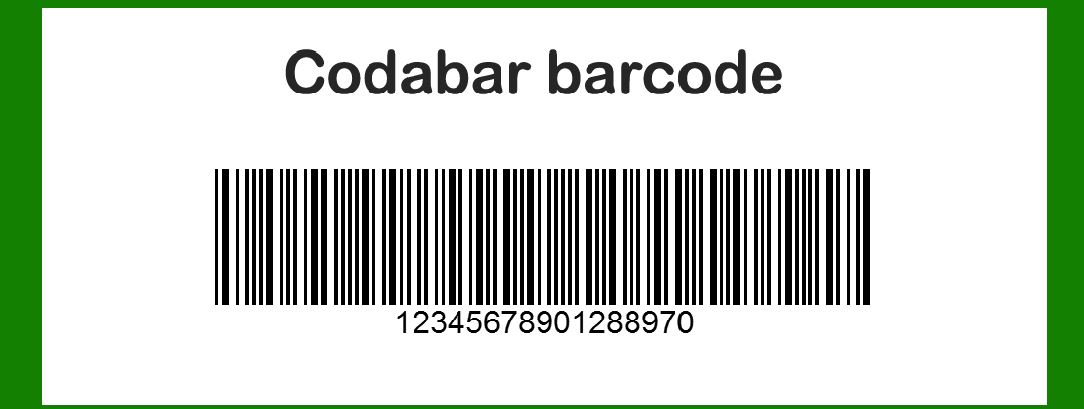
Codabar, also known as USD-4 or NW-7, is a linear barcode symbology widely used in various industries despite being considered outdated in many modern applications. |
It was originally developed in 1972 by Pitney Bowes, Inc. and is characterized by its simplicity and ability to encode numeric digits, as well as certain special characters. Codabar barcodes have been historically employed in libraries, blood banks, and on airbills due to their reliability and ease of printing and decoding. |
|
Structure and Encoding |
Codabar barcodes consist of a series of bars and spaces, with each character encoded using a unique combination of these elements. The barcode can encode up to 16 different characters, including numeric digits (0-9) and a few special characters such as dash (-), colon (:), dollar ($), slash (/), plus (+), and period (.). This limited character set makes Codabar less suitable for encoding large amounts of data compared to more modern barcode formats. |
Character Set |
The Codabar symbology uses four different start/stop characters: A, B, C, and D. Each start/stop character determines the type of information encoded within the barcode. For example, the start character A encodes digits 0-9 and the special characters - : . $ / +, while the start character B encodes digits 0-9 and the letters A-D. This flexibility allows Codabar to be used in various applications where different types of data need to be encoded. |

|
Applications |
1.Libraries: Codabar barcodes have been traditionally used in libraries for cataloging books and other media. Despite advancements in library automation systems, some libraries still use Codabar due to existing infrastructure and compatibility with older systems. 2.Blood Banks: Codabar barcodes are also prevalent in blood banks for labeling blood products and samples. The reliability and simplicity of Codabar make it suitable for environments where accuracy and quick identification are critical. 3.Airbills: In shipping and logistics, Codabar barcodes have historically been used on airbills and shipping labels for tracking packages and shipments. Although less common today in favor of more advanced barcode formats like Code 128 and QR codes, Codabar's robustness in harsh environments remains a consideration. |
Structure and Printing Considerations |
Codabar barcodes can be printed using various technologies, including thermal printers and laser printers. The barcode must meet specific standards for bar width, spacing, and ratio to ensure accurate scanning and decoding by barcode readers. The size of Codabar barcodes can vary depending on the application, with larger sizes often used to ensure readability in environments where scanning equipment may be at a distance or under varying lighting conditions. |
Decoding and Compatibility |
Modern barcode scanners and software are generally capable of decoding Codabar barcodes, although compatibility may vary depending on the specific implementation of the symbology. Software tools and libraries are available for decoding Codabar barcodes in various programming languages, facilitating integration into modern information systems. |
|
Advantages and Disadvantages |
Advantages: |
Simplicity: Codabar is straightforward to generate and decode, requiring minimal computational resources. Reliability: The symbology is robust and can withstand moderate printing and scanning variations. |
Disadvantages: |
Limited Character Set: Codabar can only encode a limited set of characters, limiting its use in applications requiring complex data encoding. Size and Density: Compared to newer barcode formats like Code 128 or QR codes, Codabar requires more space to encode the same amount of information. |

|
Usage Trends and Future Outlook |
While Codabar is considered outdated in many applications, it continues to be used in specific industries where its simplicity and reliability are valued over data density and modern encoding capabilities. As technology evolves, the adoption of more advanced barcode formats and technologies like RFID and NFC may further diminish the use of Codabar in favor of solutions that offer enhanced data storage capacity and real-time tracking capabilities. |

|
Conclusion |
Codabar barcode technology, despite its age and limitations, remains a staple in certain industries such as libraries, blood banks, and logistics where its reliability and ease of use continue to provide value. While newer barcode formats have largely supplanted Codabar in many applications, its historical significance and ongoing use underscore its enduring relevance in specialized environments where its specific advantages are paramount. |
 cs@easiersoft.com