Codabar is a linear barcode symbology that was developed in 1972 by Pitney Bowes Corp. It is widely used in various industries, including libraries, blood banks, and air cargo, due to its simplicity and ease of implementation. The symbology allows encoding of numeric data and a few special characters, making it particularly useful in applications where simplicity and reliability are paramount. In this detailed explanation, we will cover the encoding of the Codabar barcode, its character set, structure, and examples to illustrate the encoding process. |
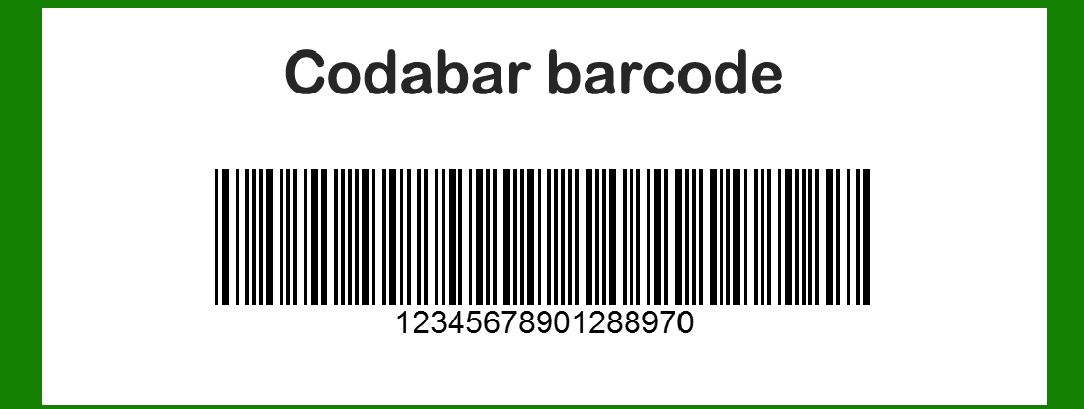
|
Character Set |
The Codabar barcode supports the following character set: |
Numeric digits: 0, 1, 2, 3, 4, 5, 6, 7, 8, 9 Special characters: - (dash), $ (dollar), : (colon), / (slash), . (dot), + (plus) Start/stop characters: A, B, C, D |

|
Structure of the Codabar Barcode |
A Codabar barcode consists of the following components: |
1.Start Character: One of the characters A, B, C, or D. 2.Data Characters: A sequence of numeric digits and/or special characters. 3.Stop Character: One of the characters A, B, C, or D. |
Each character in the Codabar symbology is encoded using a combination of seven elements: four bars and three spaces. The bars and spaces are either wide or narrow, with a narrow element typically being one unit wide and a wide element being two or three units wide. |

|
Encoding Table |
The table below shows the encoding for each character in the Codabar symbology. Each character is represented by a sequence of seven elements, with 1 indicating a bar and 0 indicating a space. Wide bars and spaces are represented by multiple consecutive 1s or 0s. |
CharacterEncodingBar/Space Pattern |
0101010011bar-space-bar-space-bar-space-space-bar 1101011001bar-space-bar-space-bar-space-bar-space 2101001011bar-space-bar-space-space-bar-space-bar 3110010101bar-bar-space-bar-space-bar-space-bar 4101101001bar-space-bar-bar-space-bar-space-space 5110101001bar-bar-space-bar-space-bar-space-space 6100101011bar-space-space-bar-space-bar-space-bar 7100101101bar-space-space-bar-space-bar-bar-space 8100110101bar-space-space-bar-bar-space-bar-space 9110100101bar-bar-space-bar-space-bar-space-space -101001101bar-space-bar-space-space-bar-bar-space $101100101bar-space-bar-bar-space-bar-space-space :1101011011bar-bar-space-bar-space-bar-bar-space-bar-space /110110101bar-bar-space-bar-bar-space-bar-space .11011011bar-bar-space-bar-bar-space-bar-space +1011001101bar-space-bar-bar-space-bar-space-bar-bar A1011001bar-space-bar-bar-space-space-bar B1001011bar-space-space-bar-space-bar-space C1010011bar-space-bar-space-space-bar-space D101001001bar-space-bar-space-space-bar-space-bar |

|
Encoding Process |
To encode a message in the Codabar barcode symbology, follow these steps: |
1.Select Start and Stop Characters: Choose appropriate start and stop characters from A, B, C, or D. These characters frame the encoded data. |
2.Encode Each Data Character: Convert each character in the data string to its corresponding bar/space pattern using the encoding table. |
3.Assemble the Full Barcode Pattern: Combine the start character encoding, encoded data characters, and the stop character encoding into a single sequence of bars and spaces. |
4.Render the Barcode: Translate the sequence of bars and spaces into a visual representation, where 1 represents a bar and 0 represents a space. |

|
Example |
Let's encode the message A1234B using the Codabar barcode symbology. |
1.Start Character: A (1011001) |
2.Data Characters: 1: 101011001 2: 101001011 3: 110010101 4: 101101001 |
3.Stop Character: B (1001011) Step-by-Step Encoding: 1.Start Character A: A -> 1011001 2.First Data Character 1: 1 -> 101011001 3.Second Data Character 2: 2 -> 101001011 4.Third Data Character 3: 3 -> 110010101 5.Fourth Data Character 4: 4 -> 101101001 6.Stop Character B: B -> 1001011 |
Combining the Encoded Characters: A + 1 + 2 + 3 + 4 + B -> 1011001 + 101011001 + 101001011 + 110010101 + 101101001 + 1001011 Full Barcode Pattern: 1011001 101011001 101001011 110010101 101101001 1001011 |
Visual Representation |
The sequence of bars and spaces can be visualized as follows (note that 1 represents a bar and 0 represents a space): | || ||| | ||| | || || | || ||| || | | |

|
Detailed Encoding Examples |
Let's explore a few more examples to illustrate the encoding process in greater detail. |
Example 1: Encoding C7890D |
1.Start Character: C (1010011) |
2.Data Characters: 7: 100101101 8: 100110101 9: 110100101 0: 101010011 |
3.Stop Character: D (101001001) |
Step-by-Step Encoding: |
1.Start Character C: C -> 1010011 2.First Data Character 7: 7 -> 100101101 3.Second Data Character 8: 8 -> 100110101 4.Third Data Character 9: 9 -> 110100101 5.Fourth Data Character 0: 0 -> 101010011 6.Stop Character D: D -> 101001001 |
Combining the Encoded Characters: |
C + 7 + 8 + 9 + 0 + D -> 1010011 + 100101101 + 100110101 + 110100101 + 101010011 + 101001001 Full Barcode Pattern: 1010011 100101101 100110101 110100101 101010011 101001001 |
Visual Representation: | || | || | | || || || | | | || | || || || | | | |

|
Example 2: Encoding A+/$1B |
1.Start Character: A (1011001) |
2.Data Characters: +: 1011001101 /: 110110101 $: 101100101 1: 101011001 |
3.Stop Character: B (1001011) |
Step-by-Step Encoding: |
1.Start Character A: A -> 1011001 |
2.First Data Character +: + -> 1011001101 |
3.Second Data Character /: / -> 110110101 |
4.Third Data Character $: $ -> 101100101 |
5.Fourth Data Character 1: 1 -> 101011001 |
6.Stop Character B: B -> 1001011 |
Combining the Encoded Characters: |
A + + + / + $ + 1 + B -> 1011001 + 1011001101 + 110110101 + 101100101 + 101011001 + 1001011 |
Full Barcode Pattern: 1011001 1011001101 110110101 101100101 101011001 1001011 |
Visual Representation: | || | || | | || | || || | | || | | | | | || | | || | |
|
Example 3: Encoding D123.456A |
1.Start Character: D (101001001) |
2.Data Characters: |
1: 101011001 2: 101001011 3: 110010101 .: 11011011 4: 101101001 5: 110101001 6: 100101011 |
3.Stop Character: A (1011001) |
Step-by-Step Encoding: |
1.Start Character D: D -> 101001001 |
2.First Data Character 1: 1 -> 101011001 |
3.Second Data Character 2: 2 -> 101001011 |
4.Third Data Character 3: 3 -> 110010101 |
5.Fourth Data Character .: . -> 11011011 |
6.Fifth Data Character 4: 4 -> 101101001 |
7.Sixth Data Character 5: 5 -> 110101001 |
8.Seventh Data Character 6: 6 -> 100101011 |
9.Stop Character A: A -> 1011001 |
Combining the Encoded Characters: D + 1 + 2 + 3 + . + 4 + 5 + 6 + A -> 101001001 + 101011001 + 101001011 + 110010101 + 11011011 + 101101001 + 110101001 + 100101011 + 1011001 |
Full Barcode Pattern: 101001001 101011001 101001011 110010101 11011011 101101001 110101001 100101011 1011001 |
Visual Representation: | || | | || | || | || | | || || || | | | || || | || | || || | || | || | |

|
Conclusion |
The Codabar barcode symbology is straightforward and versatile, capable of encoding numeric data and a few special characters using a simple pattern of bars and spaces. Its ease of use and reliability have made it a popular choice in various applications, including libraries, blood banks, and air cargo tracking. By understanding the encoding table and following the encoding process, one can efficiently encode data into a Codabar barcode for use in a wide range of applications. |
 cs@easiersoft.com