Introduction |
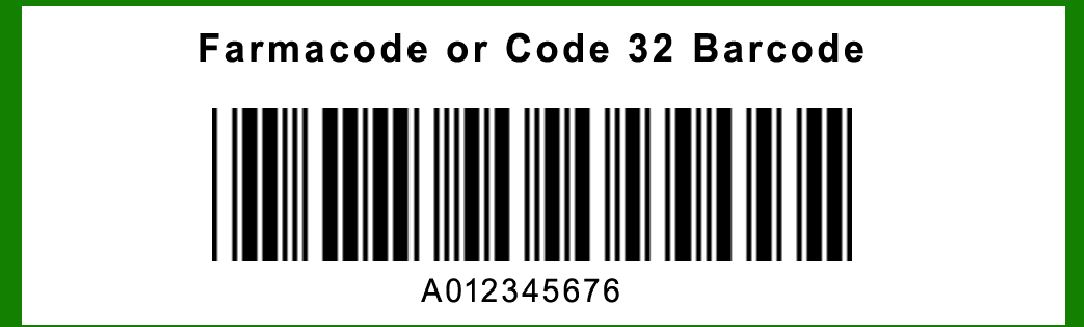
Farmacode, also known as Code 32, is a barcode symbology that was developed to encode the Italian Pharmacode. This symbology is a subset of the more widely used Code 39, modified to meet the specific needs of the pharmaceutical industry in Italy. It is primarily used for the identification of pharmaceutical products, ensuring accurate tracking and inventory management. |
|
Structure of Code 32 |
Code 32 is an alphanumeric barcode that can encode the numbers 0-9 and the letters A-Z. However, in the context of Farmacode, it is typically used to encode numeric data. The barcode is composed of several key components: |
1.Start Character: The barcode begins with a start character. 2.Data Characters: These are the characters that represent the encoded information. 3.Check Digit: A single digit used for error detection. 4.Stop Character: The barcode ends with a stop character. |

|
Encoding Process |
The encoding process for Farmacode (Code 32) involves several steps. Each step ensures that the barcode is correctly formatted and can be accurately read by barcode scanners. Below, we break down the encoding process into detailed steps. |
Step 1: Data Preparation |
The first step in encoding a Farmacode is to prepare the data. For the purposes of this symbology, the data is usually a numeric value that needs to be encoded. For example, let's consider the number 12345678. |

|
Step 2: Conversion to Code 32 Format |
Farmacode requires the numeric data to be converted into a specific format. This format includes a check digit which is calculated using a modulo-32 algorithm. Here is how the conversion is done: |
1.Convert the Numeric Data to Base 32: Convert the numeric value into a base 32 representation. In base 32, the numbers are represented using the digits 0-9 and the letters A-V. |
For the number 12345678, the base 32 conversion is as follows: |
Divide 12345678 by 32 to get the quotient and remainder. Continue dividing the quotient by 32 until the quotient is zero. Collect the remainders, which represent the base 32 digits. |
12345678 ÷ 32 = 385802 remainder 14 -> 14 is E in base 32 385802 ÷ 32 = 12056 remainder 10 -> 10 is A in base 32 12056 ÷ 32 = 376 remainder 24 -> 24 is O in base 32 376 ÷ 32 = 11 remainder 24 -> 11 is B in base 32 11 ÷ 32 = 0 remainder 11 -> 11 is B in base 32 |
Reading the remainders from bottom to top, the base 32 representation of 12345678 is BBEOA. |
2.Add Check Digit: Calculate the check digit using a modulo-32 algorithm. To do this, take the sum of the numeric values of each character in the base 32 representation and find the remainder when divided by 32. |
B (11) + B (11) + E (14) + O (24) + A (10) = 70 70 mod 32 = 6 The check digit is 6, which corresponds to 6 in base 32. |
3.Create the Final Encoded Data: Append the check digit to the base 32 representation. For our example, the final encoded data is BBEOA6. |

|
Step 3: Encoding Characters into Bars and Spaces |
Each character in the encoded data BBEOA6 is then converted into a pattern of bars and spaces. The patterns used in Code 32 are derived from the Code 39 symbology. Each character is represented by a series of 9 elements (5 bars and 4 spaces), with each element being either wide or narrow. |
Here are the patterns for the characters used in our example: |
B (11): 100101101 (where 1 represents a bar and 0 represents a space) E (14): 100110011 O (24): 101001011 A (10): 100100001 6: 100010111 |
The patterns are concatenated together with appropriate start and stop characters. The start character for Code 32 is represented by 1101001 and the stop character by 1101001. |
|
Step 4: Assembling the Complete Barcode |
The complete barcode includes the start character, the encoded data characters, and the stop character. For our example, the assembled barcode is: |
Start Character: 1101001 |
B: 100101101 B: 100101101 E: 100110011 O: 101001011 A: 100100001 6: 100010111 Stop Character: 1101001 |
When concatenated, the barcode pattern is: 1101001 100101101 100101101 100110011 101001011 100100001 100010111 1101001 |
This pattern is then printed as alternating bars (1) and spaces (0) of varying widths. |

|
Example Encoding |
Let's go through a complete example from start to finish using the number 987654. |
1.Data Preparation: The number to be encoded is 987654. 2.Conversion to Base 32: |
987654 ÷ 32 = 30864 remainder 6 -> 6 in base 32 30864 ÷ 32 = 964 remainder 16 -> 16 is G in base 32 964 ÷ 32 = 30 remainder 4 -> 4 in base 32 30 ÷ 32 = 0 remainder 30 -> 30 is U in base 32 The base 32 representation of 987654 is U4G6. |
3.Add Check Digit: |
U (30) + 4 (4) + G (16) + 6 (6) = 56 56 mod 32 = 24 |
The check digit is 24, which corresponds to O in base 32. |
4.Final Encoded Data: The final encoded data is U4G6O. |
5.Encode Characters into Bars and Spaces: U (30): 101011000 4: 100100111 G (16): 100111101 6: 100010111 O (24): 101001011 |
6.Assemble the Complete Barcode: |
Start Character: 1101001 U: 101011000 4: 100100111 G: 100111101 6: 100010111 O: 101001011 Stop Character: 1101001 |
The complete barcode pattern is: 1101001 101011000 100100111 100111101 100010111 101001011 1101001 |

|
Conclusion |
The encoding of Farmacode (Code 32) involves converting numeric data into a base 32 format, calculating a check digit, and then converting the final encoded data into a series of bars and spaces. This barcode symbology is a specialized subset of Code 39, tailored to meet the needs of the pharmaceutical industry in Italy. The detailed encoding process ensures accurate and reliable data representation, essential for tracking and managing pharmaceutical products. |

|
 cs@easiersoft.com