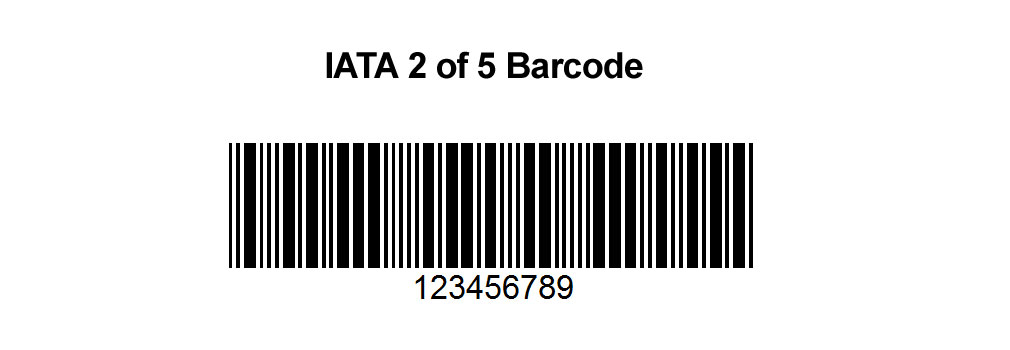
The IATA 2 of 5 barcode, also known as the International Air Transport Association's 2 of 5 barcode, is a specific implementation of the Interleaved 2 of 5 (ITF) barcode standard. This barcode type is widely used in the airline industry for applications such as baggage handling, cargo tracking, and other logistical processes. The encoding of the IATA 2 of 5 barcode involves converting data into a series of black and white bars that can be read by scanners. In this detailed explanation, we'll delve into the encoding process, covering the following topics: |
|
1.Structure of the IATA 2 of 5 Barcode 2.Character Encoding 3.Check Digit Calculation 4.Start and Stop Patterns 5.Encoding Example |

|
1. Structure of the IATA 2 of 5 Barcode |
The IATA 2 of 5 barcode is a continuous, self-checking symbology. It is called '2 of 5' because each character in the barcode is represented by five bars, and exactly two of these bars are wide, while the remaining three are narrow. The barcode typically consists of the following components: |
Start Pattern: A unique pattern indicating the beginning of the barcode. Encoded Data: The actual information encoded into the barcode. Check Digit: An additional digit used for error detection. Stop Pattern: A unique pattern indicating the end of the barcode. |

|
2. Character Encoding |
In the IATA 2 of 5 barcode, each digit from 0 to 9 is represented by a unique pattern of five bars, where two bars are wide and three are narrow. The encoding of digits is as follows: |
DigitPattern 0Narrow Narrow Wide Wide Narrow 1Wide Narrow Narrow Narrow Wide 2Narrow Wide Narrow Narrow Wide 3Wide Wide Narrow Narrow Narrow 4Narrow Narrow Wide Narrow Wide 5Wide Narrow Wide Narrow Narrow 6Narrow Wide Wide Narrow Narrow 7Narrow Narrow Narrow Wide Wide 8Wide Narrow Narrow Wide Narrow 9Narrow Wide Narrow Wide Narrow |
Each pattern consists of alternating black bars and white spaces, starting and ending with a black bar. |

|
3. Check Digit Calculation |
The check digit is calculated using a weighted sum of the digits in the barcode. The process involves the following steps: |
1.Assign weights: Assign alternating weights of 3 and 1 to the digits, starting from the rightmost digit (excluding the check digit). 2.Calculate the weighted sum: Multiply each digit by its weight and sum the results. 3.Calculate the check digit: The check digit is the amount needed to bring the weighted sum to the next higher multiple of 10. |
Example Calculation |
Let's calculate the check digit for the data '123456'. |
1.Assign weights: 1, 3, 1, 3, 1, 3 (from right to left) |
2.Multiply each digit by its weight: 6 * 1 = 6 5 * 3 = 15 4 * 1 = 4 3 * 3 = 9 2 * 1 = 2 1 * 3 = 3 |
3.Sum the results: 6 + 15 + 4 + 9 + 2 + 3 = 39 |
|
4.Calculate the check digit: The next multiple of 10 after 39 is 40, so the check digit is 40 - 39 = 1 |
The check digit for '123456' is 1, making the complete data '1234561'. |
4. Start and Stop Patterns |
The IATA 2 of 5 barcode uses specific patterns to indicate the beginning and end of the barcode. |
Start Pattern: The start pattern is 'Narrow Narrow Wide', represented by three bars: narrow bar, narrow space, and wide bar. Stop Pattern: The stop pattern is 'Wide Narrow Narrow', represented by three bars: wide bar, narrow space, and narrow bar. |

|
5. Encoding Example |
Let's walk through the encoding process with a complete example. We'll use the data '1234561', which includes the check digit calculated in the previous section. |
1.Start Pattern: Narrow Narrow Wide |
2.Encoded Data: 1: Wide Narrow Narrow Narrow Wide 2: Narrow Wide Narrow Narrow Wide 3: Wide Wide Narrow Narrow Narrow 4: Narrow Narrow Wide Narrow Wide 5: Wide Narrow Wide Narrow Narrow 6: Narrow Wide Wide Narrow Narrow 1: Wide Narrow Narrow Narrow Wide |
3.Stop Pattern: Wide Narrow Narrow |
Let's combine these components into the full barcode sequence. |
Start Pattern: Narrow Narrow Wide Encoded Data: 1: Wide Narrow Narrow Narrow Wide 2: Narrow Wide Narrow Narrow Wide 3: Wide Wide Narrow Narrow Narrow 4: Narrow Narrow Wide Narrow Wide 5: Wide Narrow Wide Narrow Narrow 6: Narrow Wide Wide Narrow Narrow 1: Wide Narrow Narrow Narrow Wide Stop Pattern: Wide Narrow Narrow |

|
Full Barcode Sequence |
Below is the full sequence of bars and spaces for the barcode '1234561' with start and stop patterns: |
Start Pattern: N N W Digit 1: W N N N W Digit 2: N W N N W Digit 3: W W N N N Digit 4: N N W N W Digit 5: W N W N N Digit 6: N W W N N Digit 1: W N N N W Stop Pattern: W N N |
Let's visualize this sequence: |
N N W W N N N N W N W N N W W N N N N W N N W N W N W N N N W W N N N N N W N W W N N N N N W W N W N N |
Where: |
N = Narrow bar or space W = Wide bar or space |
The above sequence can be drawn as a series of alternating black and white bars of varying widths, with narrow bars and spaces typically having a width of 1 unit, and wide bars and spaces having a width of 3 units (though these widths can vary based on the specific implementation and printing requirements). |

|
Detailed Encoding Example |
Let's provide another detailed example with the data '847362'. |
Step-by-Step Encoding |
1.Data with Check Digit: First, calculate the check digit for '847362'. Assign weights: 1, 3, 1, 3, 1, 3 (from right to left) Multiply each digit by its weight: 2 * 1 = 2 6 * 3 = 18 3 * 1 = 3 7 * 3 = 21 4 * 1 = 4 8 * 3 = 24 Sum the results: 2 + 18 + 3 + 21 + 4 + 24 = 72 Calculate the check digit: The next multiple of 10 after 72 is 80, so the check digit is 80 - 72 = 8 |
The complete data with the check digit is '8473628'. |
2.Start Pattern: Narrow Narrow Wide |
3.Encoded Data: 8: Wide Narrow Narrow Wide Narrow 4: Narrow Narrow Wide Narrow Wide 7: Narrow Narrow Narrow Wide Wide 3: Wide Wide Narrow Narrow Narrow 6: Narrow Wide Wide Narrow Narrow 2: Narrow Wide Narrow Narrow Wide 8: Wide Narrow Narrow Wide Narrow |
4.Stop Pattern: Wide Narrow Narrow |
Full Barcode Sequence Start Pattern: N N W Digit 8: W N N W N Digit 4: N N W N W Digit 7: N N N W W Digit 3: W W N N N Digit 6: N W W N N Digit 2: N W N N W Digit 8: W N N W N Stop Pattern: W N N |
Let's visualize this sequence: N N W W N N W N N N W W N N N N N W N W W W N N N N N W W N N W N N N N W N W W N N N W N W N N N W |

|
Summary |
The IATA 2 of 5 barcode encoding process involves converting numeric data into a series of black and white bars, using a specific pattern for each digit, along with start and stop patterns to mark the beginning and end of the barcode. The inclusion of a check digit ensures data integrity and error detection. This detailed encoding process enables the efficient and accurate reading of barcodes in various applications within the airline industry. |
 cs@easiersoft.com