The Industrial 2 of 5 barcode, also known as the Standard 2 of 5 or simply 2 of 5, is a linear symbology used for encoding numeric data. It is particularly known for its simplicity and straightforward encoding mechanism, making it suitable for applications where the encoded information consists solely of numeric digits. This barcode type uses a combination of wide and narrow bars and spaces to represent the digits 0 through 9. | 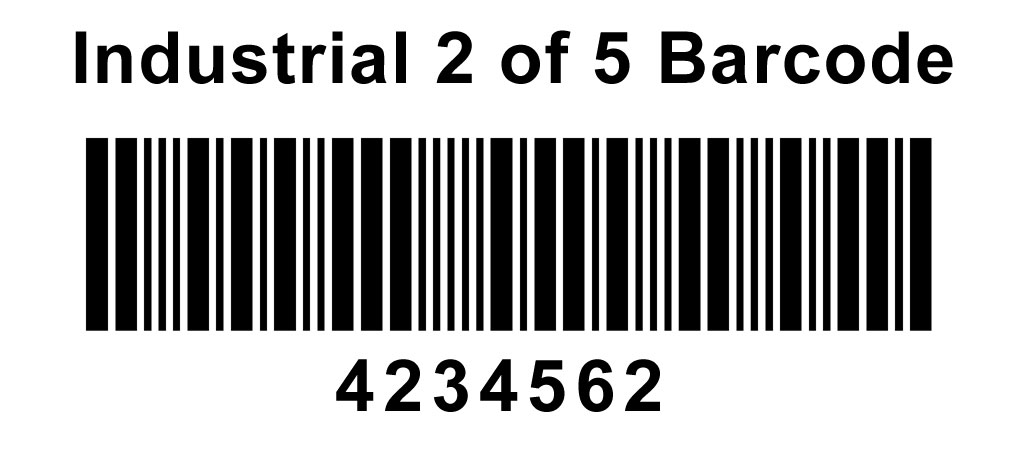
| Barcode Structure | The structure of the Industrial 2 of 5 barcode consists of the following components: | 1.Start Character: A pattern that indicates the beginning of the barcode. 2.Encoded Data Characters: Each numeric digit is represented by a unique sequence of wide and narrow bars and spaces. 3.Stop Character: A pattern that indicates the end of the barcode. | Each character in the barcode (start, data, and stop) is encoded using five bars and five spaces, with two out of the five elements being wide and the remaining three being narrow. This characteristic gives the barcode its name, '2 of 5.' | 
| Character Encoding | Each digit (0-9) in the Industrial 2 of 5 barcode is encoded using a unique pattern of five bars and five spaces. Here are the encoding patterns for each digit: | 0: Narrow, Narrow, Wide, Wide, Narrow (NNWWN) 1: Wide, Narrow, Narrow, Narrow, Wide (WNNNW) 2: Narrow, Wide, Narrow, Narrow, Wide (NWNWN) 3: Wide, Wide, Narrow, Narrow, Narrow (WWNNN) 4: Narrow, Narrow, Wide, Narrow, Wide (NNWNW) 5: Wide, Narrow, Wide, Narrow, Narrow (WNWNN) 6: Narrow, Wide, Wide, Narrow, Narrow (NWWNN) 7: Narrow, Narrow, Narrow, Wide, Wide (NNNWW) 8: Wide, Narrow, Narrow, Wide, Narrow (WNNWN) 9: Narrow, Wide, Narrow, Wide, Narrow (NWNNW) | 
| Start and Stop Characters | The start and stop characters are specific patterns that help the barcode reader identify the beginning and end of the barcode. The start character consists of two narrow bars and one wide bar (NNW), and the stop character consists of one wide bar and two narrow bars (WNN). | Encoding Process | The encoding process for an Industrial 2 of 5 barcode involves the following steps: | 1.Start Character: Add the start character pattern to the barcode. 2.Data Characters: Convert each numeric digit in the data to its corresponding pattern of wide and narrow bars and spaces. 3.Stop Character: Add the stop character pattern to the barcode. | 
| Example Encoding | Let's encode the numeric string '12345' into an Industrial 2 of 5 barcode. | 1.Start Character: NNW 2.Digit '1': WNNNW 3.Digit '2': NWNWN 4.Digit '3': WWNNN 5.Digit '4': NNWNW 6.Digit '5': WNWNN 7.Stop Character: WNN | Combining all the characters, we get the complete barcode pattern: | NNW WNNNW NWNWN WWNNN NNWNW WNWNN WNN | 
| Detailed Example | Let's go through another detailed example to encode the numeric string '9876543210' into an Industrial 2 of 5 barcode. | 1.Start Character: NNW 2.Digit '9': NWNNW 3.Digit '8': WNNWN 4.Digit '7': NNNWW 5.Digit '6': NWWNN 6.Digit '5': WNWNN 7.Digit '4': NNWNW 8.Digit '3': WWNNN 9.Digit '2': NWNWN 10.Digit '1': WNNNW 11.Digit '0': NNWWN 12.Stop Character: WNN | Combining all the characters, we get the complete barcode pattern: | NNW NWNNW WNNWN NNNWW NWWNN WNWNN NNWNW WWNNN NWNWN WNNNW NNWWN WNN | 
| Explanation of the Example | Let's break down the example into its components to understand how each digit is encoded. | 1.Start Character: Bars: Narrow (N), Narrow (N), Wide (W) Spaces: Narrow (N), Narrow (N) Pattern: NNW | 2.Digit '9': Bars: Narrow (N), Wide (W), Narrow (N), Narrow (N), Wide (W) Spaces: Narrow (N), Narrow (N) Pattern: NWNNW | 3.Digit '8': Bars: Wide (W), Narrow (N), Narrow (N), Wide (W), Narrow (N) Spaces: Narrow (N) Pattern: WNNWN | 4.Digit '7': Bars: Narrow (N), Narrow (N), Narrow (N), Wide (W), Wide (W) Spaces: Narrow (N), Narrow (N) Pattern: NNNWW | 5.Digit '6': Bars: Narrow (N), Wide (W), Wide (W), Narrow (N), Narrow (N) Spaces: Narrow (N) Pattern: NWWNN | 6.Digit '5': Bars: Wide (W), Narrow (N), Wide (W), Narrow (N), Narrow (N) Spaces: Narrow (N) Pattern: WNWNN | 7.Digit '4': Bars: Narrow (N), Narrow (N), Wide (W), Narrow (N), Wide (W) Spaces: Narrow (N) Pattern: NNWNW | 8.Digit '3': Bars: Wide (W), Wide (W), Narrow (N), Narrow (N), Narrow (N) Spaces: Narrow (N) Pattern: WWNNN | 9.Digit '2': Bars: Narrow (N), Wide (W), Narrow (N), Narrow (N), Wide (W) Spaces: Narrow (N) Pattern: NWNWN | 10.Digit '1': Bars: Wide (W), Narrow (N), Narrow (N), Narrow (N), Wide (W) Spaces: Narrow (N) Pattern: WNNNW | 11.Digit '0': Bars: Narrow (N), Narrow (N), Wide (W), Wide (W), Narrow (N) Spaces: Narrow (N) Pattern: NNWWN | 12.Stop Character: Bars: Wide (W), Narrow (N), Narrow (N) Spaces: Narrow (N), Narrow (N) Pattern: WNN | By combining all the patterns, we obtain the complete barcode for the string '9876543210'. | 
| Detailed Character Breakdown | For further clarity, let's provide a detailed breakdown of each digit with the exact sequence of bars and spaces. | 1.Digit '9': Bars: Narrow (N), Wide (W), Narrow (N), Narrow (N), Wide (W) Spaces: Narrow (N), Narrow (N), Wide (W), Narrow (N) Pattern: NWNNW | 2.Digit '8': Bars: Wide (W), Narrow (N), Narrow (N), Wide (W), Narrow (N) Spaces: Narrow (N), Wide (W), Narrow (N) Pattern: WNNWN | 3.Digit '7': Bars: Narrow (N), Narrow (N), Narrow (N), Wide (W), Wide (W) Spaces: Narrow (N), Narrow (N), Wide (W) Pattern: NNNWW | 4.Digit '6': Bars: Narrow (N), Wide (W), Wide (W), Narrow (N), Narrow (N) Spaces: Wide (W), Narrow (N), Narrow (N) Pattern: NWWNN | 5.Digit '5': Bars: Wide (W), Narrow (N), Wide (W), Narrow (N), Narrow (N) Spaces: Narrow (N), Wide (W), Narrow (N) Pattern: WNWNN | 6.Digit '4': Bars: Narrow (N), Narrow (N), Wide (W), Narrow (N), Wide (W) Spaces: Narrow (N), Wide (W), Narrow (N) Pattern: NNWNW | 7.Digit '3': Bars: Wide (W), Wide (W), Narrow (N), Narrow (N), Narrow (N) Spaces: Wide (W), Narrow (N), Narrow (N) Pattern: WWNNN | 8.Digit '2': Bars: Narrow (N), Wide (W), Narrow (N), Narrow (N), Wide (W) Spaces: Narrow (N), Wide (W), Narrow (N) Pattern: NWNWN | 9.Digit '1': Bars: Wide (W), Narrow (N), Narrow (N), Narrow (N), Wide (W) Spaces: Narrow (N), Wide (W), Narrow (N) Pattern: WNNNW | 10.Digit '0': Bars: Narrow (N), Narrow (N), Wide (W), Wide (W), Narrow (N) Spaces: Wide (W), Narrow (N), Narrow (N) Pattern: NNWWN | Each digit pattern consists of alternating bars and spaces, with two out of the five elements being wide and the remaining three being narrow. This alternating pattern ensures that the barcode can be easily read by barcode scanners. | 
| Conclusion | The Industrial 2 of 5 barcode encoding is a straightforward and efficient method for representing numeric data using a sequence of wide and narrow bars and spaces. The encoding process involves converting each digit into a unique pattern of five bars and five spaces, with two out of the five elements being wide. The start and stop characters provide a clear indication of the beginning and end of the barcode, ensuring accurate scanning and decoding. | The examples provided demonstrate how numeric strings are encoded into Industrial 2 of 5 barcodes, showcasing the simplicity and effectiveness of this symbology. This makes the Industrial 2 of 5 barcode suitable for various applications where numeric data needs to be represented in a compact and machine-readable format. |
|
 cs@easiersoft.com