Overview |
The Japan Post Barcode, also known as the Postal Code Symbol, is a type of barcode used by the Japan Post Service for automated mail sorting. This barcode encodes the postal code of the destination address, which facilitates efficient and accurate mail processing. The encoding scheme used in the Japan Post Barcode is a binary representation of the numerical postal code, with specific patterns representing each digit. |
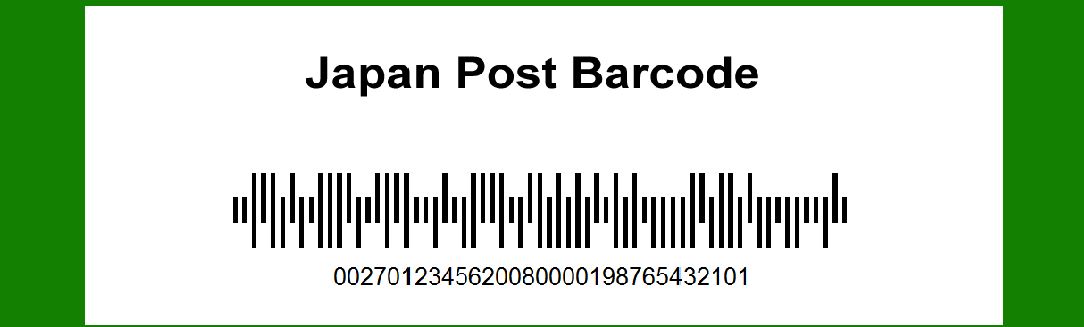
|
Structure of the Japan Post Barcode |
The Japan Post Barcode consists of several key components: |
1.Start Character: A unique pattern that signifies the beginning of the barcode. 2.Encoded Postal Code: The main body of the barcode, representing the numerical postal code in binary form. 3.Check Digit: A single digit used for error detection. 4.Stop Character: A unique pattern that signifies the end of the barcode. |

|
Encoding the Postal Code |
Step 1: Converting Postal Code to Binary |
The first step in encoding the postal code is to convert each digit of the postal code into its binary equivalent. The Japan Post Barcode uses a 4-bit binary encoding for each digit (0-9). Here is the 4-bit binary representation for each decimal digit: |
0: 0000 1: 0001 2: 0010 3: 0011 4: 0100 5: 0101 6: 0110 7: 0111 8: 1000 9: 1001 |
For example, the postal code '1234567' would be converted to binary as follows: |
1: 0001 2: 0010 3: 0011 4: 0100 5: 0101 6: 0110 7: 0111 |
Concatenating these binary digits together, we get the binary representation of the postal code '1234567': |
0001 0010 0011 0100 0101 0110 0111 |

|
Step 2: Adding the Check Digit |
The check digit is a single digit used for error detection. It is calculated by summing the digits of the postal code and taking the modulus 11 of the result. If the remainder is 10, the check digit is set to 0. |
For example, for the postal code '1234567': |
Sum of digits: 1 + 2 + 3 + 4 + 5 + 6 + 7 = 28 Modulus 11: 28 % 11 = 6 |
So, the check digit is 6. |
The binary representation of the check digit 6 is: 0110 |

|
Step 3: Constructing the Barcode |
The barcode is constructed by placing the start character, the binary encoded postal code, the check digit, and the stop character in sequence. |
The start and stop characters are fixed binary patterns: |
Start Character: 11010 Stop Character: 11101 |
Thus, for the postal code '1234567' with a check digit of 6, the complete binary barcode would be: 11010 0001 0010 0011 0100 0101 0110 0111 0110 11101 |

|
Detailed Encoding Example |
Let's walk through a detailed example of encoding the postal code '9876543'. |
1.Convert Each Digit to Binary: 9: 1001 8: 1000 7: 0111 6: 0110 5: 0101 4: 0100 3: 0011 |
Binary representation of '9876543': 1001 1000 0111 0110 0101 0100 0011 |
2.Calculate Check Digit: Sum of digits: 9 + 8 + 7 + 6 + 5 + 4 + 3 = 42 Modulus 11: 42 % 11 = 9 |
So, the check digit is 9, and its binary representation is: 1001 |
3.Construct the Barcode: Start Character: 11010 Encoded Postal Code: 1001 1000 0111 0110 0101 0100 0011 Check Digit: 1001 Stop Character: 11101 |
Complete barcode: 11010 1001 1000 0111 0110 0101 0100 0011 1001 11101 |

|
Summary |
The Japan Post Barcode encoding process involves converting each digit of the postal code into a 4-bit binary format, calculating a check digit for error detection, and then combining these with start and stop characters to form the complete barcode. The detailed steps are as follows: |
1.Convert each postal code digit to binary: Use a 4-bit representation. 2.Calculate the check digit: Sum the postal code digits, take the modulus 11, and use the result as the check digit. 3.Construct the barcode: Combine the start character, encoded postal code, check digit, and stop character. |
This process ensures that the barcode is both accurate and easily scannable, enabling efficient mail sorting and delivery by the Japan Post Service. |

|
Encoding Examples |
To further illustrate the encoding process, here are a few more examples with different postal codes. |
Example 1: Postal Code '1100110' 1.Convert Each Digit to Binary: 1: 0001 1: 0001 0: 0000 0: 0000 1: 0001 1: 0001 0: 0000 |
Binary representation of '1100110': 0001 0001 0000 0000 0001 0001 0000 |
2.Calculate Check Digit: Sum of digits: 1 + 1 + 0 + 0 + 1 + 1 + 0 = 4 Modulus 11: 4 % 11 = 4 |
So, the check digit is 4, and its binary representation is: 0100 |
3.Construct the Barcode: Start Character: 11010 Encoded Postal Code: 0001 0001 0000 0000 0001 0001 0000 Check Digit: 0100 Stop Character: 11101 |
Complete barcode: 11010 0001 0001 0000 0000 0001 0001 0000 0100 11101 |

|
Example 2: Postal Code '5432100' |
1.Convert Each Digit to Binary: 5: 0101 4: 0100 3: 0011 2: 0010 1: 0001 0: 0000 0: 0000 |
Binary representation of '5432100': 0101 0100 0011 0010 0001 0000 0000 |
2.Calculate Check Digit: Sum of digits: 5 + 4 + 3 + 2 + 1 + 0 + 0 = 15 Modulus 11: 15 % 11 = 4 |
So, the check digit is 4, and its binary representation is: 0100 |
3.Construct the Barcode: Start Character: 11010 Encoded Postal Code: 0101 0100 0011 0010 0001 0000 0000 Check Digit: 0100 Stop Character: 11101 |
Complete barcode: 11010 0101 0100 0011 0010 0001 0000 0000 0100 11101 |

|
Error Detection and Correction |
The check digit provides a basic level of error detection. If a single digit in the postal code is incorrect or a digit is missing, the check digit will not match the expected value, indicating an error. However, this system does not provide error correction, meaning it cannot determine which digit is incorrect or what the correct digit should be. For more robust error correction, additional error-detection codes or more sophisticated encoding schemes would be required. |

|
Conclusion |
The Japan Post Barcode encoding process is straightforward and efficient, utilizing a 4-bit binary representation for each digit of the postal code and a check digit for error detection. By following the steps outlined above, one can accurately encode any Japanese postal code into a binary barcode suitable for automated mail sorting. This encoding system ensures reliable and efficient processing of mail, contributing to the overall effectiveness of the Japan Post Service. |
 cs@easiersoft.com