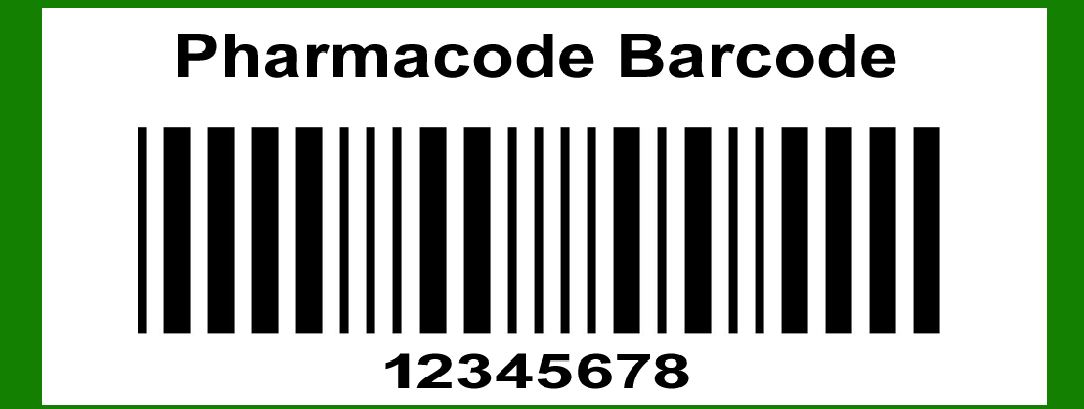
Pharmacode, also known as Pharmaceutical Binary Code, is a linear barcode symbology used in the pharmaceutical industry for packaging control and management. It is a unique barcode that differs from other barcode symbologies in several ways, primarily because it can encode only numeric data and it is read based on the width of the bars rather than the spaces between them. This makes it highly resistant to printing errors and variations in bar width, which is crucial in pharmaceutical packaging. |
|
Characteristics of Pharmacode |
1.Numeric Data Only: Pharmacode encodes numeric data only, typically representing numbers between 3 and 131070 (though some implementations may vary). 2.Single-Dimensional: It is a one-dimensional barcode, composed of a series of bars. 3.Binary Representation: Pharmacode uses a binary encoding scheme, where the width of the bars determines the value of the encoded number. 4.Unidirectional Reading: It can be read from left to right or right to left, which increases its reliability in various orientations. |
|
Encoding Mechanism |
Pharmacode encoding is relatively straightforward. It converts a decimal number into a binary representation, which is then translated into a series of bars of varying widths. The widths of the bars in the barcode directly correspond to the bits in the binary representation of the number. Here's a step-by-step explanation of the encoding process: |
Step 1: Convert the Decimal Number to Binary |
First, convert the decimal number to its binary equivalent. For example, let's encode the decimal number 13: |
Decimal: 13 Binary: 1101 |
Step 2: Assign Bar Widths Based on Binary Digits |
Each binary digit (bit) is represented by a bar in the Pharmacode. There are two types of bars: narrow bars and wide bars. Typically, a '1' in the binary representation corresponds to a wide bar, and a '0' corresponds to a narrow bar. |
Using our example (1101): |
Binary: 1101 Bar Pattern: Wide, Wide, Narrow, Wide |
Step 3: Construct the Barcode |
Construct the barcode by arranging the bars according to the pattern derived from the binary representation. The barcode for the number 13 would look like a series of bars with the following widths: |
Wide Bar Wide Bar Narrow Bar Wide Bar |
In Pharmacode, the bars are usually the same height, and the only variation is in their width. |

|
Detailed Example |
Let's go through a more detailed example to illustrate the encoding process further. |
Encoding the Number 30 |
1.Convert Decimal to Binary: Decimal: 30 Binary: 11110 |
2.Assign Bar Widths: Binary: 11110 Bar Pattern: Wide, Wide, Wide, Wide, Narrow |
3.Construct the Barcode: The barcode would have the following bar widths: Wide Bar Wide Bar Wide Bar Wide Bar Narrow Bar |
Encoding the Number 7 |
1.Convert Decimal to Binary: Decimal: 7 Binary: 111 |
2.Assign Bar Widths: Binary: 111 Bar Pattern: Wide, Wide, Wide |
3.Construct the Barcode: The barcode would have the following bar widths: Wide Bar Wide Bar Wide Bar |

|
Handling Larger Numbers |
Pharmacode can handle larger numbers as well, following the same encoding principles. The main difference with larger numbers is that the binary representation will have more digits, resulting in a longer barcode with more bars. |
Encoding the Number 100 |
1.Convert Decimal to Binary: Decimal: 100 Binary: 1100100 |
2.Assign Bar Widths: Binary: 1100100 Bar Pattern: Wide, Wide, Narrow, Narrow, Wide, Narrow, Narrow |
3.Construct the Barcode: The barcode would have the following bar widths: Wide Bar Wide Bar Narrow Bar Narrow Bar Wide Bar Narrow Bar Narrow Bar |

|
Considerations in Pharmacode Encoding |
1.Error Detection and Correction: Pharmacode does not have built-in error detection and correction mechanisms like some other barcode symbologies. However, its simplicity and the robustness of bar width variations make it relatively reliable. 2.Printing Quality: Pharmacode is designed to be resistant to variations in printing quality. Since the encoding is based on bar widths rather than spaces, minor deviations in the printing process do not significantly impact the readability. 3.Orientation: One of the advantages of Pharmacode is its ability to be read in either direction (left to right or right to left). This bidirectional readability ensures that the barcode can be scanned accurately regardless of its orientation on the package. 4.Application in Packaging: Pharmacode is commonly used in pharmaceutical packaging to ensure the correct combination of products and packaging components. It can be printed in various sizes to fit different packaging needs, and its robustness makes it suitable for high-speed manufacturing environments. |

|
Encoding Multiple Numbers |
Pharmacode is typically used to encode a single number. However, in some applications, multiple numbers may need to be encoded separately. This can be achieved by printing multiple Pharmacode barcodes on the same package, each representing a different number. |
Example: Encoding the Numbers 15 and 20 on the Same Package |
1.Convert Decimal to Binary: Number 15: Binary 1111 Number 20: Binary 10100 |
2.Assign Bar Widths: Number 15: Wide, Wide, Wide, Wide Number 20: Wide, Narrow, Wide, Narrow, Narrow |
3.Construct the Barcodes: Barcode for 15: Wide Bar, Wide Bar, Wide Bar, Wide Bar Barcode for 20: Wide Bar, Narrow Bar, Wide Bar, Narrow Bar, Narrow Bar |
In this scenario, the two barcodes would be printed next to each other on the package, each representing its respective number. |

|
Variations and Extensions |
While the basic principles of Pharmacode encoding remain the same, there may be variations and extensions based on specific industry requirements or advancements in technology. These variations may include: |
1.Color Coding: In some cases, colors may be used to enhance the distinction between wide and narrow bars, although this is less common in standard Pharmacode usage. 2.Composite Barcodes: Composite barcodes may combine Pharmacode with other barcode symbologies to encode additional information or enhance data capacity. 3.Special Characters: Although Pharmacode primarily encodes numeric data, special implementations may allow encoding of specific characters or symbols, although this is not standard practice. |
|
Practical Implementation |
Pharmacode is implemented in various ways depending on the packaging and production requirements. Here are some practical considerations for implementing Pharmacode: |
1.Printing Technology: Choose a printing technology that ensures consistent bar widths. Common printing methods include offset printing, thermal transfer, and inkjet printing. 2.Barcode Size: Determine the appropriate size of the barcode based on the packaging space and scanning equipment. Pharmacode can be scaled to fit different sizes without losing its readability. 3.Scanning Equipment: Use barcode scanners that are capable of reading Pharmacode. These scanners are typically designed to detect variations in bar width accurately. 4.Quality Control: Implement quality control measures to ensure that the printed barcodes meet the required standards. This may include visual inspection, automated scanning, and verification processes. |

|
Summary |
Pharmacode, or Pharmaceutical Binary Code, is a specialized barcode symbology used in the pharmaceutical industry for packaging control. Its encoding process involves converting a decimal number to binary and representing each binary digit with a bar of specific width. Wide bars correspond to '1' and narrow bars correspond to '0'. Pharmacode's simplicity, robustness to printing variations, and bidirectional readability make it an ideal choice for pharmaceutical packaging applications. |
In summary, the key steps in encoding a Pharmacode barcode are: |
1.Convert the decimal number to binary. 2.Assign bar widths based on binary digits (wide for '1', narrow for '0'). 3.Construct the barcode by arranging the bars according to the pattern. |
This encoding process ensures reliable and accurate representation of numeric data on pharmaceutical packages, supporting efficient packaging control and management. |

|
 cs@easiersoft.com