Error Correction in GS1 DataBar (Reduced Space Symbology) |
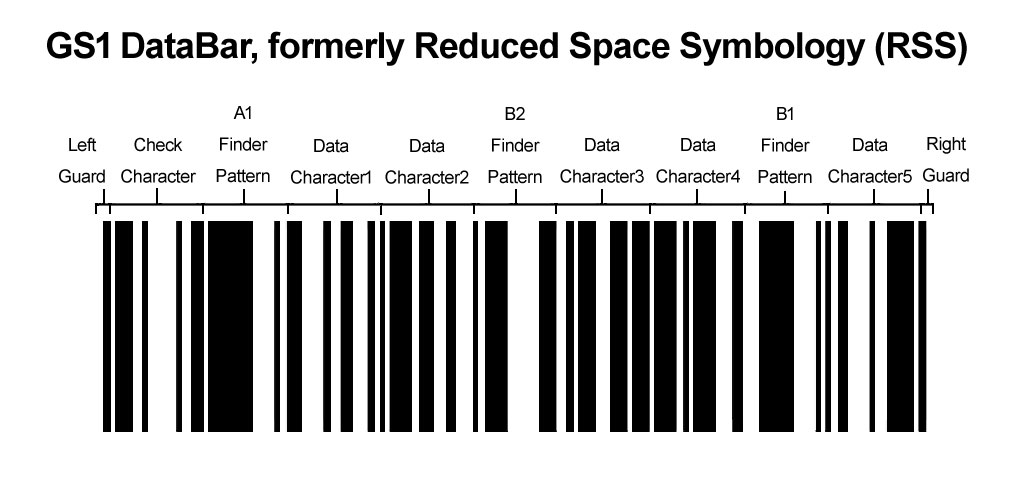
The GS1 DataBar, also known as Reduced Space Symbology (RSS), is a family of barcodes that include several variants designed to encode product identification and other data in a compact form. Among its features, error correction plays a crucial role in ensuring that the information encoded in the barcode can be accurately decoded even if the symbol is damaged or partially obscured. This document delves into the details of error correction in GS1 DataBar, focusing on the mechanisms and examples of how error correction works within this barcode type. |
|
1. Introduction to Error Correction |
Error correction in GS1 DataBar is implemented to enhance the reliability and robustness of barcode reading. The primary goal is to ensure that even if the barcode is partially damaged or distorted, the encoded data can still be recovered accurately. This section outlines the key concepts and mechanisms of error correction used in GS1 DataBar. |

|
2. Error Correction Basics |
2.1. Error Correction Overview |
Error correction in barcodes is achieved through the use of redundant data. This redundancy allows the decoding software to identify and correct errors that may occur due to damage, printing defects, or scanning issues. In GS1 DataBar, error correction is specifically designed to handle typical problems such as missing or incorrect bars and spaces. |
2.2. Redundancy Mechanism |
GS1 DataBar employs a form of error correction that integrates redundancy into the encoding scheme. This redundancy is achieved by adding additional information to the barcode data, which can be used to reconstruct the original data in the event of errors. |

|
3. Error Correction in GS1 DataBar Variants |
GS1 DataBar includes several variants, each with its own error correction mechanism. Here we discuss the main variants and their error correction capabilities: |
3.1. GS1 DataBar Omnidirectional |
The Omnidirectional variant is designed for scanning from any angle. It incorporates a simple error detection mechanism but does not feature advanced error correction. Error detection is achieved through checksum digits, which help identify errors but do not correct them. |
Example: If a GS1 DataBar Omnidirectional barcode includes an incorrect digit due to a printing error, the checksum can identify the error, but the barcode reader might not be able to correct it automatically. The error must be resolved manually. |
3.2. GS1 DataBar Stacked Omnidirectional |
The Stacked Omnidirectional variant uses a stacking method to improve data density. This variant also includes error detection through checksums but lacks sophisticated error correction algorithms. |
Example: In a stacked barcode, if one of the stacked segments is partially damaged, the checksum can detect inconsistencies between segments. However, correcting these errors requires additional processing. |
3.3. GS1 DataBar Expanded |
The Expanded variant includes additional data fields beyond the standard GS1 DataBar encoding. It utilizes error correction through a combination of checksums and redundancy in the data fields. |
Example: An Expanded DataBar might include additional characters for error correction, allowing the barcode reader to correct single errors in the encoded data. For instance, if a character is misread, the redundant information helps reconstruct the original data. |
3.4. GS1 DataBar Expanded Stacked |
This variant combines the features of the Expanded and Stacked variants, providing enhanced data capacity and error correction capabilities. It uses more complex error correction techniques, including Reed-Solomon error correction codes. |
Example: A GS1 DataBar Expanded Stacked barcode can recover from multiple errors by using Reed-Solomon codes. For instance, if several bars are misprinted, the error correction algorithm can use the redundant data to reconstruct the correct sequence. |

|
4. Reed-Solomon Error Correction |
Reed-Solomon error correction is a key technique used in some GS1 DataBar variants to provide robust error correction capabilities. This section explains how Reed-Solomon codes work and their application in GS1 DataBar. |
4.1. Principles of Reed-Solomon Codes |
Reed-Solomon codes are a type of error correction code that can correct multiple errors in a block of data. They work by adding redundant data, called parity symbols, to the original data. These codes are particularly effective in correcting burst errors, where multiple adjacent symbols are corrupted. |
4.2. Application in GS1 DataBar |
In GS1 DataBar Expanded Stacked and other variants using Reed-Solomon codes, the error correction is applied to the data blocks within the barcode. The process involves encoding the data with Reed-Solomon codes, which adds parity symbols. During decoding, the Reed-Solomon algorithm checks for errors and uses the parity symbols to correct them. |
Example: Suppose a GS1 DataBar Expanded Stacked barcode encodes a sequence of characters with Reed-Solomon error correction. If a section of the barcode is damaged, the Reed-Solomon algorithm can detect and correct errors based on the redundant parity symbols, ensuring that the original data is accurately recovered. |

|
5. Error Detection vs. Error Correction |
Understanding the difference between error detection and error correction is crucial for evaluating the robustness of GS1 DataBar. This section clarifies these concepts and their implications. |
5.1. Error Detection |
Error detection involves identifying errors in the barcode data but does not necessarily correct them. In GS1 DataBar variants such as Omnidirectional and Stacked Omnidirectional, error detection is achieved through checksum digits that validate the integrity of the data. |
5.2. Error Correction |
Error correction goes beyond detection by not only identifying errors but also correcting them. This is achieved through techniques like Reed-Solomon codes, which allow for the reconstruction of corrupted data. |
Example: In a GS1 DataBar with Reed-Solomon error correction, if a barcode is partially damaged and some bars are misprinted, the error correction algorithm can reconstruct the missing or incorrect data based on the redundant information. |

|
6. Practical Considerations |
6.1. Error Correction Limits |
While error correction enhances the reliability of GS1 DataBar, it is not infallible. There are limits to the extent of error correction, determined by the amount of redundant data included and the specific algorithm used. |
Example: A GS1 DataBar Expanded Stacked barcode with Reed-Solomon codes can correct multiple errors, but if the damage exceeds the correction capability of the code, the barcode may still fail to be read accurately. |
6.2. Impact on Data Density |
Error correction introduces additional data, which can impact the overall density of the barcode. In GS1 DataBar variants with advanced error correction, the barcode may be larger or more complex, potentially affecting scanning efficiency. |
Example: A GS1 DataBar Expanded Stacked barcode with extensive Reed-Solomon codes may require more space compared to a simpler Omnidirectional variant, impacting the barcode's data density and the physical space required for printing. |

|
7. Examples and Use Cases |
7.1. Retail and Inventory Management |
In retail and inventory management, GS1 DataBar barcodes are used to encode product information. Error correction ensures that even if a barcode label is partially damaged, the product information can still be accurately read and processed. |
Example: A retail product with a GS1 DataBar Expanded Stacked barcode may experience wear and tear, but the error correction mechanism allows the barcode scanner to read the product information accurately despite minor damage. |
7.2. Healthcare and Pharmaceuticals |
In the healthcare and pharmaceutical industries, accurate barcode scanning is critical for tracking and identifying products. Error correction in GS1 DataBar ensures that medications and medical supplies can be reliably tracked even if the barcode labels are damaged. |
Example: A GS1 DataBar Expanded Stacked barcode on a medication package might be subjected to rough handling or exposure to chemicals. The error correction capabilities help maintain accurate identification and prevent errors in medication administration. |
7.3. Logistics and Shipping |
For logistics and shipping, GS1 DataBar barcodes are used for tracking packages and shipments. Error correction ensures that tracking information remains intact even if the barcode is partially obscured or damaged during transit. |
Example: A shipping label with a GS1 DataBar Omnidirectional barcode might encounter issues such as smudging or abrasion. The error correction mechanism helps ensure that the tracking information can still be read and processed correctly. |

|
8. Conclusion |
Error correction in GS1 DataBar (Reduced Space Symbology) is an essential feature that enhances the reliability of barcode scanning in various applications. By incorporating redundancy and sophisticated error correction techniques such as Reed-Solomon codes, GS1 DataBar ensures accurate data retrieval even in the presence of damage or distortion. Understanding the principles and applications of error correction helps in selecting the appropriate GS1 DataBar variant for specific use cases and ensures effective implementation in real-world scenarios. |

|
 cs@easiersoft.com