1. Introduction to ITF-14 Barcodes |
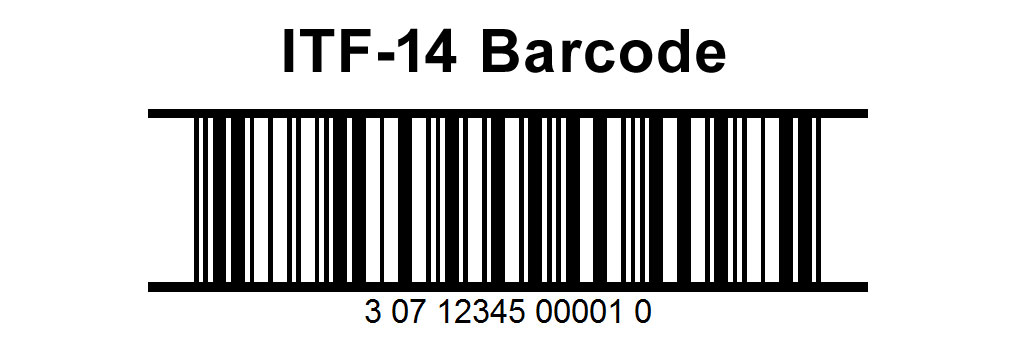
The ITF-14 barcode is a 14-digit barcode commonly used to mark cartons, containers, and logistics units. It encodes the Global Trade Item Number (GTIN) and is typically used in warehouse and distribution environments. Error correction in ITF-14 barcodes is crucial because it ensures data integrity, reducing the risk of misreading or data loss due to damage or poor printing quality. |
|
2. Structure of ITF-14 Barcodes |
Before diving into error correction mechanisms, it's essential to understand the structure of ITF-14 barcodes: |
1.Start and Stop Patterns: These are unique patterns that signal the beginning and end of the barcode. 2.Data Characters: The 14-digit GTIN, encoded in Interleaved 2 of 5 (ITF) format. 3.Check Digit: The last digit, calculated using the Modulo 10 algorithm, helps in basic error detection. |
|
3. Error Types in ITF-14 Barcodes |
Errors in ITF-14 barcodes can arise due to various factors, including: |
1.Printing Errors: Inconsistent printing quality, smudges, or ink bleed can distort barcode lines. 2.Scanning Errors: Misalignment or improper angle during scanning. 3.Damage: Physical damage to the barcode, such as scratches or tears. |

|
4. Error Detection Mechanisms |
1.Check Digit: The primary mechanism for error detection in ITF-14 barcodes is the check digit. It helps detect common errors such as single-digit errors and adjacent transpositions. 2.Reed-Solomon Error Detection: Some advanced systems may employ Reed-Solomon error detection, which can identify and flag a broader range of errors. |

|
5. Error Correction Mechanisms |
Error correction in ITF-14 barcodes typically involves redundancy and sophisticated algorithms to recover the original data from a damaged or poorly printed barcode. |
5.1 Redundancy in Barcode Printing |
One of the simplest error correction strategies is printing redundant barcodes on the same packaging. If one barcode is damaged or unreadable, the scanner can attempt to read another copy. |
5.2 Error Correction Algorithms |
Advanced error correction involves algorithms that can reconstruct the original data even if part of the barcode is unreadable. |
5.2.1 Reed-Solomon Error Correction |
Reed-Solomon codes are widely used in digital communications and storage. They are particularly effective for correcting burst errors, which are common in barcodes due to smudges or scratches. |
How Reed-Solomon Works: |
1.Encoding: The original data is transformed into a set of polynomial coefficients. 2.Redundancy: Extra parity symbols are added to the data to form a codeword. 3.Decoding: If part of the codeword is lost or corrupted, the Reed-Solomon algorithm can reconstruct the missing data. |
Example: Assume an ITF-14 barcode with the following data: 01234567890123 and a check digit 4, making the full code 012345678901234. |
1.Convert to Polynomial: Convert the data into a polynomial. 2.Generate Parity Symbols: Add parity symbols using the Reed-Solomon algorithm. 3.Detect and Correct Errors: During scanning, if part of the barcode is unreadable, the Reed-Solomon decoder uses the parity symbols to correct errors and reconstruct the original data. |
5.3 Interleaved 2 of 5 (ITF) Symbology |
The ITF encoding itself offers some inherent error resistance due to its design: |
1.Interleaving: Each pair of digits is encoded using both spaces and bars, reducing the chance of misinterpretation. 2.Wide-Narrow Ratio: ITF uses a wide-narrow bar pattern, which is more robust against printing variations than other symbologies. |
|
6. Practical Implementation of Error Correction |
In real-world applications, error correction involves both software and hardware solutions: |
1.Scanner Technology: Modern barcode scanners come equipped with advanced algorithms that can correct for minor errors in real-time. 2.Software Decoders: Software solutions can enhance error correction by applying advanced algorithms like Reed-Solomon to the scanned data. |
Example: Consider a warehouse scenario where ITF-14 barcodes are printed on cartons. Over time, some barcodes become partially damaged. A modern scanner reads the barcode, identifies errors, and uses error correction algorithms to reconstruct the original GTIN. If the damage is beyond correction, the redundancy of multiple barcodes on the carton provides an alternative way to retrieve the data. |

|
7. Limitations and Challenges |
Despite the robustness of ITF-14 barcodes and the effectiveness of error correction mechanisms, there are limitations and challenges: |
1.Severe Damage: If a barcode is extensively damaged, even advanced algorithms may not recover the data. 2.Printing Quality: High-quality printing is essential to minimize the need for error correction. 3.Environmental Factors: Barcodes exposed to harsh environments may suffer from higher rates of degradation. |
Example: A carton stored in a humid environment might have its barcode degrade faster. While error correction can handle minor issues, extensive mold or ink bleed might render the barcode unreadable. Redundant barcodes and proper storage conditions are crucial in such cases. |

|
8. Future Developments |
Future advancements in barcode error correction may include: |
1.Enhanced Algorithms: Continued improvement in error correction algorithms, potentially leveraging machine learning to predict and correct errors more effectively. 2.Hybrid Systems: Combining ITF-14 with other symbologies or technologies (like RFID) to enhance data integrity. 3.Improved Materials: Development of more durable printing materials that resist damage and degradation. |
Example: A future ITF-14 barcode system might include an embedded RFID chip, providing an additional layer of data redundancy. Even if the barcode is unreadable, the RFID chip can transmit the GTIN, ensuring data accuracy. |
|
9. Conclusion |
Error correction in ITF-14 barcodes is a critical component for ensuring the reliability and integrity of encoded data. Through the use of check digits, Reed-Solomon codes, and redundancy, ITF-14 barcodes can effectively manage and correct errors arising from various factors. As technology advances, the effectiveness of these error correction methods will continue to improve, ensuring that ITF-14 remains a reliable choice for industrial and logistical applications. |
Example Recap: |
1.A warehouse uses ITF-14 barcodes with redundant printing. 2.A scanner reads a damaged barcode and uses Reed-Solomon to correct errors. 3.If the damage is severe, the scanner reads the redundant barcode. 4.Future systems might use hybrid ITF-14 and RFID for enhanced reliability. |

|
 cs@easiersoft.com