1. Introduction to ITF-6 Barcode Error Correction |
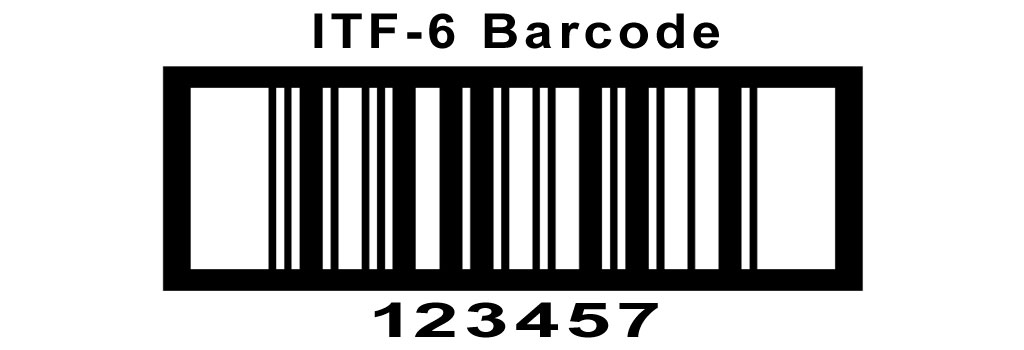
Error correction is a crucial aspect of barcode technology, ensuring data integrity and reliability in the presence of potential errors during scanning. The ITF-6 barcode, also known as the Interleaved 2 of 5 barcode, is a widely used linear barcode symbology designed for encoding numeric data. Understanding its error correction mechanisms involves examining various techniques and principles used to detect and correct errors that may arise due to various factors such as printing imperfections, scanning issues, or environmental conditions. |
|
2. Fundamentals of ITF-6 Barcode Error Correction |
2.1. Basic Structure of ITF-6 Barcode |
The ITF-6 barcode encodes six digits using pairs of bars and spaces. Each digit is represented by a unique combination of two wide and three narrow elements. The structure of the ITF-6 barcode makes it inherently resistant to some types of errors, but additional error correction mechanisms enhance its robustness. |
2.2. Error Detection and Correction Principles |
Error correction in barcodes typically involves two main principles: |
1.Redundancy: Introducing additional information to detect and correct errors. 2.Check Digits: Adding extra digits calculated from the original data to validate the accuracy of the encoded data. |
|
3. Redundancy in ITF-6 Barcode |
Redundancy in barcodes can be achieved by incorporating additional elements or repeating certain parts of the code. For ITF-6, redundancy is usually implemented through the use of specific patterns and the encoding structure. |
3.1. Self-Checking Properties |
The ITF-6 barcode has self-checking properties due to its unique encoding scheme. Each digit is represented by a specific pattern of bars and spaces, making it possible to identify some errors based on the sequence of bars and spaces. If the scanner detects an invalid pattern, it can signal an error, prompting a rescan or manual verification. |
3.2. Error Detection through Pattern Recognition |
The scanner's ability to recognize valid and invalid patterns plays a crucial role in error detection. By comparing the scanned pattern with the expected patterns for each digit, the scanner can identify discrepancies that indicate potential errors. |

|
4. Check Digits in ITF-6 Barcode |
Check digits are a common error detection and correction method in barcodes. For ITF-6, the use of a check digit enhances the reliability of the encoded data. |
4.1. Calculation of Check Digits |
The check digit for ITF-6 is calculated using a specific algorithm. One common method is the Modulo 10 algorithm, which involves the following steps: |
1.Sum of Odd-Positioned Digits: Add the digits in the odd positions (1st, 3rd, and 5th). 2.Sum of Even-Positioned Digits: Add the digits in the even positions (2nd, 4th, and 6th) and multiply the sum by 3. 3.Total Sum: Add the results of the previous two steps. 4.Modulo Operation: Find the remainder when the total sum is divided by 10. 5.Check Digit: Subtract the remainder from 10. If the remainder is 0, the check digit is also 0. |
Example: |
For the ITF-6 barcode data '123456': |
1.Sum of odd-positioned digits: 1 + 3 + 5 = 9 2.Sum of even-positioned digits: (2 + 4 + 6) * 3 = 12 * 3 = 36 3.Total sum: 9 + 36 = 45 4.Remainder when divided by 10: 45 % 10 = 5 5.Check digit: 10 - 5 = 5 Thus, the complete ITF-6 barcode with the check digit is '1234565'. |
4.2. Validation Using Check Digits |
When a barcode is scanned, the check digit is recalculated based on the scanned data. If the recalculated check digit matches the scanned check digit, the data is considered valid. If there is a discrepancy, an error is detected, prompting further action such as rescanning or manual verification. |
|
5. Error Types and Their Handling |
Understanding the types of errors that can occur in ITF-6 barcodes helps in designing effective error correction mechanisms. Common error types include: |
5.1. Substitution Errors |
Substitution errors occur when one digit is incorrectly scanned as another. The check digit mechanism can detect such errors by identifying mismatches in the recalculated check digit. |
Example: |
If the correct barcode is '1234565' but is scanned as '1234575': |
1.The recalculated check digit for '123457' is 6. 2.Since 6 does not match the scanned check digit 5, an error is detected. |
5.2. Deletion Errors |
Deletion errors happen when a digit is omitted during scanning. The length of the ITF-6 barcode and the check digit calculation can help detect such errors. |
Example: |
If the correct barcode is '1234565' but is scanned as '123465': |
1.The length of the scanned data is incorrect. 2.The check digit validation fails, indicating an error. |
5.3. Insertion Errors |
Insertion errors occur when an extra digit is added during scanning. Similar to deletion errors, the length of the barcode and the check digit calculation can detect these errors. |
Example: |
If the correct barcode is '1234565' but is scanned as '12345675': |
1.The length of the scanned data is incorrect. 2.The check digit validation fails, indicating an error. |

|
6. Advanced Error Correction Techniques |
While basic error detection mechanisms are effective for many common errors, advanced techniques can further enhance error correction capabilities. |
6.1. Reed-Solomon Error Correction |
Reed-Solomon error correction is a powerful method used in various data communication systems. It can correct multiple errors within a certain limit, providing a higher level of reliability. |
6.2. Implementation in ITF-6 Barcode |
Implementing Reed-Solomon error correction in ITF-6 involves encoding additional redundancy information alongside the original data. This redundancy allows the system to detect and correct errors without needing to rescan the barcode. |
Example: |
For the ITF-6 barcode data '123456', Reed-Solomon encoding would generate additional parity digits that are appended to the barcode. When scanned, these parity digits enable the detection and correction of multiple errors. |
|
7. Practical Examples of Error Correction |
To illustrate the error correction mechanisms in ITF-6 barcodes, consider the following practical examples. |
7.1. Example 1: Simple Check Digit Validation |
Barcode data: '234567' Calculated check digit: 4 Complete barcode: '2345674' If scanned as '2345673': |
1.Recalculated check digit: 4 2.Mismatch with scanned check digit 3, indicating an error. |
7.2. Example 2: Handling Substitution Errors |
Barcode data: '345678' Calculated check digit: 2 Complete barcode: '3456782' If scanned as '3456792': |
1.Recalculated check digit: 1 2.Mismatch with scanned check digit 2, indicating an error. |
7.3. Example 3: Correcting Multiple Errors with Reed-Solomon |
Barcode data: '456789' Reed-Solomon encoded barcode: '456789XXXX' (where 'XXXX' represents parity digits) If scanned with errors in two digits: |
1.The Reed-Solomon algorithm uses the parity digits to detect and correct the errors. 2.The corrected barcode data is retrieved accurately. |

|
8. Conclusion |
Error correction in ITF-6 barcodes is vital for maintaining data integrity and ensuring reliable scanning. By leveraging self-checking properties, check digits, and advanced techniques like Reed-Solomon error correction, ITF-6 barcodes can effectively detect and correct various types of errors. These mechanisms contribute to the robustness of ITF-6 barcodes, making them suitable for diverse applications in different industries. |
|
 cs@easiersoft.com