1. Introduction to MSI (Modified Plessey) Barcode |
The MSI (Modified Plessey) barcode, also known simply as MSI, is a continuous, non-self-checking symbology commonly used for inventory control and labeling applications. Despite its simplicity and ease of implementation, it inherently lacks built-in error correction mechanisms, necessitating additional methods to ensure data integrity and accuracy. |
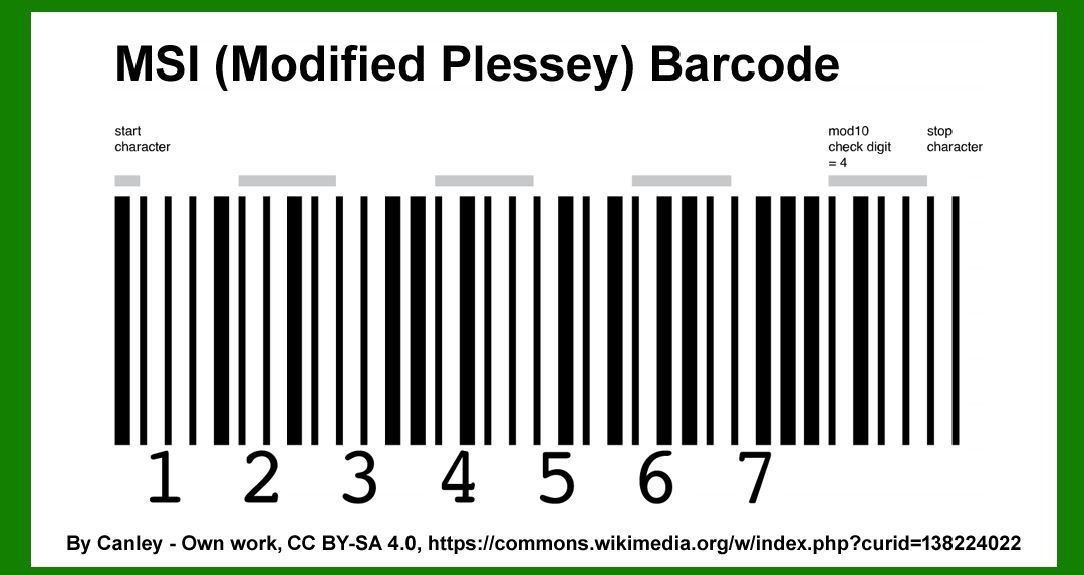
|
2. Fundamentals of Error Correction in Barcodes |
Error correction in barcodes involves detecting and correcting errors that occur during data transmission or scanning. This is crucial for ensuring the reliability and accuracy of data retrieved from barcodes. Error correction mechanisms typically employ algorithms that add redundancy to the data, allowing the detection and correction of errors without needing to retransmit the original data. |

|
3. Error Detection in MSI Barcode |
Error detection in MSI barcodes primarily relies on the inclusion of check digits. These check digits are calculated using specific algorithms and appended to the end of the barcode data. The two most common check digit algorithms used with MSI barcodes are the Modulo 10 and Modulo 11 algorithms. |
3.1 Modulo 10 Check Digit |
The Modulo 10 check digit is calculated by following these steps: |
1.Step 1: Start with the rightmost digit and assign weights in a repeating pattern of 2 and 1. 2.Step 2: Multiply each digit by its assigned weight. 3.Step 3: Sum the results of these multiplications. 4.Step 4: Calculate the Modulo 10 of the sum. 5.Step 5: Subtract the result from 10 to obtain the check digit. If the result is 10, the check digit is set to 0. |
3.1.1 Example of Modulo 10 Check Digit Calculation |
Consider the MSI barcode data '123456': |
1.Assign weights: 1*21 \cdot 21*2, 2*12 \cdot 12*1, 3*23 \cdot 23*2, 4*14 \cdot 14*1, 5*25 \cdot 25*2, 6*16 \cdot 16*1. 2.Multiply: 1*2=21 \cdot 2 = 21*2=2, 2*1=22 \cdot 1 = 22*1=2, 3*2=63 \cdot 2 = 63*2=6, 4*1=44 \cdot 1 = 44*1=4, 5*2=105 \cdot 2 = 105*2=10, 6*1=66 \cdot 1 = 66*1=6. 3.Sum: 2+2+6+4+10+6=302 + 2 + 6 + 4 + 10 + 6 = 302+2+6+4+10+6=30. 4.Calculate Modulo 10: 30mod**10=030 \mod 10 = 030mod10=0. 5.Subtract from 10: 10*0=1010 - 0 = 1010*0=10, set check digit to 0. |
The barcode data '123456' with the Modulo 10 check digit becomes '1234560'. |
3.2 Modulo 11 Check Digit |
The Modulo 11 check digit is calculated by: |
1.Step 1: Start with the rightmost digit and assign weights in a repeating pattern from 2 to 7. 2.Step 2: Multiply each digit by its assigned weight. 3.Step 3: Sum the results of these multiplications. 4.Step 4: Calculate the Modulo 11 of the sum. 5.Step 5: Subtract the result from 11 to obtain the check digit. If the result is 11, the check digit is set to 0. |
3.2.1 Example of Modulo 11 Check Digit Calculation |
Consider the MSI barcode data '123456': |
1.Assign weights: 1*21 \cdot 21*2, 2*32 \cdot 32*3, 3*43 \cdot 43*4, 4*54 \cdot 54*5, 5*65 \cdot 65*6, 6*76 \cdot 76*7. 2.Multiply: 1*2=21 \cdot 2 = 21*2=2, 2*3=62 \cdot 3 = 62*3=6, 3*4=123 \cdot 4 = 123*4=12, 4*5=204 \cdot 5 = 204*5=20, 5*6=305 \cdot 6 = 305*6=30, 6*7=426 \cdot 7 = 426*7=42. 3.Sum: 2+6+12+20+30+42=1122 + 6 + 12 + 20 + 30 + 42 = 1122+6+12+20+30+42=112. 4.Calculate Modulo 11: 112mod**11=2112 \mod 11 = 2112mod11=2. 5.Subtract from 11: 11*2=911 - 2 = 911*2=9, set check digit to 9. |
The barcode data '123456' with the Modulo 11 check digit becomes '1234569'. |

|
4. Enhanced Error Correction Methods |
While the check digits help in detecting errors, they do not provide full error correction capabilities. To achieve error correction, additional techniques such as Reed-Solomon codes, Hamming codes, or other error-correcting codes can be employed. These methods introduce more redundancy and complexity to the barcode data, enabling both error detection and correction. |
4.1 Reed-Solomon Error Correction |
Reed-Solomon codes are block-based error correction codes that are widely used in digital communications and storage. They can correct multiple errors in a data block and are well-suited for applications where data integrity is critical. |
4.1.1 Implementation of Reed-Solomon Codes in MSI Barcode |
To implement Reed-Solomon error correction in MSI barcodes: |
1.Step 1: Define the Reed-Solomon code parameters, including the number of data and parity symbols. 2.Step 2: Encode the MSI barcode data using the Reed-Solomon algorithm to generate parity symbols. 3.Step 3: Append the parity symbols to the original barcode data. |
4.1.2 Example of Reed-Solomon Error Correction |
Consider the MSI barcode data '123456' with a Reed-Solomon code capable of correcting 2 errors (RS(7,5)): |
1.Encode '123456' using the Reed-Solomon algorithm to generate parity symbols, for instance, '78'. 2.Append the parity symbols: '12345678'. |
In this example, the barcode data '123456' is encoded with the Reed-Solomon error correction code '78', resulting in '12345678'. |
4.2 Hamming Error Correction |
Hamming codes are a family of linear error-correcting codes that can detect and correct single-bit errors. They add redundant bits to the data to ensure that errors can be identified and corrected. |
4.2.1 Implementation of Hamming Codes in MSI Barcode |
To implement Hamming error correction in MSI barcodes: |
1.Step 1: Choose a Hamming code suitable for the length of the MSI barcode data. 2.Step 2: Encode the MSI barcode data by adding redundant bits using the Hamming algorithm. 3.Step 3: Integrate the encoded data into the barcode. |
4.2.2 Example of Hamming Error Correction |
Consider the MSI barcode data '123456' with a Hamming(7,4) code: |
1.Encode '1234' (truncated for simplicity) using the Hamming algorithm to generate redundant bits, for instance, '1234067'. 2.Integrate the encoded data: '123456067'. |
In this example, the barcode data '1234' is encoded with the Hamming code '067', resulting in '123456067'. |

|
5. Practical Considerations and Limitations |
When implementing error correction for MSI barcodes, several practical considerations and limitations must be addressed: |
5.1 Barcode Length and Redundancy |
Adding error correction codes increases the length of the barcode. This can impact the barcode's scannability and the amount of data that can be stored. Careful consideration must be given to balance error correction capabilities with the practical constraints of barcode length. |
5.2 Scanner Compatibility |
Not all barcode scanners are equipped to decode barcodes with embedded error correction codes. Ensuring compatibility with existing scanning equipment is crucial for seamless integration. |
5.3 Computational Complexity |
Error correction algorithms, especially those like Reed-Solomon, can be computationally intensive. The processing power required for encoding and decoding must be considered, particularly for applications with limited computational resources. |
5.4 Application-Specific Requirements |
Different applications have varying requirements for data integrity and error correction. The choice of error correction method should align with the specific needs of the application, considering factors such as error rates, environmental conditions, and data criticality. |

|
6. Conclusion |
Error correction in MSI barcodes is essential for ensuring data integrity and accuracy in applications where data transmission and scanning errors can occur. While the basic check digit methods (Modulo 10 and Modulo 11) provide error detection capabilities, advanced error correction techniques like Reed-Solomon and Hamming codes can offer robust error correction. Implementing these methods requires careful consideration of barcode length, scanner compatibility, computational complexity, and application-specific requirements. By leveraging appropriate error correction strategies, the reliability and usability of MSI barcodes can be significantly enhanced. |

|
 cs@easiersoft.com