1. Introduction to Error Correction in Barcodes |
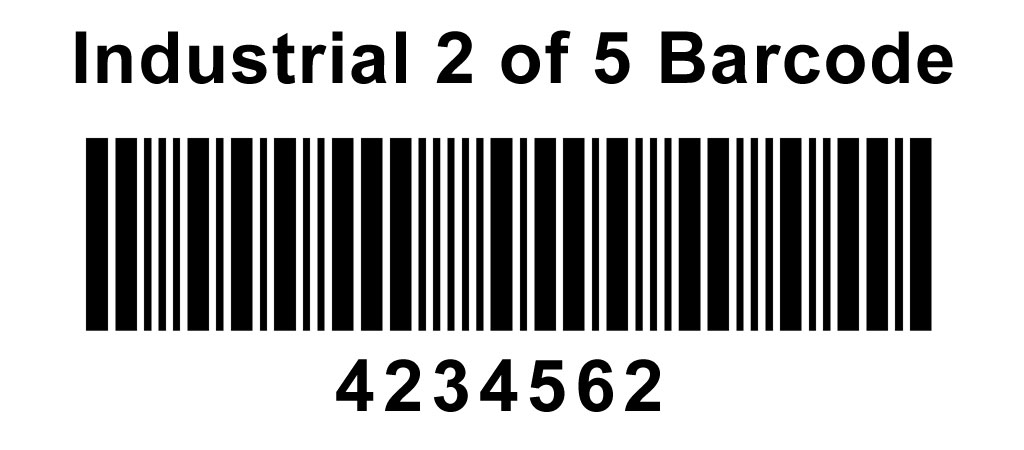
Error correction in barcodes is essential for ensuring data integrity and accurate decoding, especially in environments where barcodes are subject to damage, distortion, or poor printing quality. While many modern barcodes, such as QR codes and DataMatrix codes, incorporate sophisticated error correction algorithms like Reed-Solomon, traditional linear barcodes like Industrial 2 of 5 (I2/5) have more basic error detection and correction mechanisms. Understanding the specifics of error correction in the Industrial 2 of 5 barcode is crucial for applications where robustness and reliability are paramount. |
|
2. Basic Structure of the Industrial 2 of 5 Barcode |
The Industrial 2 of 5 barcode, also known as the Standard 2 of 5 barcode, is a continuous, self-checking linear symbology that encodes data in the form of numeric digits. Each character in the barcode consists of five elements: two wide bars and three narrow bars, hence the name '2 of 5.' The barcode starts with a start pattern and ends with a stop pattern, providing framing for the encoded data. |
2.1. Elements of the Industrial 2 of 5 Barcode |
1.Start Pattern: The start pattern typically consists of narrow bar and narrow space pairs. 2.Data Characters: Each digit from 0 to 9 is represented by a unique combination of wide and narrow bars. 3.Stop Pattern: The stop pattern consists of a specific sequence of bars and spaces, distinct from the start pattern. |
|
3. Error Detection Mechanisms |
Industrial 2 of 5 barcodes employ basic error detection mechanisms to identify errors in the scanned data. These mechanisms help ensure that the data read from the barcode is accurate and has not been corrupted. |
3.1. Check Digit |
A common error detection method used in the Industrial 2 of 5 barcode is the inclusion of a check digit. The check digit is calculated based on the numeric data encoded in the barcode and is appended to the end of the data before printing. During scanning, the check digit is recalculated and compared to the check digit read from the barcode. If the two do not match, an error is detected. |
3.1.1. Calculation of the Check Digit |
The check digit is typically calculated using the Modulo 10 algorithm. Here's how it is done: |
1.Sum Calculation: Sum all the digits in the data string. 2.Modulo Operation: Perform a modulo 10 operation on the sum (i.e., divide the sum by 10 and take the remainder). 3.Check Digit: The check digit is the result of subtracting the remainder from 10. If the remainder is 0, the check digit is also 0. |
Example: |
Data: 123456 Sum: 1 + 2 + 3 + 4 + 5 + 6 = 21 Modulo 10: 21 % 10 = 1 Check Digit: 10 - 1 = 9 Encoded Data: 1234569 |
3.1.2. Verification Process |
During scanning, the check digit is recalculated from the scanned data and compared to the check digit read from the barcode. If they match, the data is considered valid; otherwise, an error is flagged. |
3.2. Self-Checking Properties |
The Industrial 2 of 5 barcode is designed to be self-checking to some extent. Each character is encoded using two wide bars and three narrow bars, creating a predictable pattern. This predictability allows for basic error detection: |
1.Wide and Narrow Bars: Since each character must have exactly two wide bars and three narrow bars, any deviation from this pattern can indicate an error. 2.Character Width: Each character has a fixed width, which aids in detecting errors related to bar or space width. |

|
4. Limitations of Error Correction in Industrial 2 of 5 |
While the Industrial 2 of 5 barcode has some basic error detection mechanisms, it lacks sophisticated error correction capabilities found in newer barcode symbologies. This limitation means that while errors can often be detected, they cannot always be corrected without rescanning the barcode. |
4.1. Environmental Factors |
Barcodes can be affected by various environmental factors, including: |
1.Printing Quality: Poor printing can lead to misinterpretation of wide and narrow bars. 2.Damage: Physical damage to the barcode can corrupt data. 3.Scanner Variability: Differences in scanner sensitivity and resolution can affect readability. |
4.2. Error Correction Code Absence |
The Industrial 2 of 5 barcode does not incorporate advanced error correction codes (ECC), such as Reed-Solomon, which can correct multiple errors within the data. This absence limits its robustness in error-prone environments. |
|
5. Enhancing Error Correction in Industrial 2 of 5 |
While the inherent design of the Industrial 2 of 5 barcode does not support advanced error correction, certain practices and enhancements can improve its reliability. |
5.1. Quality Control in Printing |
Ensuring high-quality printing is crucial for reducing errors in barcode scanning. This includes: |
1.Proper Contrast: Using high contrast between bars and spaces to improve readability. 2.Consistent Bar Widths: Maintaining consistent widths for wide and narrow bars to avoid misinterpretation. |
5.2. Environmental Considerations |
Minimizing environmental factors that can damage or distort the barcode helps maintain its integrity: |
1.Protective Coatings: Applying protective coatings to barcodes to prevent physical damage. 2.Optimal Placement: Placing barcodes in locations less prone to wear and tear. |
5.3. Scanner Calibration |
Regular calibration and maintenance of barcode scanners can enhance their ability to accurately read Industrial 2 of 5 barcodes, reducing the likelihood of errors. |
5.4. Use of Redundancy |
In critical applications, redundancy can be employed to ensure data integrity: |
1.Multiple Barcodes: Printing multiple copies of the same barcode on different parts of a product or package. 2.Cross-Checking: Using multiple scans and cross-checking results to confirm accuracy. |

|
6. Practical Example of Error Detection and Correction |
To illustrate the concepts discussed, let's consider a practical example involving the Industrial 2 of 5 barcode. |
6.1. Scenario |
A manufacturing company uses Industrial 2 of 5 barcodes to track parts in its inventory. Each part is assigned a unique numeric identifier encoded in the barcode. The barcodes are printed on labels affixed to the parts. |
6.1.1. Barcode Data and Check Digit Calculation |
Suppose a part has the identifier '467382.' The company appends a check digit for error detection: |
1.Data: 467382 2.Sum: 4 + 6 + 7 + 3 + 8 + 2 = 30 3.Modulo 10: 30 % 10 = 0 4.Check Digit: 10 - 0 = 0 5.Encoded Data: 4673820 |
6.1.2. Printing and Scanning |
The barcode '4673820' is printed on the label. During scanning, the scanner reads the barcode and extracts the data, including the check digit. |
6.1.3. Error Detection |
During a routine inventory check, a scanner reads the barcode on a part but encounters an error due to a smudge on the label. The scanner reads the data as '4673520' instead of '4673820.' The following steps occur: |
1.Scanned Data: 4673520 2.Sum: 4 + 6 + 7 + 3 + 5 + 2 = 27 3.Modulo 10: 27 % 10 = 7 4.Expected Check Digit: 10 - 7 = 3 |
Since the expected check digit (3) does not match the scanned check digit (0), an error is detected. |
6.2. Mitigation Strategies |
To address the error, the following strategies can be employed: |
1.Re-scan: Attempt to re-scan the barcode to see if the error was a one-time issue. 2.Manual Verification: If re-scanning fails, manually verify the part identifier against records. 3.Replace Label: If the label is damaged, replace it with a new one and reprint the barcode. |

|
7. Conclusion |
Error correction in the Industrial 2 of 5 barcode primarily relies on basic error detection mechanisms, such as the use of check digits and the inherent self-checking properties of the barcode's structure. While these methods provide a level of reliability, they are not as robust as the error correction techniques found in more modern barcode symbologies. Enhancing the reliability of Industrial 2 of 5 barcodes can be achieved through careful printing practices, environmental considerations, and redundancy measures. Despite its limitations, the Industrial 2 of 5 barcode remains a valuable tool in various applications due to its simplicity and ease of use. |

|
 cs@easiersoft.com