Error Correction of the Pharmacode Barcode (Pharmaceutical Binary Code) |
1. Introduction to Pharmacode and its Error Correction Mechanism |
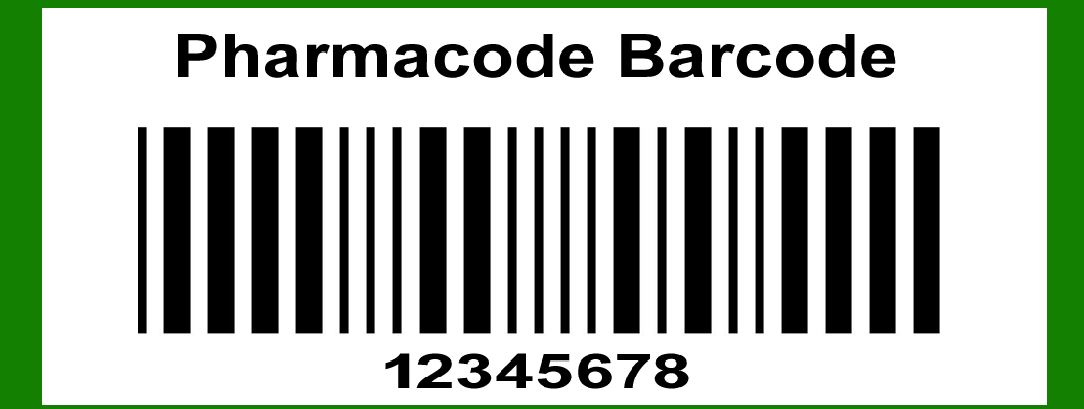
Pharmacode, also known as the Pharmaceutical Binary Code, is a one-dimensional (1D) barcode symbology used in the pharmaceutical industry for packaging control and quality assurance. The barcode is specifically designed to be robust and readable even when printed in small sizes or under conditions where print quality is not optimal. One of the critical aspects of Pharmacode's reliability is its error correction capabilities. |
|
2. Importance of Error Correction in Pharmacode |
Error correction in Pharmacode is crucial because it ensures that the encoded data can still be correctly interpreted even if the barcode is partially damaged or degraded. This is particularly important in pharmaceutical settings, where incorrect information could lead to severe consequences, including medication errors. |

|
3. Mechanism of Error Correction in Pharmacode |
Pharmacode employs several techniques to ensure robust error correction. These techniques can be broadly categorized into the following: |
3.1 Redundancy in Encoding |
Pharmacode uses a form of redundancy in its encoding scheme. Each bar in a Pharmacode barcode represents a binary digit (1 or 0). The simplicity of the encoding allows for redundancy to be built into the structure, where certain patterns are repeated or checked against predefined rules to validate the integrity of the data. |
3.1.1 Example of Redundancy |
Consider a Pharmacode representing the binary sequence 1101. In a typical scenario, the redundancy mechanism might involve checking if the sequence conforms to specific rules, such as the minimum number of bars required or the expected ratio of wide to narrow bars. If the barcode scanner detects anomalies that violate these rules, it can infer the presence of an error and attempt to correct it by comparing with known valid patterns. |
3.2 Use of Symbology-Specific Rules |
Pharmacode barcodes are designed with specific rules regarding the width and spacing of the bars. These rules help in detecting and correcting errors by providing a framework for what constitutes a valid barcode. |
3.2.1 Width Variations |
Pharmacode distinguishes between wide and narrow bars. A typical error correction approach involves verifying the relative widths of the bars. For example, if a narrow bar is mistakenly printed as wide, the error correction algorithm can detect this discrepancy based on the overall pattern and correct it accordingly. |
3.3 Error Detection Algorithms |
Pharmacode utilizes error detection algorithms to identify and correct errors. These algorithms can be implemented in barcode scanners and software systems to enhance the reliability of barcode reading. |
3.3.1 Parity Checks |
Parity checks are a common error detection method. In the context of Pharmacode, parity checks involve adding an extra bit to the barcode that represents the parity (even or odd) of the number of 1s in the binary sequence. If the parity bit does not match the expected value, an error is detected, and correction mechanisms can be triggered. |
3.3.2 Check Digits |
Another method is the use of check digits. Although less common in Pharmacode compared to other barcode symbologies, check digits can be implemented to enhance error detection. A check digit is a digit added to the end of a barcode, calculated based on the other digits. If the check digit does not match the calculated value when the barcode is read, an error is detected. |

|
4. Practical Implementation of Error Correction in Pharmacode |
The practical implementation of error correction in Pharmacode involves several steps, from barcode creation to reading and error handling. |
4.1 Barcode Creation and Printing |
During the creation and printing of a Pharmacode barcode, ensuring high-quality printing is the first step in minimizing errors. However, since perfect printing conditions are not always possible, error correction mechanisms must be robust. |
4.1.1 Quality Control Measures |
Implementing quality control measures during the printing process can help reduce the likelihood of errors. These measures include using high-resolution printers and regular maintenance to ensure consistent print quality. |
4.2 Barcode Scanning and Interpretation |
When a Pharmacode barcode is scanned, the scanner's software interprets the binary sequence. Error correction mechanisms are integrated into the software to handle potential errors. |
4.2.1 Scanner Calibration |
Regular calibration of barcode scanners ensures accurate reading of barcodes. Calibration helps the scanner distinguish between wide and narrow bars accurately, reducing the likelihood of errors. |
4.3 Error Detection and Correction in Software |
Once the barcode is scanned, the software interprets the data and applies error detection and correction algorithms. |
4.3.1 Error Detection Process |
The software first checks the scanned data for conformity to the expected pattern rules, including the ratio of wide to narrow bars and the presence of valid parity bits or check digits. If an inconsistency is detected, the software flags an error. |
4.3.2 Error Correction Algorithms |
After detecting an error, the software attempts to correct it using predefined algorithms. These algorithms may include: |
Pattern Matching: Comparing the scanned barcode against a database of known valid patterns and selecting the closest match. Majority Voting: If multiple scans of the same barcode produce different results, the software uses a majority voting mechanism to determine the most likely correct sequence. |

|
5. Advanced Error Correction Techniques in Pharmacode |
In addition to basic error correction methods, advanced techniques can be employed to enhance the reliability of Pharmacode barcodes. |
5.1 Machine Learning for Error Correction |
Machine learning algorithms can be trained to recognize and correct common errors in Pharmacode barcodes. |
5.1.1 Training Data |
Training a machine learning model requires a large dataset of valid and invalid Pharmacode barcodes. The model learns to distinguish between common printing defects and valid barcode patterns. |
5.1.2 Error Prediction and Correction |
Once trained, the machine learning model can predict potential errors in new barcodes and suggest corrections based on its training data. This approach can significantly enhance the accuracy of error correction. |
5.2 Redundant Encoding Techniques |
Redundant encoding involves encoding the same data multiple times within the barcode to provide additional error correction capabilities. |
5.2.1 Double Encoding |
In double encoding, the same binary sequence is encoded twice within the barcode. If one part of the barcode is damaged, the scanner can still read the redundant part to retrieve the correct data. |
5.2.2 Error Correcting Codes |
Implementing error-correcting codes (ECC) within the Pharmacode structure can provide advanced error correction capabilities. ECC algorithms such as Reed-Solomon can detect and correct multiple errors in the barcode. |
|
6. Case Studies of Error Correction in Pharmacode |
Examining real-world case studies can provide insight into the effectiveness of error correction techniques in Pharmacode. |
6.1 Case Study 1: Pharmaceutical Packaging |
A pharmaceutical company implemented Pharmacode barcodes on its packaging to ensure accurate tracking and quality control. During the initial phase, the company faced issues with barcode readability due to printing defects. |
6.1.1 Implementation of Error Correction |
The company integrated error detection algorithms into its barcode scanners, which included parity checks and pattern matching. These algorithms significantly reduced the error rate, ensuring accurate barcode reading even under suboptimal conditions. |
6.2 Case Study 2: Medication Verification |
A hospital pharmacy used Pharmacode barcodes for medication verification. The barcodes were occasionally damaged during handling, leading to reading errors. |
6.2.1 Advanced Error Correction Techniques |
The pharmacy implemented machine learning-based error correction algorithms in its barcode scanning system. The machine learning model was trained on a dataset of damaged and intact barcodes, enabling it to accurately predict and correct errors. This approach improved the reliability of medication verification, reducing the risk of dispensing errors. |

|
7. Challenges in Error Correction for Pharmacode |
Despite the robust error correction mechanisms, certain challenges remain in ensuring the accuracy and reliability of Pharmacode barcodes. |
7.1 Printing Quality Variations |
Variations in printing quality, such as ink smudging or inconsistent bar widths, can pose challenges to error correction algorithms. |
7.1.1 Mitigation Strategies |
Regular printer maintenance and quality control checks can mitigate these issues. Additionally, using high-quality printing materials can reduce the likelihood of printing defects. |
7.2 Environmental Factors |
Environmental factors such as exposure to light, heat, and moisture can degrade the quality of Pharmacode barcodes. |
7.2.1 Protective Measures |
Implementing protective measures such as using UV-resistant inks and protective coatings can enhance the durability of Pharmacode barcodes. |

|
8. Future Directions in Pharmacode Error Correction |
The future of error correction in Pharmacode barcodes involves integrating advanced technologies to further enhance reliability and accuracy. |
8.1 Integration of Artificial Intelligence |
Artificial intelligence (AI) can be integrated into barcode scanning systems to provide real-time error correction and adaptive learning capabilities. |
8.1.1 AI-Powered Scanners |
AI-powered barcode scanners can learn from new data and continuously improve their error detection and correction algorithms. This approach can adapt to evolving printing technologies and environmental conditions. |
8.2 Enhanced Redundancy Techniques |
Developing new redundancy techniques, such as multi-layer encoding, can provide additional error correction capabilities. |
8.2.1 Multi-Layer Encoding |
In multi-layer encoding, data is encoded in multiple layers within the barcode. If one layer is damaged, the scanner can read the other layers to reconstruct the original data. |

|
9. Conclusion |
Error correction is a critical component of Pharmacode barcodes, ensuring reliable data interpretation even in the presence of printing defects or environmental degradation. The combination of redundancy in encoding, symbology-specific rules, and advanced error detection algorithms provides a robust framework for error correction. As technology advances, integrating AI and developing new redundancy techniques will further enhance the reliability and accuracy of Pharmacode barcodes, ensuring their continued effectiveness in the pharmaceutical industry. |
In summary, error correction in Pharmacode barcodes involves a multi-faceted approach, combining redundancy, symbology-specific rules, and advanced algorithms. Practical implementations and real-world case studies demonstrate the effectiveness of these techniques in ensuring accurate barcode reading. Despite challenges such as printing quality variations and environmental factors, future advancements in AI and redundancy techniques promise to further enhance the robustness of Pharmacode error correction. |

|
 cs@easiersoft.com