GS1 DataBar, formerly known as Reduced Space Symbology (RSS), is a family of linear barcode symbologies developed by GS1 (formerly known as the Uniform Code Council, UCC) to encode data in a smaller space compared to traditional linear barcodes like UPC and EAN. This technology detail spans the various types of GS1 DataBar symbologies, their applications, technical specifications, encoding principles, advantages, and use cases across industries. |
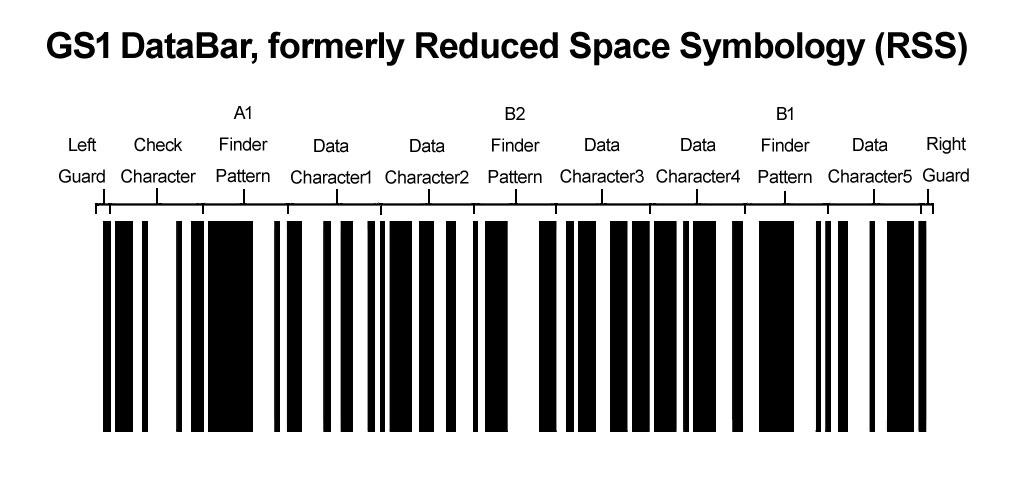
|
Introduction to GS1 DataBar |
GS1 DataBar was initially developed to accommodate smaller items where space for a larger barcode is limited. It provides a solution for encoding more data in a compact format, suitable for various retail and non-retail applications. The symbology was designed to address specific needs such as variable measure products, coupons, fresh foods, and other items where traditional barcodes may not be practical. |

|
Types of GS1 DataBar Symbologies |
GS1 DataBar encompasses several variants, each tailored to different use cases and data requirements: |
1.GS1 DataBar Omnidirectional: This variant allows for scanning from any direction, making it suitable for retail point-of-sale (POS) applications where items may be presented to the scanner in various orientations. 2.GS1 DataBar Truncated: This symbology is used in cases where space is limited vertically, allowing for the barcode to be truncated (shortened) to fit onto smaller items or packaging. 3.GS1 DataBar Stacked: This variant stacks multiple rows of barcodes vertically, enabling the encoding of more data or multiple data fields within a single barcode. 4.GS1 DataBar Limited: Designed for items where space is constrained horizontally, this variant limits the width of the barcode while maintaining the ability to encode necessary data. 5.GS1 DataBar Expanded: This symbology is used for encoding extended information such as secondary data fields or supplementary information related to the main barcode data. |

|
Technical Specifications |
Structure and Encoding |
GS1 DataBar symbologies are structured to include: |
Quiet Zones: Required blank areas on either side of the barcode to ensure reliable scanning. Start and Stop Characters: Mark the beginning and end of the barcode to facilitate scanning initiation and termination. Data Characters: Encode alphanumeric or numeric data based on the specific symbology variant and application requirements. Check Characters: Used to verify the accuracy of the encoded data and ensure scanning reliability. |

|
Data Capacity |
The data capacity of GS1 DataBar symbologies varies depending on the specific variant and the amount of data encoded. Typically, they can encode up to several dozen characters of alphanumeric data, making them suitable for encoding product information, pricing details, expiration dates, and other relevant data. |
Barcode Dimensions |
The dimensions of GS1 DataBar symbologies are defined by GS1 standards to ensure compatibility with scanning equipment and readability across different environments. The size of the barcode may vary based on the symbology variant and the specific application requirements. |

|
Applications of GS1 DataBar |
GS1 DataBar symbologies find applications across various industries: |
Retail: Used for encoding product information on smaller items, fresh produce, variable measure products, and coupons. Healthcare: Employed for identifying medical devices, pharmaceuticals, and patient information where space for larger barcodes is limited. Logistics: Applied for tracking and tracing items through supply chains, especially where space constraints require a compact barcode solution. Government: Used in applications requiring compact and reliable barcode solutions for identification and tracking purposes. |

|
Advantages of GS1 DataBar |
1.Compact Size: Occupies less space compared to traditional linear barcodes, making it suitable for small items and packaging. 2.Enhanced Data Capacity: Can encode more data, including variable measure products and supplementary information, within a smaller barcode. 3.Scanning Flexibility: Supports omnidirectional scanning and stacking, improving efficiency at checkout counters and in inventory management. 4.Compatibility: Designed to integrate seamlessly with existing GS1 standards and barcode scanning infrastructure. |

|
Use Cases |
Retail Applications |
In retail environments, GS1 DataBar symbologies are used for: |
Encoding product information on fresh foods, variable measure products, and items with limited packaging space. Facilitating efficient checkout processes and inventory management, reducing errors and enhancing operational efficiency. |
Healthcare Applications |
In healthcare settings, GS1 DataBar symbologies are utilized for: |
Identifying medical devices, pharmaceuticals, and patient information where space constraints require compact barcode solutions. Ensuring accurate tracking and tracing of items through hospital supply chains and inventory management systems. |

|
Implementation Guidelines |
GS1 Standards Compliance |
To ensure interoperability and reliability, organizations implementing GS1 DataBar symbologies are encouraged to adhere to GS1 standards, including: |
Proper barcode placement and sizing to ensure readability and scanning accuracy. Compliance with GS1 encoding rules and guidelines for data structure and formatting. |

|
Conclusion |
GS1 DataBar, formerly known as Reduced Space Symbology (RSS), represents a family of barcode symbologies designed to encode data in a compact format suitable for various applications across industries. By providing enhanced data capacity and scanning flexibility, GS1 DataBar symbologies offer a versatile solution for encoding product information, pricing details, and supplementary data on smaller items, fresh produce, and variable measure products. Adherence to GS1 standards ensures interoperability and reliability, supporting efficient inventory management, supply chain traceability, and enhanced customer service in retail and healthcare environments alike. |
 cs@easiersoft.com