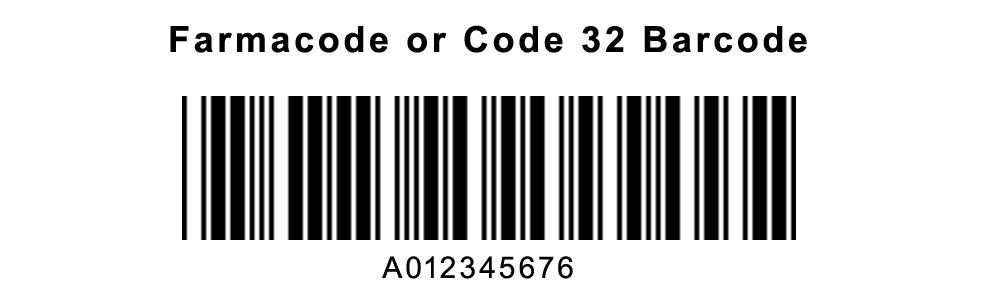
Farmacode, also known as Code 32, is a specialized 2D barcode primarily used in the pharmaceutical industry for encoding product information, including batch numbers, expiry dates, and serial numbers. This detailed description will cover its components, structure, encoding method, applications, advantages, and limitations. |
|
1. Introduction to Farmacode (Code 32) |
Farmacode, or Code 32, is a 2D barcode symbology specifically designed to meet the unique requirements of the pharmaceutical industry. It allows for the encoding of critical product information such as: |
Batch numbers Expiry dates Serial numbers Manufacturer information Product identifiers |

|
2. Components of Farmacode |
2.1. Quiet Zone |
Every barcode requires a quiet zone, which is an area of whitespace surrounding the barcode. It ensures that no other elements interfere with the barcode's readability. |
2.2. Finder and Alignment Patterns |
Farmacode uses finder patterns, typically located in three corners of the barcode, to indicate the beginning and orientation of the barcode. Alignment patterns help scanners establish the precise position of each module within the barcode. |
2.3. Timing Patterns |
Timing patterns assist in determining the width of each module in the barcode. They provide a reference for decoding data accurately. |
2.4. Data Encoding |
The core of Farmacode's structure lies in its data encoding method. It employs a combination of data modules arranged in a grid pattern. The presence or absence of these modules within specific regions of the barcode encodes alphanumeric data. |
2.5. Checksum |
To ensure data integrity, Farmacode often includes a checksum. This checksum allows the scanner to verify that the data read from the barcode is accurate and hasn't been corrupted. |

|
3. Structure of Farmacode |
Farmacode's structure is defined by a matrix of data modules arranged in a grid. The size of the grid can vary, but typical versions of Farmacode contain several rows and columns of modules. Each module within the grid can either be black (representing a binary '1') or white (representing a binary '0'). |
3.1. Module Size and Aspect Ratio |
The size of each module and the overall aspect ratio (width to height ratio) of the barcode are crucial for ensuring readability across different scanning devices and conditions. |
3.2. Error Correction Capability |
Farmacode incorporates error correction mechanisms to enhance reliability. This includes the ability to reconstruct damaged or obscured parts of the barcode during scanning. |
3.3. Data Capacity |
The data capacity of Farmacode varies depending on the version and size of the barcode. It can typically store several hundred characters of information, making it suitable for encoding detailed product data. |

|
4. Encoding Method of Farmacode |
4.1. Data Encoding Modes |
Farmacode supports various encoding modes, including numeric, alphanumeric, and byte encoding. Each mode determines how characters are represented within the barcode's data modules. |
4.2. Special Characters and Delimiters |
Special characters and delimiters may be used within Farmacode to separate different types of information encoded within the barcode. This ensures that the data can be correctly interpreted by scanning devices. |

|
5. Applications of Farmacode |
5.1. Pharmaceutical Packaging |
Farmacode is predominantly used on pharmaceutical packaging to encode crucial information required for regulatory compliance, inventory management, and product traceability. |
5.2. Supply Chain Management |
In pharmaceutical supply chains, Farmacode facilitates the tracking and authentication of products as they move through distribution channels. This enhances visibility and reduces the risk of counterfeit products entering the market. |
5.3. Patient Safety |
By encoding batch numbers and expiry dates, Farmacode helps healthcare providers and patients verify the authenticity and expiration status of pharmaceutical products before use. |

|
6. Advantages of Farmacode |
6.1. Data Density |
Farmacode can store large amounts of data within a relatively small area, making it efficient for encoding extensive product information. |
6.2. Error Correction |
The error correction capabilities of Farmacode ensure reliable scanning even in conditions where the barcode may be partially damaged or obscured. |
6.3. Regulatory Compliance |
Farmacode meets industry-specific regulatory requirements for pharmaceutical labeling, ensuring that products can be traced and verified throughout their lifecycle. |

|
7. Limitations of Farmacode |
7.1. Scanner Compatibility |
Not all scanning devices may be equipped to read Farmacode, especially older or less advanced models. Compatibility issues can affect the barcode's usability in certain environments. |
7.2. Printing Quality |
Farmacode requires high printing quality to ensure that all data modules are distinct and readable. Poor printing quality can lead to scanning errors and data misinterpretation. |
7.3. Size Constraints |
Due to its grid-based structure, Farmacode may require a larger physical space on packaging compared to linear barcodes. This can be a limitation in cases where packaging space is limited. |

|
8. Conclusion |
Farmacode, or Code 32, is a sophisticated 2D barcode symbology tailored for the pharmaceutical industry. Its robust structure and encoding capabilities make it invaluable for encoding critical product information, ensuring regulatory compliance, and enhancing supply chain efficiency. While it offers significant advantages in data capacity and error correction, considerations such as scanner compatibility and printing quality must be addressed to maximize its effectiveness in practical applications. As technology evolves, Farmacode continues to play a crucial role in pharmaceutical packaging and product traceability, contributing to patient safety and regulatory adherence in the healthcare sector. |
 cs@easiersoft.com