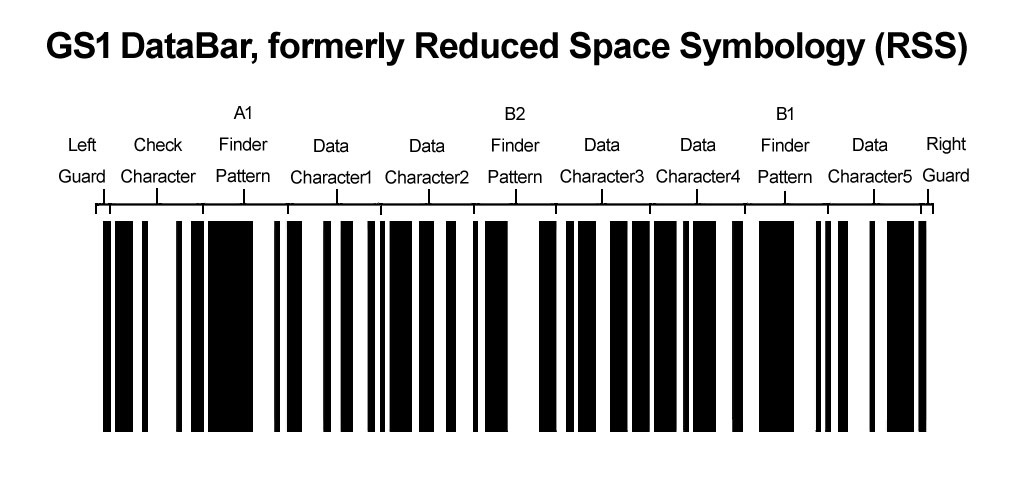
The GS1 DataBar, formerly known as Reduced Space Symbology (RSS), is a family of barcode symbologies developed by GS1 to enhance the capabilities of traditional linear barcodes. These barcodes are designed to encode more information in a smaller space, making them particularly useful in retail and logistics where space on packaging is limited. In this detailed explanation, we will explore the components, structures, and variations of GS1 DataBar to provide a comprehensive understanding of its design and applications. |
|
Introduction to GS1 DataBar |
GS1 DataBar encompasses several variations, each tailored for specific applications within the retail sector. These barcodes are characterized by their compact size and ability to encode additional information such as batch numbers, expiry dates, and serial numbers, alongside standard product identification data. They were developed to address the limitations of traditional UPC/EAN barcodes, which have less flexibility in encoding such additional information. |

|
Components of GS1 DataBar |
1. Quiet Zone |
Like all barcode symbologies, GS1 DataBar requires a quiet zone around the barcode to ensure accurate scanning. The quiet zone is a blank space that separates the barcode from any other printed information or physical obstructions. It allows barcode scanners to detect the beginning and end of the barcode without interference. |
2. Start and Stop Characters |
GS1 DataBar begins with a start character and ends with a stop character. These characters indicate the beginning and end of the barcode to the scanner. They are crucial for decoding the information contained within the barcode. |
3. Data Characters |
The data characters within GS1 DataBar encode the actual information related to the product or item being scanned. This can include the Global Trade Item Number (GTIN), which uniquely identifies the product, as well as supplementary data like batch numbers, expiration dates, and serial numbers. The structure and organization of these data characters vary depending on the specific GS1 DataBar variation being used. |
4. Check Digit |
A check digit is a calculated digit appended to the data characters to ensure the accuracy of the barcode during scanning. It helps detect errors that may occur due to printing defects or scanning issues. |

|
Structures of GS1 DataBar Variations |
1. GS1 DataBar Omnidirectional |
GS1 DataBar Omnidirectional is the most common variation and is used in situations where products may be scanned from multiple orientations. It can encode a GTIN and additional information such as expiry dates or batch numbers. This variation is widely used in retail environments where space is limited. |
2. GS1 DataBar Stacked |
GS1 DataBar Stacked allows for more information to be encoded vertically. It is often used on items where space is limited horizontally but vertical space is more available. This variation can encode the same information as the omnidirectional version but in a stacked format. |
3. GS1 DataBar Expanded |
GS1 DataBar Expanded is used when more data needs to be encoded than what the omnidirectional or stacked versions can handle. It allows for encoding of larger amounts of information such as serial numbers or detailed product information. This variation can be both stacked and omnidirectional, depending on the application requirements. |
4. GS1 DataBar Limited |
GS1 DataBar Limited is designed for smaller items where space is extremely limited. It encodes a GTIN and a few additional pieces of information. This variation is used on items like jewelry or small electronics where traditional barcodes may be too large. |

|
Technical Specifications |
1. Size Requirements |
GS1 DataBar comes with specific size requirements to ensure proper scanning. These requirements include minimum and maximum dimensions for the barcode itself as well as the quiet zone surrounding it. Adhering to these specifications ensures that the barcode can be scanned reliably across different scanning devices. |
2. Printing and Contrast Requirements |
To ensure accurate scanning, GS1 DataBar must be printed with sufficient contrast between the bars and spaces. This contrast ensures that barcode scanners can distinguish between the black bars and white spaces, even in varying lighting conditions. |
3. Scanning Distance and Angle |
GS1 DataBar can be scanned from various distances and angles, depending on the type of scanner used. Handheld scanners typically allow for scanning from a few inches away, while fixed-mount scanners can scan from several feet away. The angle at which the barcode is scanned should ideally be perpendicular to the barcode to ensure accurate decoding. |

|
Applications of GS1 DataBar |
GS1 DataBar is widely used in the retail industry for encoding additional information beyond product identification. Some common applications include: |
Fresh Foods: Encoding batch numbers and expiration dates for perishable goods. Coupons and Discounts: Encoding promotional offers and discounts for retail items. Pharmaceuticals: Encoding lot numbers and expiry dates for medication tracking. Logistics: Encoding shipment information such as batch numbers and quantities. |

|
Advantages of GS1 DataBar |
1. Compact Size |
One of the primary advantages of GS1 DataBar is its compact size, which allows for more information to be encoded in a smaller space compared to traditional UPC/EAN barcodes. |
2. Enhanced Data Capacity |
GS1 DataBar can encode more than just product identification data, allowing for the inclusion of batch numbers, expiration dates, and other supplementary information. |
3. Flexibility |
The various versions of GS1 DataBar-omnidirectional, stacked, expanded, and limited-provide flexibility in encoding information based on the specific requirements of the product or item being labeled. |
4. Improved Scanning Efficiency |
GS1 DataBar's design and structure enhance scanning efficiency, reducing the likelihood of scanning errors and improving overall operational efficiency in retail and logistics environments. |

|
Conclusion |
In conclusion, GS1 DataBar, formerly known as Reduced Space Symbology (RSS), represents a significant advancement in barcode technology, especially in retail and logistics applications. Its ability to encode more information in a compact space makes it versatile for a wide range of products and industries. Understanding its components, structures, technical specifications, and applications provides insight into how GS1 DataBar enhances efficiency and accuracy in product identification and tracking systems. |
 cs@easiersoft.com