Barcode Technology

Barcode History

Barcode Label Paper

Barcode Printer

Barcode Application

Inventory Management

AI Barcode QRCode

Barcode Scanner

Barcode Software

Barcode Software B

Barcode Software C

Barcode Software D

Barcode Software E

New Technology A

New Technology B

Robot Technology

Barcode Types

Barcode Types B

Barcode Types C

Barcode Types D

Barcode Types E

Barcode Types F

Electronic Technology

Psychology at Work

Barcode Technology and Barcode Software Related   <<< Back to Directory <<<

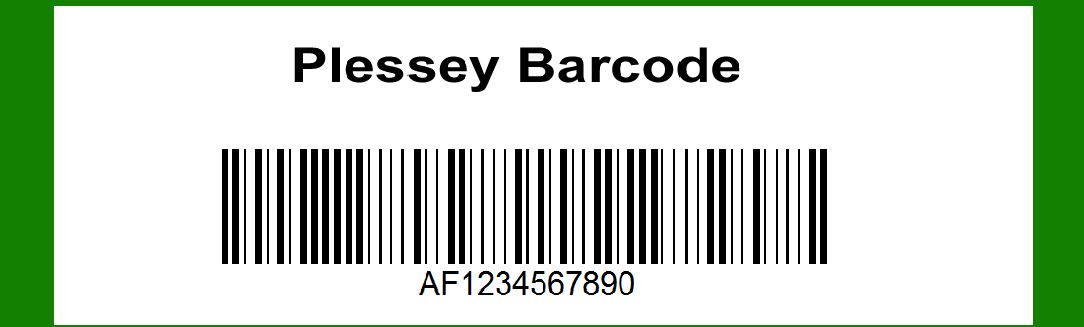
Structures of Plessey barcode

The Plessey barcode, also known as the Plessey Code, is a linear barcode symbology developed by Plessey Company plc in the United Kingdom during the late 1960s. It was primarily used in retail and industrial applications until the widespread adoption of more compact and versatile barcode formats like the UPC and EAN codes. Understanding its components and structure provides insights into its encoding scheme, applications, and historical significance in barcode technology.

Historical Background

The Plessey Company, a prominent electronics manufacturer, developed the Plessey Code in response to the growing need for automated data collection in manufacturing and retail sectors. Introduced in 1971, it was notable for being an early example of a barcode system used for inventory control and product identification.

Structure and Components

1. Basic Structure

The Plessey barcode is a continuous, variable-length symbology composed of black and white bars. Unlike modern linear barcodes that encode data in varying widths of bars and spaces, the Plessey Code uses a simpler structure where each character consists of a set number of bars and spaces.

2. Character Set

The Plessey Code primarily encodes numeric digits (0-9) and a limited set of special characters. It does not encode letters or provide support for extended character sets like alphanumeric or binary data.

3. Encoding Scheme

Each character in the Plessey barcode is represented by a unique pattern of bars and spaces. The width of each bar or space determines the value of the encoded data. Typically, wider bars and spaces represent binary 1s, while narrower ones represent binary 0s.

4. Quiet Zones

Similar to other barcode types, the Plessey Code requires quiet zones-blank margins on either side of the barcode-to ensure accurate scanning and decoding. These zones prevent interference from adjacent graphical elements or printing artifacts.

5. Reading Mechanism

Plessey barcodes are read using optical scanners that detect variations in light reflection caused by the alternating black and white bars. The scanner translates these variations into binary data, which is then decoded into readable characters.

Applications and Usage

1. Retail and Inventory Management

In its heyday, the Plessey Code found significant use in retail environments for tracking inventory, managing stock levels, and speeding up checkout processes. Its simplicity and reliability made it a popular choice before the advent of more advanced barcode technologies.

2. Industrial Applications

The Plessey barcode also saw use in industrial applications, particularly in manufacturing and logistics, where it helped streamline operations by automating data entry and inventory tracking tasks.

Advantages and Limitations

1. Advantages

Simplicity: The straightforward encoding scheme of the Plessey barcode made it easy to implement and read with early barcode scanners.

Reliability: Its linear format and clear distinction between bars and spaces contributed to high scanning accuracy.

2. Limitations

Data Capacity: Limited to numeric characters and a few special symbols, the Plessey Code had lower data capacity compared to later barcode formats.

Compatibility: With the rise of universal standards like UPC and EAN, the Plessey Code lost popularity due to lack of global acceptance and compatibility.

Comparison with Other Barcode Types

1. UPC and EAN

The Universal Product Code (UPC) and European Article Number (EAN) barcodes superseded the Plessey Code due to their ability to encode alphanumeric characters, broader adoption in international markets, and enhanced data capacity.

2. Code 39 and Code 128

Code 39 and Code 128 are examples of modern linear barcode formats that support alphanumeric characters and provide higher data density than the Plessey Code. They are widely used in logistics, healthcare, and other industries where extensive data encoding is required.

Conclusion

The Plessey barcode, while no longer in widespread use, played a crucial role in the evolution of barcode technology. Its simplicity and early adoption in retail and industrial sectors paved the way for more sophisticated barcode systems that dominate today's automated data capture landscape. Understanding its components and structure provides a valuable historical perspective on the development of barcode symbologies and their impact on modern business practices.


EasierSoft Barcode Label Design & Bulk Printing Software

---- Use Excel Data to Batch Print Barcodes on Label Sheets or Roll Labels  

---- How to use this barcode software

Download:  Free Barcode Software + Barcode Label Designer

Download Free Barcode Software at Softonic

     Download at CNET

Once you obtain a GS1/UPC/EAN barcode, or other barcode type and QR code, you can use our free software to batch print barcode labels onto Roll label paper using a professional label printer, or to batch print barcodes onto Avery 5160 label sheets using a regular laser or inkjet printer. Our software has free and paid versions.

The free version fully meets your needs for batch printing GS1/UPC/EAN barcodes. The paid version can import data from Excel and databases to batch print barcode labels with different values.

How to Start

Input Data

Import Excel Data

Print Barcode

Barcode Format

Label Designer

All Screen Shot

Export Barcode Image

Save Template

Output Word Excel

How to Use & FAQ:

Serial number generator

The supported barcode types

Load Excel data (pro)

Manually copy data from Excel files

Filter some data for printing

Edit imported barcode data

Input data (Pro)

Label Designer

Edit data in Label designer

Label Designer - Add new label

Label Designer - Printing

Set the barcode label format to be printed

Other Barcode Label Format Settings

Barcode types supported by this program

Barcode Label Font Settings

Configuring the Barcode Print Rotation

Text Alignment for Barcode Labels

Automatically Adjusting Barcode Width

Text Beneath the Barcode

Configuring Barcode Size

Auto Calculate the Barcode Size

Export Barcode images

Export Barcode Image Format

File Names for Exported Barcode

Resolution of Exported Barcode Images

Fixed Folder for Exporting Barcode

Default Barcode Image Export Format

Print bulk barcodes quickly

Print barcodes to Avery 5160 label

How to bulk Barcode Printing

Sample - Avery 5162 (2x7) Label Sheet

Example: Print barcodes to 5*3cm roll

Example: Print barcodes to 5161 label

Example: Print barcodes to 5162 label

Example: Print barcodes to 5163 label

Example: Print barcodes to 5164 label

Example: Print portrait orientation 5164

Example: Print barcodes to 5167 label

Example: Print barcodes to 5168 label

Example: Print portrait orientation 5168

Example: Print barcodes to 5169 label

Example: Print barcodes to 5660 label

Example: Print barcodes to 5661 label

Example: Print barcodes to 5662 label

Example: Print barcodes to 5663 label

Example: Print barcodes to 5664 label

Example: Print portrait orientation 5664

Example: Print barcodes to 5873 label

Example: Print barcodes to 5874 label

Two ways to import Excel data

Highlights

Excel integration: Import data directly from Excel to generate and print barcodes in bulk.

Label designer: Create complex labels with multiple barcodes, text, logos, and shapes.

Batch printing: Print thousands of barcodes at once using standard inkjet/laser printers or professional barcode printers.


Flexible editions:

Standard Edition: Simple batch printing with Excel data.

Professional Edition: Adds command-line automation for workflow integration.

Label Designer Edition: Advanced design features for complex labels.


Why Choose Our Barcode Solutions?

Cost-effective: Free online generator and permanent free desktop version available.

Easy to use: No technical expertise required—just input data and print.

Versatile: Supports nearly all 1D and 2D barcode types, including QR codes.

Trusted: Recommended by CNET and widely downloaded by users worldwide.


Suitable Use Cases

Small businesses and startups needing quick barcode labels for products.

Retailers and online sellers managing inventory with batch barcode printing.

Manufacturers requiring sequential or custom barcode labels for packaging.

Educational and testing environments where barcodes are used for tracking.


CONTACT

cs@easiersoft.com

If you have any question, please feel free to email us.


https://free-barcode.com


<<< Back to Directory <<<     Barcode Generator     Barcode Freeware     Privacy Policy