1. Introduction to RM Mailmark L Barcode |
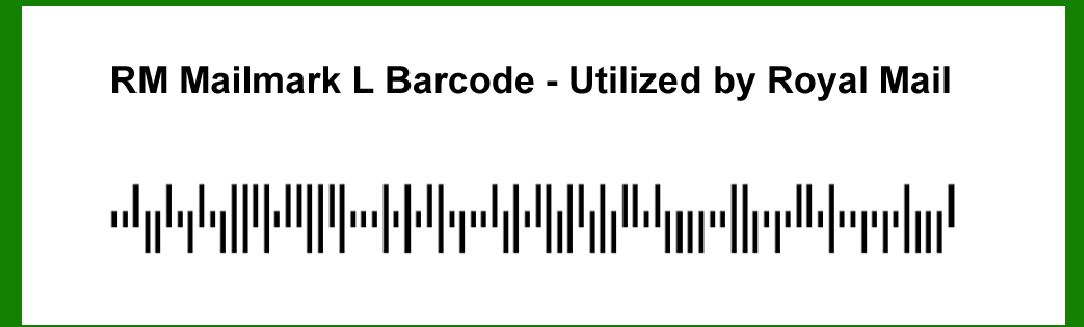
The RM Mailmark L barcode is a postal barcode used primarily by Royal Mail for addressing and sorting mail in the UK. It's part of the RM Mailmark system, which facilitates the processing and management of mail through automated systems. This barcode is designed to streamline mail handling, improve efficiency, and ensure accurate delivery. |
|
2. Application in Address Management |
2.1. Address Verification |
One of the key applications of the RM Mailmark L barcode is in address verification. The barcode contains encoded information that allows postal systems to cross-reference the address on the mail item with Royal Mail's address database. This verification process helps ensure that the mail is directed to the correct address, reducing the chances of misdelivery. |
2.2. Address Correction |
When a discrepancy is found between the address on the mail and the database, the RM Mailmark L barcode can trigger address correction protocols. For example, if the barcode reveals an address that does not match the one on file, the system may flag it for manual review or automatic correction based on predefined rules. This application is crucial in maintaining accurate address records and improving delivery accuracy. |

|
3. Application in Sorting and Processing |
3.1. Automated Sorting |
The RM Mailmark L barcode plays a significant role in the automated sorting of mail. Postal facilities use sophisticated sorting machines equipped with barcode scanners to read the RM Mailmark L barcode. Based on the encoded information, these machines can sort mail into the appropriate bins or conveyor belts for further processing. This automated sorting reduces manual handling and speeds up the mail processing cycle. |
3.2. Route Optimization |
The information encoded in the RM Mailmark L barcode also assists in route optimization. By analyzing the data, postal systems can determine the most efficient routes for delivering mail. For example, the system might use the barcode information to consolidate deliveries in a particular geographic area, thereby reducing travel time and fuel consumption. |

|
4. Application in Mail Tracking |
4.1. Real-Time Tracking |
Another important application of the RM Mailmark L barcode is in real-time mail tracking. As mail items move through the postal system, the barcode is scanned at various checkpoints, allowing both the postal service and the recipient to track the progress of the mail. For instance, a recipient might use an online tracking tool to see when their parcel is out for delivery or has been successfully delivered. |
4.2. Delivery Confirmation |
The RM Mailmark L barcode also aids in delivery confirmation. Upon successful delivery, the barcode data can be updated in the postal system to reflect that the item has been delivered. This information can be used to generate delivery confirmation receipts or notifications for the sender and recipient, providing proof of delivery. |

|
5. Application in Bulk Mail Management |
5.1. Bulk Mail Discounts |
Businesses and organizations that send large volumes of mail can benefit from the RM Mailmark L barcode through bulk mail discounts. The barcode helps Royal Mail identify mail that qualifies for bulk pricing, streamlining the billing process and ensuring that businesses receive the appropriate discounts. For example, a company sending out thousands of promotional mailers can use the RM Mailmark L barcode to qualify for reduced rates. |
5.2. Campaign Management |
For marketing campaigns, the RM Mailmark L barcode provides a way to manage and track bulk mail distributions effectively. Marketers can use the barcode to monitor the performance of their campaigns, track delivery rates, and analyze the success of their direct mail efforts. This application helps in optimizing future campaigns and improving return on investment. |

|
6. Application in International Mail |
6.1. Customs and Security |
The RM Mailmark L barcode can be used for international mail, especially when it comes to customs and security checks. By encoding relevant information such as the destination country and contents of the mail, the barcode facilitates smoother customs processing. For example, international parcels can be scanned and cleared more efficiently at customs checkpoints, reducing delays. |
6.2. International Tracking |
For international deliveries, the RM Mailmark L barcode supports tracking across borders. The barcode is scanned at various international hubs and transit points, allowing the sender and recipient to monitor the mail's journey from the UK to its destination country. This application enhances the transparency and reliability of international mail services. |

|
7. Application in Returns Management |
7.1. Return Processing |
The RM Mailmark L barcode is also utilized in managing returned mail. When a recipient returns a mail item, the barcode is scanned to update the system and process the return. This application ensures that returned items are handled efficiently and that the sender is notified of the return. |
7.2. Return Address Labeling |
For mail items that are undeliverable and need to be returned to the sender, the RM Mailmark L barcode can be used on return address labels. This labeling helps in automating the return process and ensures that undelivered items are sent back to the correct address without manual intervention. |

|
8. Application in Compliance and Reporting |
8.1. Regulatory Compliance |
The RM Mailmark L barcode helps ensure compliance with postal regulations and standards. By providing detailed information about each mail item, the barcode assists in meeting regulatory requirements for mail handling and processing. For example, the barcode data can be used to generate reports required by postal authorities or for auditing purposes. |
8.2. Performance Reporting |
Postal services and businesses can use the data from RM Mailmark L barcodes to generate performance reports. These reports can include metrics such as delivery times, sorting efficiency, and error rates. For instance, a postal service might use barcode data to analyze and improve its operational performance, leading to better service quality. |

|
9. Application in Customer Service |
9.1. Customer Queries |
When customers have queries about their mail, the RM Mailmark L barcode provides a valuable tool for customer service representatives. By scanning the barcode, representatives can quickly access information about the mail item's status and history, helping them resolve customer issues more effectively. |
9.2. Customer Notifications |
The RM Mailmark L barcode can also be used to send notifications to customers. For example, if a mail item is delayed or requires action (such as customs clearance), the barcode data can trigger automated notifications to the recipient, keeping them informed about the status of their mail. |

|
10. Application in Fraud Prevention |
10.1. Fraud Detection |
The RM Mailmark L barcode contributes to fraud prevention by providing a secure way to track and manage mail. The encoded information helps detect anomalies and potential fraud. For instance, if a mail item's barcode does not match expected patterns or records, it may be flagged for further investigation. |
10.2. Authenticity Verification |
The RM Mailmark L barcode also aids in verifying the authenticity of mail items. By scanning the barcode and cross-referencing it with postal records, the system can confirm that the mail item is genuine and not a counterfeit. This application is particularly important for high-value or sensitive mail items. |

|
 cs@easiersoft.com