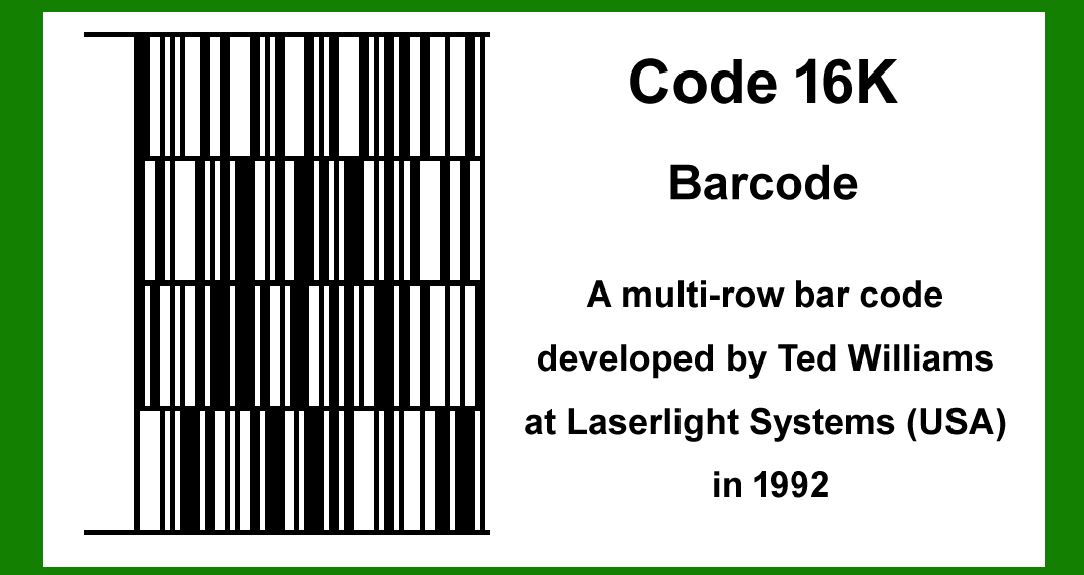
Code 16K is an intriguing barcode symbology developed by Ted Williams at Laserlight Systems in 1992, designed primarily for applications in the electronics and medical industries in the US and France. This detailed description will delve into its structure, encoding principles, applications, advantages over previous symbologies like Code 49, and its overall impact. |
|
History and Development |
Code 16K was developed by Ted Williams as a solution to the limitations of existing barcode technologies, particularly Code 49. Williams, who also developed Code 128, based the structure of Code 16K on Code 128, leveraging its robust encoding capabilities and efficiency. The name '16K' derives from the fact that 128 squared equals 16,384, simplifying to '16K' for short, indicating the increased data capacity over its predecessors. |

|
Structure and Design |
Code 16K is classified as a stacked linear barcode symbology. Unlike traditional linear barcodes that consist of a single row of data, Code 16K stacks multiple rows vertically to increase data capacity. This stacking approach allows for encoding significantly more information within a limited physical space. |
The barcode is structured into multiple rows, with each row capable of holding a certain amount of data. The exact number of rows and the amount of data each row can encode depend on factors such as the barcode dimensions and the specific application requirements. |

|
Encoding Scheme |
Code 16K uses a high-density encoding scheme, optimizing the use of space while maintaining readability and reliability. The encoding process involves mapping data characters into binary patterns that can be represented by the barcode's bars and spaces. This mapping is designed to ensure efficient encoding and decoding processes, critical for applications requiring rapid and accurate data retrieval. |

|
Technical Specifications |
The technical specifications of Code 16K include parameters such as module width, quiet zones, error correction capabilities, and data density. These specifications ensure compatibility with various scanning devices and systems, allowing seamless integration into existing operational environments in industries such as electronics manufacturing and healthcare. |

|
Applications |
Electronics Industry |
In the electronics industry, Code 16K is widely used for inventory management, product tracking, and quality control. It provides a reliable means of identifying individual components such as chips and printed circuit boards (PCBs). The barcode's high data capacity and robust error correction make it suitable for environments where precise identification and traceability are critical. |
Medical Applications |
Code 16K has found significant applications in the medical field within the United States. It is utilized for patient identification, medical equipment tracking, and inventory management in healthcare facilities. The barcode's ability to encode detailed information and withstand harsh environments makes it an ideal choice for improving efficiency and accuracy in medical processes. |

|
Advantages over Code 49 |
Code 16K addresses several limitations inherent in Code 49, a precursor barcode symbology known for its complex encoding and decoding requirements: |
1.Simplified Encoding: Unlike Code 49, which requires extensive memory for encoding and decoding tables, Code 16K uses a more streamlined structure based on Code 128, simplifying implementation and reducing computational overhead. 2.Increased Data Capacity: Code 16K offers a higher data capacity compared to Code 49, enabling the encoding of more information within a smaller barcode footprint. This increased capacity enhances data storage and retrieval efficiency, benefiting applications in both industry and healthcare. 3.Improved Error Correction: The stacked design of Code 16K allows for enhanced error correction capabilities, ensuring reliable data capture even in challenging environments. This reliability is crucial for maintaining data integrity and operational continuity across diverse applications. |

|
Implementation Challenges |
Despite its advantages, implementing Code 16K may pose challenges related to barcode printing quality, scanning technology compatibility, and integration with existing information systems. Addressing these challenges requires careful consideration of technical specifications and operational requirements, supported by robust testing and validation processes. |

|
Future Developments |
The future of Code 16K and similar barcode technologies lies in ongoing advancements in data encoding, scanning technology, and application integration. Continued research and development efforts aim to enhance barcode performance, expand data capacity, and improve interoperability across diverse industry sectors. |

|
Conclusion |
Code 16K represents a significant advancement in barcode technology, leveraging stacked symbology and efficient encoding principles to meet the evolving needs of industries such as electronics manufacturing and healthcare. With its origins rooted in Code 128 and designed to overcome the limitations of Code 49, Code 16K continues to play a crucial role in enhancing operational efficiency, data integrity, and traceability in complex industrial and medical environments. As technology progresses, the application scope and capabilities of Code 16K are expected to expand, further solidifying its position as an ultimate solution for high-capacity barcode encoding. |
 cs@easiersoft.com