Code 39, also known as USD-3, 3 of 9 Code, and Type 39, is a widely used linear barcode symbology. It is characterized by its ability to encode alphanumeric characters and a few special symbols, making it versatile for various applications across industries. This comprehensive guide delves into the technology, history, structure, encoding process, decoding methods, applications, advantages, limitations, and future prospects of the Code 39 barcode. |
|
History and Development |
Code 39 was developed by Intermec Corporation in 1974. It was originally designed to improve upon the limitations of older barcode technologies, such as Codabar and Code 128, by providing a more efficient and versatile method of encoding data. The primary aim was to create a barcode symbology that could encode both numbers and letters, making it suitable for a wider range of applications in industries such as manufacturing, healthcare, logistics, and retail. |

|
Technology Detail |
Structure and Encoding |
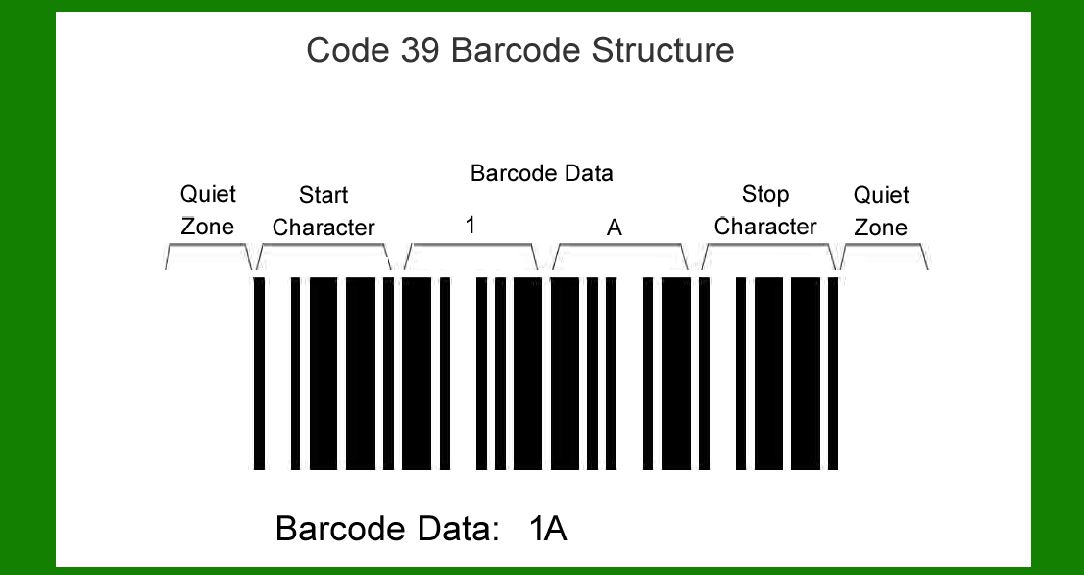
Code 39 is a variable-length, discrete barcode symbology. It consists of a series of bars and spaces that encode characters. Each character is represented by nine elements: five bars and four spaces. Of these elements, three are wide and six are narrow. The barcode also includes a start character, an optional stop character, and a mandatory checksum character for error detection. |
The basic components of a Code 39 barcode include: |
Start character: Represents the beginning of the barcode. Typically, an asterisk (*) is used. Data characters: Each character from the ASCII set (0-9, A-Z, - (minus), . (period), $ (dollar sign), / (slash), + (plus)) can be encoded. Checksum character: Optional, but recommended for error detection. Stop character: Marks the end of the barcode. Often represented by an asterisk (*) or a full stop (.). |

|
Encoding Process |
The encoding process for Code 39 involves converting alphanumeric data into a series of bars and spaces using specific encoding rules. |
Each character is represented by a unique pattern of bars and spaces. For example, the letter 'A' is represented by bars and spaces in a specific sequence, while the letter 'B' has a different sequence. This encoding allows scanners to interpret the pattern and decode it back into readable text. |
Decoding Methods |
Decoding a Code 39 barcode involves scanning the barcode with a barcode scanner or reader. The scanner captures the pattern of bars and spaces and converts it into a digital signal. The decoding software then analyzes the signal to reconstruct the encoded data. Advanced decoding algorithms ensure accurate interpretation even in cases of damaged or poorly printed barcodes. |

|
Applications |
Code 39 barcodes are used in a wide range of applications due to their versatility and reliability: |
Inventory Management: Tracking stock levels and movements in warehouses. Logistics and Shipping: Labeling packages for tracking and delivery. Healthcare: Patient identification, specimen tracking, and medical records management. Retail: Pricing, inventory control, and product identification. Automotive: Parts identification and tracking in manufacturing processes. |

|
Advantages |
Code 39 offers several advantages over other barcode symbologies: |
Alphanumeric Capability: Can encode letters (A-Z), numbers (0-9), and a few special characters. Widespread Compatibility: Supported by most barcode scanners and reading devices. Easy to Generate: Can be generated and printed using standard software and printers. Compact Size: Relatively compact, allowing it to be printed on small labels and tags. |

|
Limitations |
Despite its versatility, Code 39 has some limitations: |
Density: Lower data density compared to 2D barcodes like QR codes. Character Set: Limited special character support compared to newer barcode types. Error Correction: Limited error correction capability compared to more advanced symbologies. |

|
Future Prospects |
While newer barcode technologies like QR codes and Data Matrix have gained popularity, Code 39 continues to be widely used in industries where alphanumeric data encoding is sufficient. Its simplicity, reliability, and compatibility ensure its continued relevance in applications that do not require high-density data encoding. |

|
Conclusion |
Code 39 barcode technology has stood the test of time as a reliable and versatile method for encoding alphanumeric data. Its straightforward structure, ease of use, and widespread compatibility make it indispensable in industries ranging from healthcare to logistics. As technology evolves, Code 39 remains a foundational barcode symbology, continuing to support diverse applications in a rapidly changing world. |
This detailed exploration of Code 39 barcode technology provides a comprehensive understanding of its history, structure, encoding process, decoding methods, applications, advantages, limitations, and future prospects, showcasing its enduring relevance in the field of automatic identification and data capture (AIDC). |
 cs@easiersoft.com