Code 49 is a high-density, 2D stacked barcode symbology that was developed by Intermec in the early 1980s. | It was designed to encode large amounts of data in a relatively small space, making it suitable for applications where space is limited but extensive data storage is required. Code 49 is characterized by its ability to encode both numeric and alphabetic characters, including uppercase letters, lowercase letters, and special symbols. | 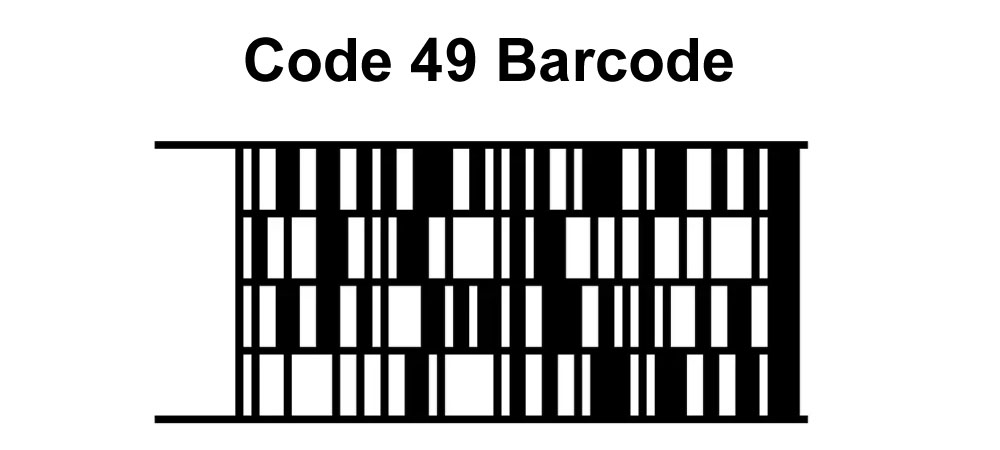
| History and Development | Code 49 was developed by Intermec Technologies Corporation, a company known for its innovations in barcode and data collection technology. It was introduced in the early 1980s as a response to the need for a barcode symbology that could encode large amounts of data in a compact format. The development of Code 49 was driven by the increasing demand for efficient data storage and retrieval systems in various industries, including logistics, manufacturing, and healthcare. | 
| Structure and Encoding | Code 49 is a 2D stacked barcode symbology, which means that it consists of multiple rows of linear barcodes stacked on top of each other. Unlike linear barcodes, which encode data in a single row of bars and spaces, Code 49 encodes data in a two-dimensional grid pattern. This allows Code 49 to store significantly more data than traditional linear barcodes. | Structure Overview: | 1.Rows and Columns: Code 49 consists of multiple rows of data, with each row containing a series of bars and spaces. The number of rows and columns in a Code 49 symbol can vary depending on the amount of data being encoded. 2.Start and Stop Patterns: Like other barcode symbologies, Code 49 symbols begin with a start pattern and end with a stop pattern. These patterns help barcode scanners identify the beginning and end of the barcode symbol. 3.Data Encoding: Code 49 can encode numeric digits (0-9), uppercase letters (A-Z), lowercase letters (a-z), and a range of special symbols. It uses a combination of bars and spaces to represent each character. | 
| Advantages of Code 49 | 1.High Data Density: Code 49 is known for its high data density, allowing it to store large amounts of data in a relatively small space. This makes it suitable for applications where space is limited but extensive data storage is required. 2.Versatility: Code 49 can encode both numeric and alphabetic characters, as well as special symbols. This versatility makes it suitable for a wide range of applications across different industries. 3.Error Correction: Some variants of Code 49 include built-in error correction capabilities, which allow the barcode to be partially damaged or obscured and still be read accurately by a barcode scanner. 4.Compact Size: Despite its high data density, Code 49 symbols are relatively compact compared to other barcode symbologies that encode similar amounts of data. | 
| Applications of Code 49 | 1.Logistics and Shipping: Code 49 is commonly used in logistics and shipping applications to track and manage inventory, shipments, and packages. Its ability to encode large amounts of data in a compact format makes it ideal for storing detailed information about products and shipments. 2.Healthcare: In the healthcare industry, Code 49 is used to encode patient information, medication details, and medical history on labels and wristbands. It helps healthcare providers quickly access critical information and improve patient safety. 3.Manufacturing: Code 49 is used in manufacturing to track work-in-progress, inventory levels, and production schedules. It enables manufacturers to streamline operations, improve efficiency, and reduce errors. 4.Document Management: Code 49 is used in document management systems to encode document identifiers, metadata, and indexing information. It helps organizations digitize and manage large volumes of documents more effectively. 5.Government and Compliance: Code 49 is used by government agencies and regulatory bodies to encode information on identification cards, driver's licenses, and other official documents. It helps ensure compliance with regulations and enhance security. | 
| Reading Code 49 Barcodes | To read a Code 49 barcode, you need a barcode scanner equipped with a decoder capable of interpreting the stacked structure and data encoding scheme of Code 49. Modern barcode scanners are designed to read a wide range of barcode symbologies, including both linear and 2D barcodes like Code 49. | 
| Challenges and Limitations | 1.Complexity: Code 49 symbols can be more complex to generate and decode compared to linear barcodes. Specialized software and hardware may be required to create and read Code 49 symbols accurately. 2.Printing Quality: Like other barcode symbologies, Code 49 symbols require high-quality printing to ensure accurate scanning. Poor printing quality or damage to the barcode can affect readability. 3.Standardization: While Code 49 is widely used in specific industries, its adoption may vary regionally or by application. Standardization efforts continue to ensure compatibility and interoperability across different systems and devices. | 
| Future Developments | The continued evolution of barcode technology, including advancements in data encoding, error correction, and scanning capabilities, may influence the future development and adoption of Code 49 and other barcode symbologies. As industries increasingly rely on digital data and automated systems, barcode technology is likely to play a crucial role in enhancing efficiency, accuracy, and data management practices. | 
| Conclusion | Code 49 is a versatile and high-density 2D stacked barcode symbology that was developed to encode large amounts of data in a compact format. It is used in various industries, including logistics, healthcare, manufacturing, and document management, to track and manage inventory, shipments, patient information, and documents. Despite its complexity and specialized requirements, Code 49 continues to be a valuable tool for improving efficiency, accuracy, and data management practices in diverse applications. |
|
 cs@easiersoft.com