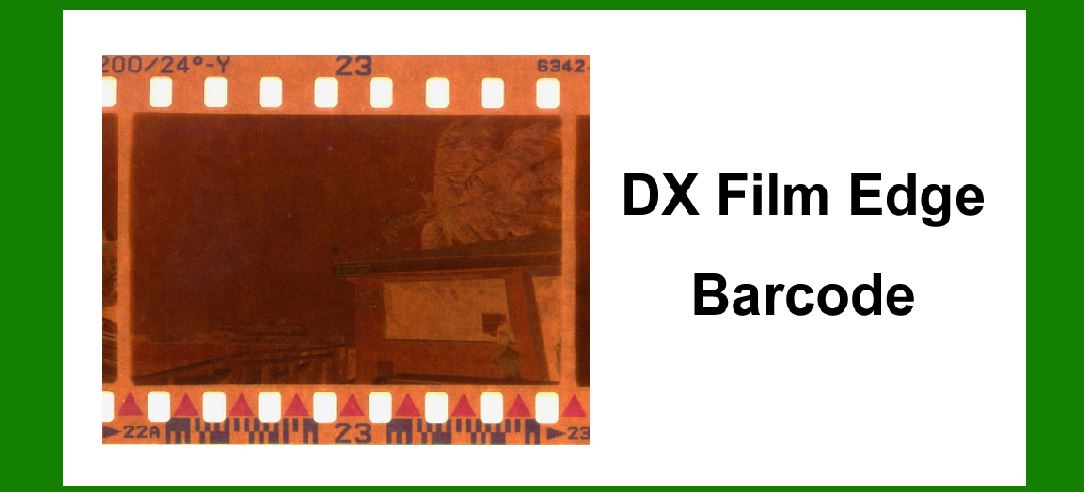
The DX film edge barcode, also known as the DX coding system, is a standardized barcode technology used primarily in photographic film cartridges to automatically set exposure settings on compatible cameras. Developed by Kodak in the mid-1980s, DX coding has become ubiquitous in 35mm film photography, ensuring seamless integration between film stock and camera settings. Here's a detailed exploration of the DX film edge barcode system, covering its history, technical specifications, encoding structure, functionality, applications, advantages, and future prospects. |
|
History and Development |
The development of DX coding stemmed from the need to simplify the photographic process and enhance user experience with automatic cameras. Before its inception, photographers manually set exposure settings based on film speed (ISO rating), aperture, and shutter speed. Kodak pioneered the DX coding system in response to the growing market for automated cameras and the desire to streamline the photographic process. |
Introduced in 1983, DX coding quickly gained traction due to its convenience and reliability. Kodak designed the system to be universally adopted, allowing film manufacturers worldwide to implement it on their products. This standardization enabled cameras equipped with DX sensors to read and adjust settings automatically, based on the encoded information from the film cartridge. |

|
Technical Specifications |
Barcode Structure and Encoding |
The DX barcode is a compact, high-density barcode printed on the edge of 35mm film cartridges. It consists of a series of black bars and white spaces arranged in a specific pattern. The barcode is read optically by sensors in compatible cameras when the film is loaded. |
The encoding structure includes several key elements: |
1.Manufacturer Code: A three-digit number assigned to film manufacturers, identifying the brand or company producing the film. 2.Film Speed Code: A three-digit number representing the ISO speed rating of the film. This code ranges from ISO 25 to ISO 5000, covering the sensitivity of various film types. 3.Format Identification: A single-digit identifier specifying the film format (e.g., 135 for 35mm film). 4.Exposure Latitude Information: Optional data indicating the film's exposure latitude, providing additional information for more precise exposure calculations in some advanced cameras. |
Barcode Placement and Visibility |
The DX barcode is typically located on the film cartridge's edge, visible through a transparent window on the camera's back or bottom when loaded. This placement ensures that cameras equipped with DX sensors can easily read the barcode without requiring direct exposure to light, maintaining film integrity. |

|
Functionality and Operation |
Camera Compatibility |
Cameras equipped with DX sensors can automatically detect and read the barcode when the film is loaded. This detection triggers the camera to set appropriate exposure settings, including aperture, shutter speed, and sometimes flash synchronization, based on the film's ISO rating and exposure latitude. |
Automatic Exposure Control |
The primary function of DX coding is to automate exposure control, ensuring accurate and consistent results regardless of the photographer's experience level. When a DX-coded film is loaded, the camera adjusts its settings to match the film's sensitivity, optimizing exposure for various lighting conditions. |
User Convenience |
DX coding enhances user convenience by eliminating the need for manual exposure adjustments. Photographers can focus more on composition and creativity without worrying about technical settings, making photography accessible to a broader audience. |

|
Applications and Industry Impact |
Photography Markets |
DX coding revolutionized 35mm film photography, influencing both amateur and professional markets. It facilitated the widespread adoption of point-and-shoot cameras and advanced SLRs, simplifying the photographic process and encouraging more people to engage in photography. |
Film Manufacturing |
Film manufacturers worldwide adopted DX coding as a standard feature on their products. This universal compatibility allowed photographers to use different brands of film with confidence, knowing that their cameras would automatically adjust settings accordingly. |
Technological Advancements |
The success of DX coding paved the way for further advancements in camera technology, including autofocus systems and digital photography. Its integration with automated camera functions demonstrated the feasibility and benefits of sensor-driven controls in consumer electronics. |

|
Advantages and Benefits |
Accuracy and Consistency |
DX coding ensures accurate exposure settings based on standardized ISO ratings, reducing the risk of underexposure or overexposure. This consistency is crucial in professional photography and critical applications where precise image quality is essential. |
User-Friendly Operation |
For beginners and enthusiasts alike, DX coding simplifies the photographic process by automating technical settings. It encourages experimentation and creativity without requiring extensive knowledge of exposure principles. |
Compatibility and Interoperability |
The universal adoption of DX coding by film manufacturers and camera brands promotes compatibility and interoperability across different equipment. Photographers can switch between cameras and films seamlessly, focusing on capturing moments rather than adjusting settings. |

|
Future Developments and Trends |
Digital Integration |
As digital photography supersedes film-based methods, DX coding's legacy continues in digital cameras and imaging software. Manufacturers may integrate digital equivalents of DX coding to streamline workflows and maintain backward compatibility with traditional film users. |
Standards Evolution |
Ongoing developments in imaging technology and standards may lead to refinements in barcode design and functionality. Future enhancements could include expanded data capacity, improved sensor technology, and compatibility with emerging photographic formats. |
Legacy and Nostalgia |
Despite digital advancements, DX coding remains a nostalgic symbol of traditional photography. Film enthusiasts and collectors appreciate its historical significance and continue to use DX-coded films for their unique characteristics and aesthetic appeal. |

|
Conclusion |
The DX film edge barcode system exemplifies Kodak's innovation in photographic technology, revolutionizing the way photographers capture and create images. From its introduction in the 1980s to its enduring legacy in modern imaging, DX coding has shaped the evolution of automatic exposure control and user-friendly photography. As digital technologies evolve, DX coding remains a testament to the convergence of artistry and engineering in visual storytelling. |
In summary, the DX film edge barcode system represents a pivotal advancement in photographic technology, offering automated exposure control, user convenience, and universal compatibility across film and camera platforms. Its historical significance and ongoing relevance underscore its enduring impact on the art and science of photography. |
 cs@easiersoft.com