Encoding of the Code 16K barcode involves a structured process of converting data into a format that can be represented visually in a 2-dimensional (2D) barcode. Code 16K is a high-density, variable-length symbology capable of encoding large amounts of data, making it suitable for applications requiring extensive data storage in a compact form. In this detailed description, we'll explore how Code 16K barcodes encode data, including its structure, encoding methods, and examples of encoding various types of data. | 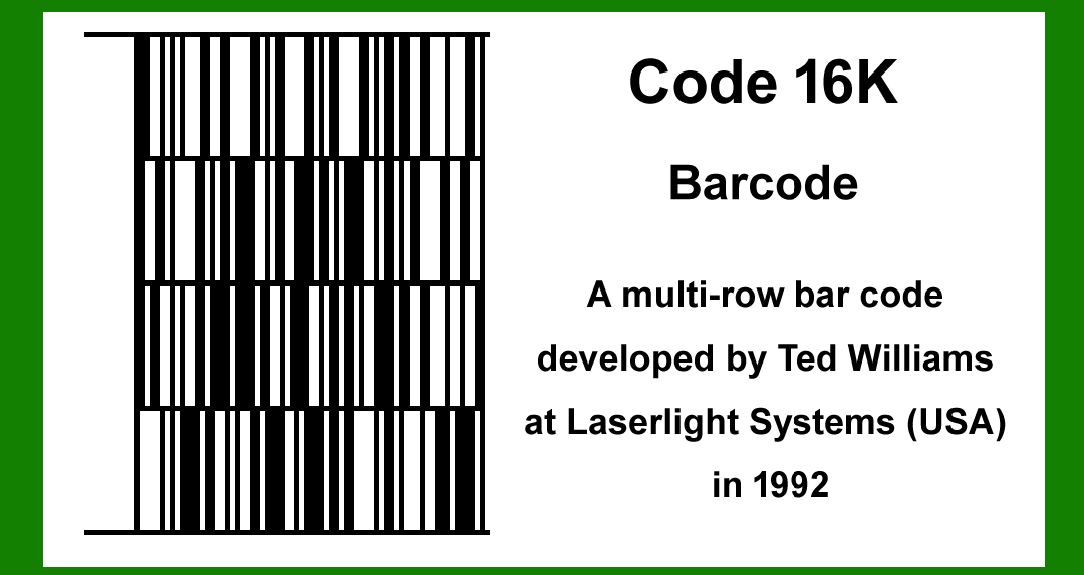
| Overview of Code 16K Barcode | Code 16K is a 2D barcode symbology developed by Intermec Technologies, now part of Honeywell. It is designed to encode up to 77 alphanumeric characters or 154 numeric digits per symbol. The barcode consists of rows and columns of dark and light square modules, which encode data in a grid-like pattern. | 
| Data Structure | The data structure of Code 16K barcode includes: | 1.Start and Stop Patterns: These are special patterns that indicate the beginning and end of the barcode symbol. 2.Data Codewords: Data is encoded into codewords, which are groups of bits that represent specific information. 3.Error Correction Codewords: Code 16K uses Reed-Solomon error correction to enhance data reliability. Error correction codewords are appended to the data to enable the barcode to withstand damage or distortion. | 
| Encoding Methods | 1. Binary Encoding | Code 16K encodes data using a binary format where each character or numeric digit is represented by a unique binary sequence. The binary data is then structured into codewords, typically 4 bits or 8 bits each, depending on the specific implementation. | 2. Reed-Solomon Error Correction | Error correction in Code 16K barcode is achieved using Reed-Solomon codes, which add redundancy to the encoded data. This redundancy allows the barcode to tolerate errors such as scratches, dirt, or printing imperfections. The number of error correction codewords appended depends on the level of error correction required, typically ranging from 10% to 30% of the total codewords. | 
| Example of Data Encoding | Let's walk through examples of encoding different types of data into a Code 16K barcode. | Example 1: Encoding Alphanumeric Data | Suppose we want to encode the following alphanumeric data into a Code 16K barcode: | Data: 'ABC123XYZ' | 1.Convert Characters to Binary: 'A' = 01000001 'B' = 01000010 'C' = 01000011 '1' = 00110001 '2' = 00110010 '3' = 00110011 'X' = 01011000 'Y' = 01011001 'Z' = 01011010 | 2.Group into Codewords: Assuming 8-bit codewords for simplicity, Codewords: [01000001, 01000010, 01000011, 00110001, 00110010, 00110011, 01011000, 01011001, 01011010] | 3.Add Error Correction: Suppose we choose to add 20% error correction codewords (16 codewords total): Original Codewords: [01000001, 01000010, 01000011, 00110001, 00110010, 00110011, 01011000, 01011001, 01011010] Error Correction Codewords: [10101010, 11001100, 11110000, 00001111, 11111100, 01010101, 10100100, 00111100, 11000011, 11100000, 00011111, 11100011, 00011100, 11110000, 00111110, 01010101] | 4.Concatenate Codewords: Combine the original and error correction codewords. Final Codewords: [01000001, 01000010, 01000011, 00110001, 00110010, 00110011, 01011000, 01011001, 01011010, 10101010, 11001100, 11110000, 00001111, 11111100, 01010101, 10100100, 00111100, 11000011, 11100000, 00011111, 11100011, 00011100, 11110000, 00111110, 01010101] | 5.Construct the Barcode: Using a Code 16K barcode generator, convert the codewords into the visual pattern of dark and light squares. | 
| Example 2: Encoding Numeric Data | Now, let's encode a numeric data string into a Code 16K barcode: | Data: '1234567890' | 1.Convert Numeric Digits to Binary: | '1' = 00000001 '2' = 00000010 '3' = 00000011 '4' = 00000100 '5' = 00000101 '6' = 00000110 '7' = 00000111 '8' = 00001000 '9' = 00001001 '0' = 00000000 | 2.Group into Codewords: Assuming 4-bit codewords for numeric data, | Codewords: [0001, 0010, 0011, 0100, 0101, 0110, 0111, 1000, 1001, 0000] | 3.Add Error Correction: | Suppose we add 15% error correction codewords (12 codewords total): Original Codewords: [0001, 0010, 0011, 0100, 0101, 0110, 0111, 1000, 1001, 0000] Error Correction Codewords: [1010, 1100, 1111, 0000, 1111, 0101, 1010, 0011, 1100, 1111, 0000, 1111] | 4.Concatenate Codewords: Combine the original and error correction codewords. | Final Codewords: [0001, 0010, 0011, 0100, 0101, 0110, 0111, 1000, 1001, 0000, 1010, 1100, 1111, 0000, 1111, 0101, 1010, 0011, 1100, 1111, 0000, 1111] | 5.Generate the Barcode: Use a Code 16K barcode generator to visualize the codewords as a barcode pattern. | 
| Conclusion | In conclusion, encoding data into a Code 16K barcode involves converting data into binary codewords, adding error correction for data integrity, and generating a visual representation of the barcode. This structured approach allows Code 16K to efficiently store and retrieve large amounts of data in various applications, from logistics and inventory management to document tracking and identification systems. The versatility and robustness of Code 16K make it a valuable tool for businesses and organizations needing reliable data encoding in a compact 2D barcode format. | 
|
|
 cs@easiersoft.com