Barcode Technology

Barcode History

Barcode Label Paper

Barcode Printer

Barcode Application

Inventory Management

AI Barcode QRCode

Barcode Scanner

Barcode Software

Barcode Software B

Barcode Software C

Barcode Software D

Barcode Software E

New Technology A

New Technology B

Robot Technology

Barcode Types

Barcode Types B

Barcode Types C

Barcode Types D

Barcode Types E

Barcode Types F

Electronic Technology

Psychology at Work

Barcode Technology and Barcode Software Related   <<< Back to Directory <<<

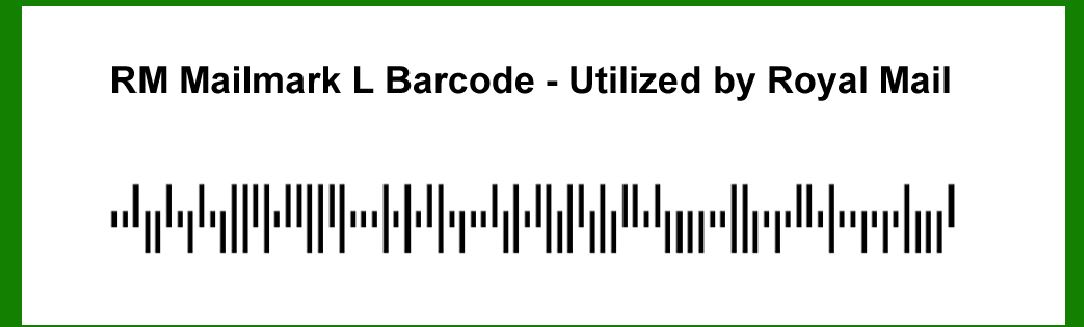
Encoding of the RM Mailmark L barcode

To encode the RM Mailmark L barcode, we need to delve into its structure, encoding rules, and how data is represented within it. The RM Mailmark L barcode is used by Royal Mail in the UK for efficient tracking and management of mail items. Here's a detailed description of its encoding process:

Structure of RM Mailmark L Barcode

The RM Mailmark L barcode belongs to the Mailmark family of barcodes used by Royal Mail. It is designed to encode essential information about a mail item in a compact form suitable for automated sorting and tracking.

Components of RM Mailmark L Barcode

1.Barcode Format: The RM Mailmark L barcode is a type of 2D barcode, specifically designed for use on large letters and parcels.

2.Data Elements: It encodes various data elements that are crucial for mail processing and tracking. These elements typically include:

Destination postcode

Delivery point identifier

Mail class

Return address information

Unique identifier for the mail item

3.Error Correction: Like most 2D barcodes, RM Mailmark L includes error correction mechanisms to ensure data integrity even if the barcode is partially damaged or obscured.

Encoding Details

1. Data Encoding

The encoding process involves converting the relevant information into a format that the barcode can represent. Here's a breakdown of how different types of data are encoded:

Numeric Data: Numerical data such as postcodes, identifiers, and counts are straightforwardly encoded in binary or decimal formats depending on the specifics of the barcode standard used by RM Mailmark L.

Alphanumeric Data: This includes text data such as addresses and names. Each character is typically represented by a binary sequence according to an agreed-upon character set, often using ASCII or UTF-8 encoding for broader character support.

Special Characters: Some data elements might require encoding of special characters or symbols. These are mapped to specific binary sequences within the barcode's encoding table.

2. Binary Representation

RM Mailmark L, being a 2D barcode, encodes data in a matrix of black and white modules (dots or squares). Each module represents a bit of data, with the entire barcode consisting of a grid of these modules.

Module Size: The size of each module (dot or square) is standardized to ensure readability across different scanning devices and distances.

Quiet Zone: A clear area surrounding the barcode, known as the quiet zone, ensures that no other marks or printing interfere with the barcode's scanning and decoding.

3. Error Correction Encoding

To enhance reliability, RM Mailmark L employs error correction techniques such as Reed-Solomon codes. These codes add redundant information to the barcode, allowing the barcode scanner to reconstruct the original data even if parts of the barcode are damaged or missing.

Error Correction Levels: Different error correction levels may be used depending on the application and the required robustness against errors.

Example of RM Mailmark L Encoding

Let's consider an example where a mail item needs to be encoded with RM Mailmark L:

1.Data Elements:

Destination postcode: EC1A1BB

Delivery point identifier: 12345

Mail class: First Class

Return address: John Doe, 123 Main St, London, UK

Unique identifier: 987654321

2.Encoding Process:

Convert each data element into its binary representation according to the RM Mailmark L encoding rules.

Apply error correction coding to ensure robustness against errors and damage.

3.Generate Barcode:

Arrange the binary data into the matrix of black and white modules.

Add quiet zones around the barcode to ensure proper scanning.

4.Final Barcode:

The completed RM Mailmark L barcode will visually appear as a grid of black and white squares or dots, representing the encoded data.

Conclusion

The encoding of RM Mailmark L barcode involves converting essential mail item data into a binary format that can be efficiently scanned and decoded by automated systems. It utilizes error correction techniques to ensure data integrity and reliability during the mail processing and delivery process. This structured approach to encoding ensures that Royal Mail can effectively track and manage large volumes of mail items with minimal errors and maximum efficiency.


EasierSoft Barcode Label Design & Bulk Printing Software

---- Use Excel Data to Batch Print Barcodes on Label Sheets or Roll Labels  

---- How to use this barcode software

Download:  Free Barcode Software + Barcode Label Designer

Download Free Barcode Software at Softonic

     Download at CNET

Once you obtain a GS1/UPC/EAN barcode, or other barcode type and QR code, you can use our free software to batch print barcode labels onto Roll label paper using a professional label printer, or to batch print barcodes onto Avery 5160 label sheets using a regular laser or inkjet printer. Our software has free and paid versions.

The free version fully meets your needs for batch printing GS1/UPC/EAN barcodes. The paid version can import data from Excel and databases to batch print barcode labels with different values.

How to Start

Input Data

Import Excel Data

Print Barcode

Barcode Format

Label Designer

All Screen Shot

Export Barcode Image

Save Template

Output Word Excel

How to Use & FAQ:

The supported barcode types

Load Excel data (pro)

Manually copy data from Excel files

Filter some data for printing

Edit imported barcode data

Input data (Pro)

Label Designer

Edit data in Label designer

Label Designer - Add new label

Label Designer - Printing

Set the barcode label format to be printed

Other Barcode Label Format Settings

Barcode types supported by this program

Barcode Label Font Settings

Configuring the Barcode Print Rotation

Text Alignment for Barcode Labels

Automatically Adjusting Barcode Width

Text Beneath the Barcode

Configuring Barcode Size

Auto Calculate the Barcode Size

Export Barcode images

Export Barcode Image Format

File Names for Exported Barcode

Resolution of Exported Barcode Images

Fixed Folder for Exporting Barcode

Default Barcode Image Export Format

Print bulk barcodes quickly

Print barcodes to Avery 5160 label

How to bulk Barcode Printing

Sample - Avery 5162 (2x7) Label Sheet

Example: Print barcodes to 5*3cm roll

Example: Print barcodes to 5161 label

Example: Print barcodes to 5162 label

Example: Print barcodes to 5163 label

Example: Print barcodes to 5164 label

Example: Print portrait orientation 5164

Example: Print barcodes to 5167 label

Example: Print barcodes to 5168 label

Example: Print portrait orientation 5168

Example: Print barcodes to 5169 label

Example: Print barcodes to 5660 label

Example: Print barcodes to 5661 label

Example: Print barcodes to 5662 label

Example: Print barcodes to 5663 label

Example: Print barcodes to 5664 label

Example: Print portrait orientation 5664

Example: Print barcodes to 5873 label

Example: Print barcodes to 5874 label

Two ways to import Excel data

Import Excel Data - Pro Edition

Highlights

Excel integration: Import data directly from Excel to generate and print barcodes in bulk.

Label designer: Create complex labels with multiple barcodes, text, logos, and shapes.

Batch printing: Print thousands of barcodes at once using standard inkjet/laser printers or professional barcode printers.


Flexible editions:

Standard Edition: Simple batch printing with Excel data.

Professional Edition: Adds command-line automation for workflow integration.

Label Designer Edition: Advanced design features for complex labels.


Why Choose Our Barcode Solutions?

Cost-effective: Free online generator and permanent free desktop version available.

Easy to use: No technical expertise required—just input data and print.

Versatile: Supports nearly all 1D and 2D barcode types, including QR codes.

Trusted: Recommended by CNET and widely downloaded by users worldwide.


Suitable Use Cases

Small businesses and startups needing quick barcode labels for products.

Retailers and online sellers managing inventory with batch barcode printing.

Manufacturers requiring sequential or custom barcode labels for packaging.

Educational and testing environments where barcodes are used for tracking.


CONTACT

cs@easiersoft.com

If you have any question, please feel free to email us.


https://free-barcode.com


<<< Back to Directory <<<     Barcode Generator     Barcode Freeware     Privacy Policy