1. Introduction to Codablock Barcode Error Correction |
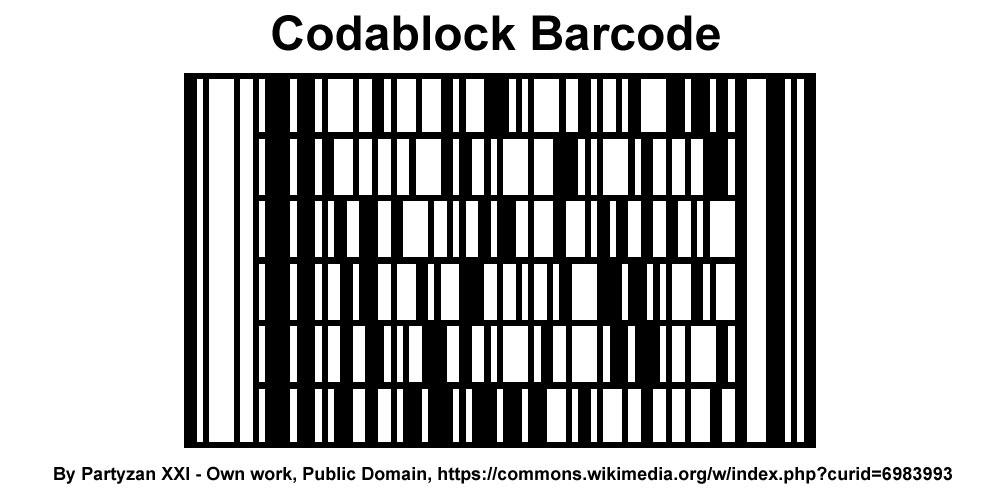
Codablock barcodes, particularly Codablock F, are stacked linear barcode symbologies that offer the advantage of encoding large amounts of data in a smaller space compared to traditional linear barcodes. They achieve this by stacking multiple rows of barcodes on top of each other. Error correction in Codablock barcodes is essential to ensure data integrity and reliability, especially in applications where barcodes are exposed to harsh environments or handling that can lead to damage. |
|
2. Error Correction Mechanisms in Codablock Barcodes |
Codablock barcodes use several error correction techniques to detect and correct errors that may occur during the barcode's lifecycle, from printing to scanning. These techniques include: |
2.1. Reed-Solomon Error Correction Reed-Solomon error correction is a widely used error correction method in barcoding technologies, including Codablock. It is particularly effective in correcting burst errors, which are common in barcodes due to physical damage or printing defects. |
2.1.1. Basics of Reed-Solomon Error Correction Reed-Solomon codes work by adding redundant data to the original message. This redundant data allows the system to detect and correct errors within the encoded message. The key components of Reed-Solomon error correction include: |
Codewords: Each codeword is a sequence of symbols from a finite field. Error Correction Capability: The number of errors that can be corrected depends on the number of redundant codewords added. For Codablock F, the typical error correction capability is denoted as ttt, where ttt is the number of symbol errors that can be corrected. |
2.1.2. Implementation in Codablock Barcodes In Codablock barcodes, Reed-Solomon error correction is applied to each row independently. This means that each row can correct errors without relying on information from other rows, making the system robust against localized damage. Example: Suppose a Codablock F barcode has 10 rows, each containing a payload of 20 data symbols and 6 Reed-Solomon code symbols. If up to 3 symbols in a row are erroneous, Reed-Solomon error correction can correct these errors and recover the original data. |

|
2.2. Interleaved 2 of 5 Error Detection |
Codablock barcodes often use the Interleaved 2 of 5 (ITF) encoding for individual rows, which includes built-in error detection through checksum calculations. |
2.2.1. Checksum Calculation Each row in the Codablock barcode can include a checksum digit, which is calculated from the data digits. This checksum helps in detecting errors within the row. Example: If a row in a Codablock F barcode encodes the data '12345678', the checksum might be calculated by summing the digits and applying a modulus operation. If the checksum is '4', the full encoded data might be '123456784'. If a scanning error changes one of the digits, the checksum will not match, indicating an error. |

|
2.3. Row Indicators and Row Counts |
Codablock barcodes include row indicators and row counts to ensure the integrity of the stacked rows. |
2.3.1. Row Indicators Row indicators are used to mark the position of each row within the stack. This ensures that the barcode reader can correctly identify the order of the rows, which is critical for reconstructing the original message. Example: In a Codablock F barcode with 5 rows, the row indicators might be numbered 1 to 5. If a row is missing or out of order, the error can be detected by checking the sequence of row indicators. |
2.3.2. Row Counts Row counts indicate the total number of rows in the barcode. This information is encoded within the barcode and helps the reader verify that all rows have been scanned. Example: If a Codablock F barcode is supposed to have 7 rows but only 6 are scanned, the reader will detect this discrepancy and report an error. |

|
3. Practical Examples of Error Correction in Codablock Barcodes |
To understand how these error correction mechanisms work in practice, consider the following scenarios: |
3.1. Scenario 1: Single Symbol Error |
Situation: A Codablock F barcode row contains the data '123456784' (with '4' as the checksum). During scanning, the digit '5' is misread as '3', resulting in '123436784'. Detection: The checksum calculation will indicate an error because the sum of the digits (1+2+3+4+3+6+7+8+4) does not match the expected checksum. Correction: Reed-Solomon error correction can correct this single symbol error and recover the original data '123456784'. |
3.2. Scenario 2: Burst Error |
Situation: A portion of a Codablock F barcode row is damaged, causing multiple consecutive symbols to be unreadable. The row data is 'ABCDEFGHIJK', where 'DEFG' is corrupted to 'XXXX'. Detection: The checksum will detect that the row data is invalid, and the Reed-Solomon code will identify the position and nature of the errors. Correction: If the Reed-Solomon code is configured to correct up to 4 symbols, it can correct the burst error and recover the original data 'ABCDEFGHIJK'. |
3.3. Scenario 3: Missing Row |
Situation: A Codablock F barcode with 5 rows has the second row missing during scanning. Detection: The row indicators will show a gap between row 1 and row 3, indicating a missing row. Correction: The reader will report an error due to the missing row. Manual inspection or re-scanning may be required to retrieve the missing data. |

|
4. Error Correction Code Structures in Codablock Barcodes |
The structure of error correction codes in Codablock barcodes can vary based on the specific implementation and the level of error correction desired. |
4.1. Reed-Solomon Code Structure |
Reed-Solomon codes in Codablock barcodes are typically structured as follows: |
4.1.1. Codeword Formation Each row in the Codablock barcode is treated as a separate codeword. The data symbols and the Reed-Solomon parity symbols form this codeword. Example: A row with 20 data symbols and 6 parity symbols forms a codeword of 26 symbols. The Reed-Solomon algorithm processes these symbols to generate the parity symbols. 4.1.2. Error Correction Capacity The number of parity symbols determines the error correction capacity. For Codablock F, typical configurations might include: 4 parity symbols: Can correct up to 2 symbol errors. 6 parity symbols: Can correct up to 3 symbol errors. |
4.2. Checksum Structure |
Checksums are simpler error detection mechanisms that are often used in conjunction with more robust error correction codes. |
4.2.1. Checksum Calculation The checksum is calculated by summing the values of the data symbols and applying a modulus operation. Example: For the data '12345678', the checksum might be calculated as follows: 1 + 2 + 3 + 4 + 5 + 6 + 7 + 8 = 36 Checksum = 36 % 10 = 6 The data with the checksum appended becomes '123456786'. |

|
5. Implementation and Best Practices for Codablock Barcode Error Correction |
When implementing Codablock barcodes, it is important to follow best practices to maximize the effectiveness of error correction mechanisms. |
5.1. Quality of Printing |
The quality of barcode printing significantly affects error rates. High-resolution printers and proper barcode design can minimize the likelihood of printing errors. Best Practices: Use high-resolution printers to ensure clear and accurate barcode printing. Avoid printing on surfaces that can cause distortions, such as curved or textured surfaces. Ensure proper alignment and spacing of barcode rows to prevent scanning errors. |
5.2. Barcode Scanning |
The choice of barcode scanner and scanning technique can also impact error detection and correction. Best Practices: Use barcode scanners with high-resolution sensors capable of reading fine details. Implement multi-angle scanning to capture all rows of the barcode accurately. Regularly calibrate and maintain barcode scanners to ensure optimal performance. |
5.3. Data Encoding |
Proper data encoding can enhance the effectiveness of error correction by ensuring that data is formatted correctly and consistently. Best Practices: Use standard data encoding formats to ensure compatibility with barcode readers and error correction algorithms. Validate data before encoding to prevent errors from propagating into the barcode. |

|
6. Advanced Error Correction Techniques |
While Reed-Solomon error correction is robust, additional techniques can further enhance error correction capabilities in Codablock barcodes. |
6.1. Interleaving |
Interleaving involves rearranging data symbols before encoding them with error correction codes. This technique can help mitigate burst errors by spreading them across different codewords. Example: If a row contains the data 'ABCDEFGHIJK', interleaving might reorder the symbols as 'ACEGIKBDFHJ'. The interleaved data is then encoded with Reed-Solomon codes. |
6.2. Hybrid Error Correction |
Combining multiple error correction techniques can provide enhanced error correction capabilities. For example, using both Reed-Solomon codes and cyclic redundancy checks (CRC) can offer robust protection against a wide range of errors. Example: A Codablock barcode might use Reed-Solomon codes for primary error correction and CRC for additional error detection. If an error is detected by the CRC but not corrected by Reed-Solomon codes, the data can be flagged for further inspection. |

|
7. Conclusion |
Error correction in Codablock barcodes is a critical feature that ensures data integrity and reliability in various applications. By utilizing Reed-Solomon error correction, Interleaved 2 of 5 error detection, row indicators, and row counts, Codablock barcodes can effectively detect and correct a wide range of errors. Implementing best practices in printing, scanning, and data encoding further enhances the robustness of these error correction mechanisms. Advanced techniques like interleaving and hybrid error correction can provide additional layers of protection, making Codablock barcodes a reliable choice for encoding large amounts of data in a compact and resilient format. |

|
 cs@easiersoft.com