1. Introduction |
Error correction is a vital aspect of barcode technology, ensuring that information encoded within barcodes can be accurately retrieved despite potential damage or distortions during scanning. Code 39, one of the earliest barcode symbologies, typically used for inventory and industrial applications, does not inherently support error correction. However, methods and practices can be employed to enhance its reliability and accuracy. This detailed discussion focuses on various aspects and techniques associated with error correction in the context of Code 39 barcodes. |
|
2. Basic Characteristics of Code 39 |
2.1. Symbology Overview |
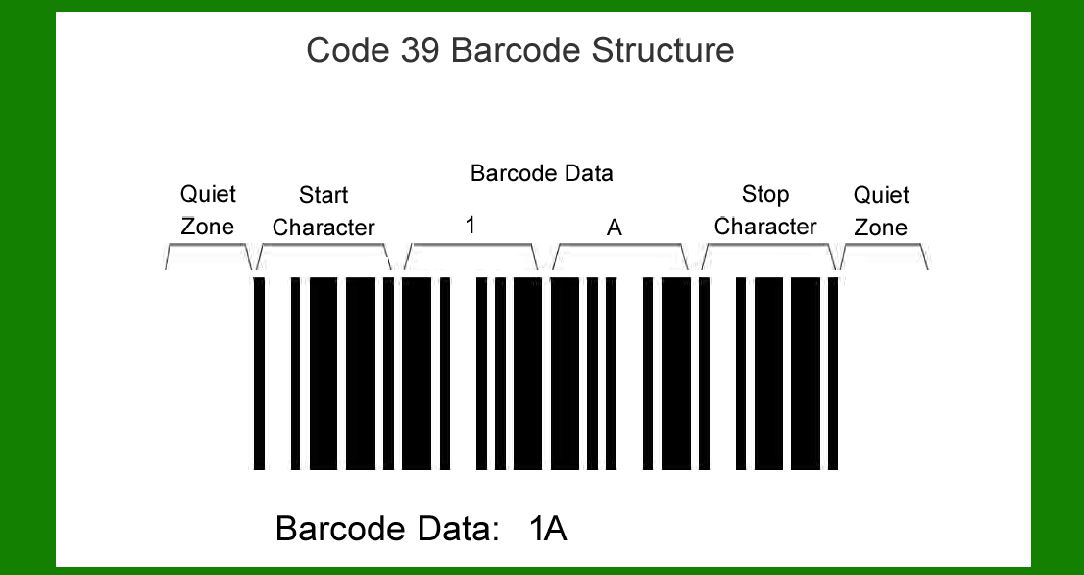
Code 39, also known as Code 3 of 9, is a discrete, variable-length alphanumeric barcode symbology. Each character is represented by a pattern of nine bars and spaces, with five bars being wide and four narrow. It encodes 43 characters, including uppercase letters, digits 0-9, and a few special characters. |
2.2. Structure |
Each Code 39 character is made up of five bars and four spaces, with a start and stop character (*). The narrow bar width is typically referred to as X, and the wide bar width is usually three times X. There is an inter-character gap (ICG) that separates each character, usually equal to the width of a narrow bar (X). |

|
3. Inherent Error Detection in Code 39 |
3.1. Start and Stop Characters |
The presence of distinct start and stop characters (*) allows scanners to identify the beginning and end of the barcode, providing a simple form of error detection by ensuring the scanner correctly interprets the boundaries of the barcode. |
3.2. Character Structure |
The unique pattern of each character's bars and spaces in Code 39 offers some inherent error detection. If a pattern deviates from the expected structure, it can be flagged as an error. |

|
4. Limitations of Code 39 in Error Correction |
4.1. Lack of Built-in Error Correction |
Unlike more advanced symbologies like QR Code or Data Matrix, Code 39 does not incorporate built-in error correction algorithms. This limitation means that any damage or distortion in the barcode can lead to unreadable or incorrectly read data. |
4.2. Vulnerability to Damage |
Since Code 39 is linear and the information is spread across the length of the barcode, any damage to the barcode, especially horizontal smudges or scratches, can significantly impact readability. |

|
5. Error Correction Techniques for Code 39 |
To address the limitations in error correction, several strategies can be employed: |
5.1. Use of Check Digits |
Adding check digits is a common method to enhance error detection and correction capabilities. |
5.1.1. Concept of Check Digits |
A check digit is an additional character added to the end of the data being encoded. It is derived from a mathematical calculation based on the data characters. |
5.1.2. Implementation in Code 39 |
For Code 39, a Modulo 43 check digit can be used. This involves: |
Assigning each character a value (e.g., A=10, B=11, ..., Z=35, 0=0, 1=1, ..., 9=9, etc.). Summing these values for all characters in the barcode. Calculating the remainder when the sum is divided by 43. Adding the character that corresponds to this remainder as the check digit. |
5.1.3. Example of Check Digit Calculation |
Consider encoding 'CODE39' without a check digit: |
C = 12 O = 24 D = 13 E = 14 3 = 3 9 = 9 |
Sum = 12 + 24 + 13 + 14 + 3 + 9 = 75 75 % 43 = 32 (Remainder) Character value 32 corresponds to W (assuming A=0, B=1, ..., Z=25, 0=26, 1=27, ..., 9=35, space=36, $, /, +, % are 37-40, and - and . are 41 and 42 respectively). So, 'CODE39W' is the encoded string with a check digit. |
5.2. Redundancy and Duplication |
In environments where error correction is critical, redundancy can be introduced by duplicating the barcode. |
5.2.1. Multiple Barcodes |
Printing the same data multiple times on the same label can allow scanners to read any one of the barcodes if others are damaged. |
5.2.2. Overlapping or Adjacent Placement |
Placing multiple instances of the barcode in different orientations or positions on the package can mitigate the risk of unreadability due to localized damage. |
5.3. Data Verification Practices |
5.3.1. Scanner Verification |
Using barcode scanners with verification capabilities can help ensure that barcodes meet quality standards before use. |
5.3.2. Human Verification |
Implementing a process for human verification, where employees manually check the printed barcodes, can add an additional layer of error prevention. |

|
6. Advanced Error Correction Strategies |
6.1. Software-Based Error Correction |
Advanced software can play a significant role in improving error correction for Code 39 barcodes. |
6.1.1. Error-Correcting Algorithms |
Sophisticated scanning software can incorporate error-correcting algorithms that analyze the scanned data for inconsistencies and attempt to correct errors based on known patterns and redundancies. |
6.1.2. Example Algorithm |
One example is the use of Reed-Solomon error correction algorithms, which are typically used in two-dimensional barcodes but can be adapted for linear barcodes through software. |
6.2. Enhanced Imaging Technology |
6.2.1. High-Resolution Scanning |
Using high-resolution scanners can improve the readability of barcodes, especially in cases where minor damage or printing errors are present. |
6.2.2. Image Processing Techniques |
Applying image processing techniques such as edge detection and noise reduction can enhance the clarity of scanned barcodes, reducing the likelihood of errors. |
6.3. Environmental Considerations |
6.3.1. Quality of Printing |
Ensuring high-quality printing with proper contrast between bars and spaces is crucial for the readability of Code 39 barcodes. |
6.3.2. Material and Surface |
Using durable materials and surfaces that do not easily smudge or scratch can help maintain barcode integrity. |

|
7. Case Studies and Examples |
7.1. Industrial Application |
7.1.1. Scenario |
A manufacturing plant uses Code 39 barcodes for tracking parts and inventory. Due to the harsh environment, barcodes often suffer damage, leading to scanning errors. |
7.1.2. Implementation of Check Digits |
The plant introduced Modulo 43 check digits to all Code 39 barcodes. This allowed the scanning system to detect errors in scanned data and flag items for re-scanning. |
7.1.3. Results |
The error rate dropped significantly, as the check digit provided a simple yet effective means of error detection. |
7.2. Retail Application |
7.2.1. Scenario |
A retail store uses Code 39 barcodes for product pricing and inventory management. Barcodes printed on paper tags often become unreadable due to handling. |
7.2.2. Use of Redundancy |
The store implemented redundant barcode printing, placing two instances of each barcode on the tags. This redundancy ensured that at least one barcode remained readable. |
7.2.3. Results |
The rate of unreadable barcodes decreased, improving the efficiency of inventory management and checkout processes. |
7.3. Healthcare Application |
7.3.1. Scenario |
A hospital uses Code 39 barcodes for patient wristbands. The barcodes often become damaged due to exposure to various liquids and physical wear. |
7.3.2. Enhanced Imaging Technology |
The hospital upgraded to high-resolution barcode scanners equipped with advanced image processing software capable of correcting minor errors. |
7.3.3. Results |
The readability of barcodes on patient wristbands improved significantly, enhancing patient safety and workflow efficiency. |

|
8. Future Directions and Innovations |
8.1. Integration with Other Technologies |
Combining Code 39 barcodes with other technologies such as RFID (Radio-Frequency Identification) can offer additional error correction and data integrity measures. |
8.2. Development of New Symbologies |
While Code 39 remains widely used, the development of new barcode symbologies with built-in error correction and higher data capacity continues to evolve, potentially offering alternatives in applications where error correction is critical. |
|
9. Conclusion |
9.1. Summary |
Code 39 barcodes, while simple and widely used, inherently lack robust error correction mechanisms. However, by implementing techniques such as check digits, redundancy, and advanced scanning technologies, the reliability and accuracy of Code 39 barcodes can be significantly enhanced. |
9.2. Practical Recommendations |
Organizations using Code 39 should consider: |
Implementing check digits to detect and correct errors. Using redundancy to mitigate the impact of localized damage. Investing in high-quality printing and durable materials. Employing advanced scanning technologies and software solutions. |
9.3. Final Thoughts |
Although Code 39 does not offer built-in error correction, practical strategies and technological advancements can greatly improve its effectiveness in various applications. By understanding and applying these methods, users can ensure that Code 39 remains a reliable and valuable tool in their barcode systems. |

|
 cs@easiersoft.com