1. Introduction to Code 49 Barcode Error Correction |
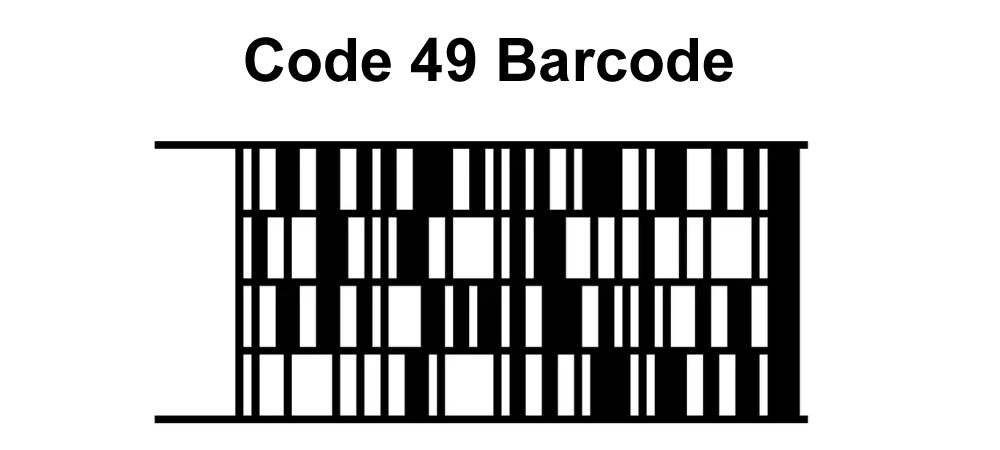
Code 49 is a stacked linear barcode symbology designed to encode large amounts of data in a compact form. It was developed in the mid-1980s by David Allais, specifically to address the limitations of traditional linear barcodes, which could not efficiently encode large data sets. A critical feature of Code 49, like many modern barcode symbologies, is its error correction capability. Error correction ensures that even if parts of the barcode are damaged or poorly printed, the original data can still be accurately retrieved. |
|
2. Error Correction Techniques |
Error correction in Code 49 is achieved through the implementation of specific algorithms that can detect and correct errors in the encoded data. The primary techniques used in Code 49 include: |
2.1 Reed-Solomon Error Correction: Reed-Solomon error correction is a widely used method in digital communications and storage. It is particularly effective in correcting burst errors, which are clusters of errors that occur together. Code 49 uses this technique to add redundancy to the data, enabling the detection and correction of multiple errors. |
2.2 Checksum Calculations: Code 49 employs checksum calculations to ensure data integrity. Checksums are additional data points derived from the original data that help in verifying the accuracy of the transmitted or stored information. |

|
3. Structure of Code 49 for Error Correction |
The structure of Code 49 plays a significant role in its error correction capabilities. The barcode consists of several rows of data, with each row having its own set of encoded information. This multi-row format allows for better handling of errors, as the damage to one row does not necessarily compromise the entire barcode. |
3.1 Data Encapsulation: Data in Code 49 is encapsulated within a structured format that includes start and stop characters, data characters, and error correction characters. This structure helps in isolating and identifying errors. |
3.2 Symbol Character Sets: Code 49 utilizes different symbol character sets, including alphanumeric and numeric characters, which are encoded in a way that enhances error detection and correction. |

|
4. Reed-Solomon Error Correction in Code 49 |
Reed-Solomon error correction is central to the robustness of Code 49. It works by adding redundancy to the data, enabling the detection and correction of errors even if part of the barcode is damaged. |
4.1 Error Correction Codewords: The barcode includes additional codewords specifically for error correction. These codewords are generated based on the original data using Reed-Solomon algorithms. |
4.2 Error Detection and Correction Process: During scanning, the barcode reader uses the Reed-Solomon algorithm to analyze the codewords. If discrepancies are found, the reader can correct them using the redundant information encoded within the barcode. |

|
5. Checksum Calculations in Code 49 |
Checksums add another layer of error detection in Code 49 barcodes. They are calculated based on the data and help verify its integrity upon scanning. |
5.1 Checksum Generation: Checksums are generated during the encoding process by applying specific mathematical functions to the data. These functions produce a value that reflects the content of the data. |
5.2 Verification Process: When the barcode is scanned, the checksum is recalculated and compared to the encoded checksum value. If they match, the data is considered intact. If not, errors are detected, prompting the error correction mechanisms to engage. |

|
6. Implementation of Error Correction in Code 49 |
Implementing error correction in Code 49 involves several steps, from generating error correction codewords to verifying data integrity upon scanning. |
6.1 Encoding Phase: During the encoding phase, the data is first segmented into multiple rows. Each row is processed separately to generate error correction codewords. The codewords are then added to the data, forming the complete barcode. |
6.2 Decoding Phase: During the decoding phase, the barcode reader scans the barcode, capturing the data and error correction codewords. The Reed-Solomon algorithm and checksums are used to detect and correct any errors. |

|
7. Examples of Error Correction in Code 49 |
To illustrate the error correction process in Code 49, let's consider a few examples demonstrating how errors are detected and corrected. |
7.1 Example 1: Single Error Correction: Suppose a Code 49 barcode is encoded with the following data: '1234567890'. During scanning, one character is read incorrectly due to a printing defect. The Reed-Solomon error correction codewords enable the barcode reader to detect and correct this single error, restoring the original data. |
7.2 Example 2: Burst Error Correction: In another example, a portion of the barcode is damaged, causing several consecutive characters to be unreadable. The error correction codewords distributed across the rows allow the barcode reader to identify the burst error and reconstruct the damaged data segments accurately. |

|
8. Advantages of Error Correction in Code 49 |
The error correction capabilities of Code 49 offer several advantages, making it suitable for applications requiring high data integrity and robustness. |
8.1 Enhanced Data Integrity: The ability to detect and correct errors ensures that the data remains intact and accurate, even in adverse conditions. |
8.2 Improved Durability: Code 49's error correction makes it more durable and reliable, particularly in environments where barcodes may be subjected to damage or poor printing quality. |

|
9. Challenges and Limitations |
Despite its robust error correction capabilities, Code 49 is not without challenges and limitations. |
9.1 Complexity: The implementation of Reed-Solomon error correction adds complexity to the encoding and decoding processes, requiring more sophisticated barcode readers. |
9.2 Data Density: The inclusion of error correction codewords increases the overall size of the barcode, which may limit its application in scenarios requiring very compact barcodes. |

|
10. Conclusion |
Error correction in Code 49 barcodes is a critical feature that enhances data integrity and reliability. Through the use of Reed-Solomon error correction and checksum calculations, Code 49 can detect and correct errors, ensuring accurate data retrieval even when parts of the barcode are damaged. This makes Code 49 a robust and reliable choice for applications requiring high data integrity and durability. |

|
11. Practical Implementation and Considerations |
11.1 Practical Steps for Encoding: To encode data with error correction in Code 49, the data is first divided into smaller chunks. These chunks are then processed to generate error correction codewords using the Reed-Solomon algorithm. The codewords are added to the original data, creating a redundant yet error-resilient barcode. |
11.2 Barcode Reader Requirements: Barcode readers must be equipped with the capability to decode Reed-Solomon codewords and verify checksums. This requires more advanced processing capabilities compared to simpler linear barcode readers. |

|
12. Detailed Example of Error Correction Calculation |
To further illustrate, let's go through a detailed example of error correction calculation for a Code 49 barcode. |
12.1 Step-by-Step Process: Suppose we need to encode the data 'HELLO123'. First, the data is divided into smaller segments suitable for encoding in Code 49. Each segment is processed to generate error correction codewords. |
12.2 Reed-Solomon Algorithm Application: The Reed-Solomon algorithm takes the data segments and generates redundancy codewords. For instance, if the original data segment is 'HELLO', the algorithm might produce additional codewords such as 'R1R2R3', where R1, R2, and R3 are the redundancy codewords. |
12.3 Checksum Calculation: Checksums are then calculated for the data, ensuring that any errors during transmission or storage can be detected and corrected. For example, a simple checksum might involve summing the ASCII values of the characters in 'HELLO123' and encoding this sum as an additional data point in the barcode. |
12.4 Final Barcode Generation: The original data, redundancy codewords, and checksums are combined to form the final Code 49 barcode. This barcode is then printed or displayed for scanning. |

|
13. Scanning and Error Correction |
When the barcode is scanned, the reader captures the encoded data, including the redundancy codewords and checksums. |
13.1 Error Detection: The reader first checks for errors by comparing the scanned data against the checksums. If discrepancies are found, it proceeds to error correction. |
13.2 Error Correction Using Reed-Solomon: The Reed-Solomon algorithm is applied to the captured data to identify and correct errors. For instance, if a segment of the barcode reads 'HE_LO123' due to a smudge, the algorithm can use the redundancy codewords to infer the missing character and restore the original 'HELLO123'. |

|
14. Conclusion and Future Outlook |
Error correction in Code 49 is a sophisticated process involving advanced algorithms and checksum calculations. It ensures high data integrity and robustness, making Code 49 suitable for applications where accuracy and reliability are paramount. As technology advances, further improvements in error correction techniques may enhance the capabilities of Code 49 and similar barcode symbologies, ensuring even greater resilience against errors and damage. |

|
15. Summary |
In summary, the error correction mechanism of Code 49 involves: |
15.1 Reed-Solomon Error Correction: Adding redundancy to the data to detect and correct errors. |
15.2 Checksum Calculations: Verifying data integrity through additional calculated values. |
15.3 Structured Data Encapsulation: Organizing data in a way that facilitates error detection and correction. |
15.4 Advanced Barcode Readers: Utilizing sophisticated readers capable of handling complex error correction algorithms. |
These components collectively ensure that Code 49 can reliably encode and decode data, even under conditions that may cause damage or data loss. |

|
16. Future Improvements and Innovations |
Future developments in error correction for Code 49 may involve enhanced algorithms and more efficient encoding techniques, further improving its robustness and applicability in various industries. |
16.1 Algorithm Enhancements: Ongoing research may yield more efficient and powerful error correction algorithms, reducing the complexity and increasing the speed of encoding and decoding processes. |
16.2 Integration with Modern Technologies: As barcode technology integrates with modern systems such as IoT and AI, the error correction capabilities of Code 49 could be further enhanced, making it more versatile and effective. |

|
17. Concluding Remarks |
Error correction is a fundamental aspect of Code 49, ensuring data integrity and reliability. By leveraging advanced techniques such as Reed-Solomon error correction and checksum calculations, Code 49 can maintain accurate data even in the face of errors and damage. This robustness makes it a valuable tool in many applications, from logistics and inventory management to complex data storage solutions. As technology continues to evolve, so too will the error correction capabilities of barcode symbologies like Code 49, paving the way for even more reliable and efficient data encoding and retrieval methods. |
 cs@easiersoft.com