1. Introduction |
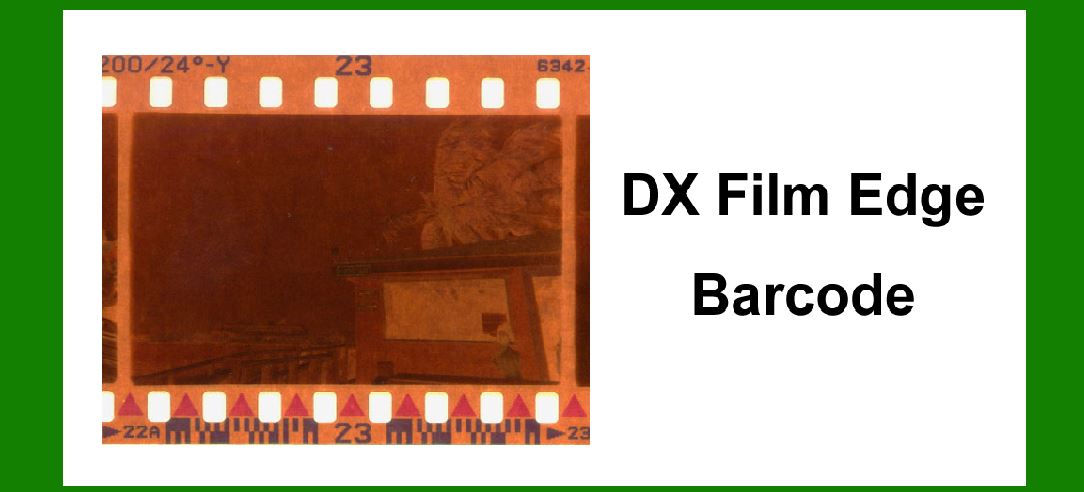
The DX (Digital indeX) film edge barcode is a unique technology used primarily in the photographic film industry. It is essential for encoding information such as film type, exposure speed, and frame number. Understanding error correction in the DX film edge barcode is critical to ensure reliable data retrieval, especially when the barcode might be damaged or partially unreadable. |
|
2. Structure of the DX Film Edge Barcode |
Before diving into error correction mechanisms, it's essential to comprehend the structure of the DX film edge barcode. This barcode typically consists of: |
2.1. Light and Dark Areas Binary Representation: The barcode is a series of alternating light and dark areas, representing binary data (0s and 1s). Data Encoding: Information is encoded in these patterns along the edge of the film. |
2.2. Data Segments Film Type Segment: Encodes the type of film (e.g., color, black and white). Speed Segment: Indicates the ISO speed of the film. Frame Number Segment: Identifies the frame numbers on the film strip. |

|
3. Error Types in DX Film Edge Barcode |
Various errors can occur in DX film edge barcodes due to physical damage, dirt, or manufacturing defects. Common error types include: |
3.1. Deletion Errors Missing Bits: Bits are missing from the barcode due to physical tears or obstructions. |
3.2. Insertion Errors Extra Bits: Extra bits are added, often due to overlapping or smudging. |
3.3. Substitution Errors Incorrect Bits: Bits are incorrectly read, often because of dirt or poor printing quality. |

|
4. Error Detection and Correction Techniques |
Several error detection and correction techniques are employed to maintain the integrity of the data in DX film edge barcodes. These techniques include: |
4.1. Redundancy and Parity Bits Adding Redundant Data: Extra bits are added to the barcode that does not contain any new information but are used to verify the integrity of the data. Parity Checking: Parity bits (either even or odd) are used to detect single-bit errors in the data. |
4.2. Checksums Checksum Calculation: A checksum is calculated by performing a series of operations on the data bits, which is then appended to the data. Verification: During scanning, the checksum is recalculated and compared to the appended checksum to detect errors. |
4.3. Error Correction Codes (ECC) Hamming Codes: A specific ECC used to detect and correct single-bit errors and detect two-bit errors. Reed-Solomon Codes: More robust ECC capable of correcting multiple random errors and burst errors. |

|
5. Detailed Explanation of Error Correction Codes |
To understand the application of ECC in DX film edge barcodes, we delve into two commonly used codes: Hamming codes and Reed-Solomon codes. |
5.1. Hamming Codes |
Hamming codes are a family of linear error-correcting codes that can detect and correct single-bit errors. The structure and application of Hamming codes involve: |
5.1.1. Parity Bit Calculation Generating Parity Bits: Calculate the parity bits for each combination of data bits. Positioning: Parity bits are positioned at power-of-two indices in the data sequence. |
5.1.2. Error Detection and Correction Syndrome Calculation: During decoding, a syndrome is calculated using the parity bits, indicating if and where an error has occurred. Correction: If a single-bit error is detected, it is corrected by flipping the erroneous bit. |
5.1.3. Example Consider a 7-bit Hamming code that encodes 4 bits of data. For data bits 1101, the Hamming code with parity bits would be 0111010. If an error occurs, say the third bit is flipped, resulting in 0101010, the syndrome calculation will indicate an error in the third bit, which is then corrected to 0111010. |

|
5.2. Reed-Solomon Codes |
Reed-Solomon codes are non-binary error-correcting codes, which are particularly effective in correcting burst errors. The structure and application involve: |
5.2.1. Polynomial Representation Data as Polynomials: Data is represented as polynomials over a finite field. Codeword Generation: Redundant symbols (parity symbols) are generated by evaluating the data polynomial at different points. |
5.2.2. Error Detection and Correction Syndrome Calculation: Syndromes are calculated by evaluating the received polynomial at the same points. Error Locator Polynomial: An error locator polynomial is computed to identify the error positions. Error Magnitude Polynomial: The magnitude of errors at each identified position is calculated. Correction: The original data is corrected by subtracting the error magnitudes from the received data. |
5.2.3. Example Consider a Reed-Solomon code RS(7, 3), which can correct up to 2 symbol errors. If the original data is D(x) = x^2 + 2x + 1, the encoded data with parity symbols might be C(x) = x^6 + 2x^5 + x^4 + x^3 + 2x^2 + 2x + 1. If two symbols are in error, the decoding process involves calculating syndromes, solving for error locations and magnitudes, and correcting the codeword. |

|
6. Practical Implementation in DX Film Edge Barcode |
6.1. Encoding Process Data Preparation: The film type, speed, and frame number data are prepared. Error Correction Code Generation: Appropriate ECC (Hamming or Reed-Solomon) is calculated and appended to the data. Barcode Printing: The complete barcode, including ECC, is printed along the edge of the film. |
6.2. Decoding Process Scanning: The barcode is scanned by a barcode reader. Error Detection: Parity bits or syndromes are calculated and compared to detect errors. Error Correction: Detected errors are corrected using ECC algorithms. Data Retrieval: Corrected data is retrieved and used. |

|
7. Examples of Error Correction in DX Film Edge Barcode |
7.1. Single-Bit Error Correction with Hamming Code Suppose the original data to be encoded is 1101. Using Hamming code, the encoded data is 0111010. If the barcode is read as 0101010 due to a single-bit error, the Hamming code detects an error in the third bit and corrects it, restoring the data to 0111010. |
7.2. Multiple-Bit Error Correction with Reed-Solomon Code Consider a scenario where the data is encoded using a Reed-Solomon code RS(7, 3). The original encoded data C(x) = x^6 + 2x^5 + x^4 + x^3 + 2x^2 + 2x + 1 is read with errors as R(x) = x^6 + 3x^5 + x^4 + 3x^3 + 2x^2 + 2x + 1. The decoding process involves calculating syndromes, identifying error locations at positions 1 and 3, and correcting the data, thus restoring the original codeword. |

|
8. Challenges and Limitations |
While ECC techniques are robust, there are inherent challenges and limitations: |
8.1. Computational Complexity Processing Time: ECC algorithms, especially Reed-Solomon, require significant computational resources, which can slow down the decoding process. |
8.2. Physical Constraints Print Quality: Poor print quality or damage can severely affect the barcode's readability and error correction capability. Environmental Factors: Dirt, smudges, and physical wear can introduce errors that may overwhelm ECC capabilities. |

|
9. Conclusion |
Error correction in the DX film edge barcode is a vital aspect that ensures reliable data retrieval despite physical damages or errors during scanning. By employing techniques such as parity bits, checksums, and ECCs like Hamming and Reed-Solomon codes, the integrity of the data is maintained. These methods enable the detection and correction of various error types, ensuring that essential information about the film is accurately captured and retrieved. However, it is crucial to address the challenges and limitations inherent in these techniques to maximize their effectiveness in practical applications. |

|
10. References |
To further understand the intricacies and applications of error correction in DX film edge barcodes, the following references provide detailed insights: Peterson, W. W., & Weldon, E. J. (1972). Error-Correcting Codes. MIT Press. Hamming, R. W. (1950). Error detecting and error correcting codes. The Bell System Technical Journal, 29(2), 147-160. Reed, I. S., & Solomon, G. (1960). Polynomial codes over certain finite fields. Journal of the Society for Industrial and Applied Mathematics, 8(2), 300-304. |
Understanding these references can provide a deeper theoretical foundation and practical insights into the error correction mechanisms applied to DX film edge barcodes. |

|
 cs@easiersoft.com