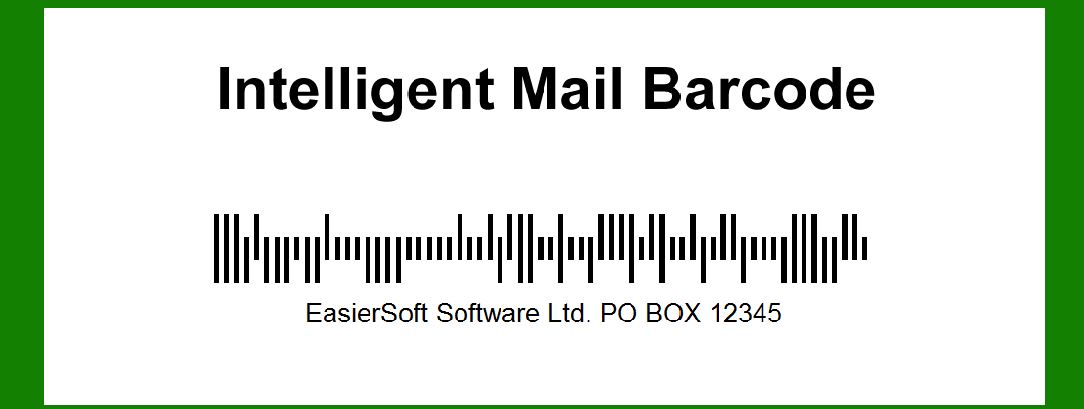
The Intelligent Mail Barcode (IMb) is a 65-bar postal barcode used by the United States Postal Service (USPS) for tracking and sorting mail. Error correction in the IMb is an integral part of ensuring the accuracy and reliability of the data encoded within the barcode. This document delves into the details of the error correction mechanisms employed in the Intelligent Mail Barcode. |
|
1. Overview of Error Correction in IMb |
Error correction in the Intelligent Mail Barcode involves several techniques designed to detect and correct errors that may occur during the printing, scanning, or transmission of the barcode. These techniques ensure that the data remains intact and can be accurately read even if parts of the barcode are damaged or degraded. |
1.1 Importance of Error Correction 1.1.1 Data Integrity: The primary purpose of error correction is to maintain the integrity of the encoded data. Given the critical nature of postal services, any errors in the barcode data could lead to misrouting or loss of mail. 1.1.2 Resilience: Error correction enhances the resilience of the barcode against physical damage such as smudges, scratches, or printing defects. 1.1.3 Reliability: It ensures that the barcode can be reliably read by different scanning devices under various conditions, thus improving the overall reliability of the postal system. |

|
2. Structure of the Intelligent Mail Barcode |
To understand the error correction mechanisms, it is essential to first comprehend the structure of the IMb. |
2.1 Composition of IMb |
2.1.1 65 Bars: The IMb consists of 65 vertical bars arranged in four distinct tracks. Each bar is a binary element, where the presence or absence of a bar represents binary 1 or 0. 2.1.2 Data Fields: The barcode encodes multiple data fields, including the ZIP Code, tracking information, and other relevant data. These fields are encoded using a series of binary sequences. 2.1.3 Encoding Scheme: The encoding scheme used in IMb is a 4-State Code, where each bar can take on one of four possible states: Ascender, Descender, Full, and Tracker. |
2.2 Error Detection and Correction Codewords |
2.2.1 Codewords: The data in the IMb is divided into several codewords. These codewords are groups of bits that represent different segments of the encoded information. 2.2.2 Redundancy: Redundancy is built into the codewords to facilitate error detection and correction. This redundancy is achieved through the use of specialized error correction algorithms. |

|
3. Error Correction Techniques |
The Intelligent Mail Barcode employs several error correction techniques, primarily based on Reed-Solomon error correction codes, to ensure data integrity. |
3.1 Reed-Solomon Error Correction |
3.1.1 Introduction to Reed-Solomon Codes: Reed-Solomon codes are block error-correcting codes that are widely used in digital communications and storage. They are particularly effective in correcting burst errors, which are common in printed barcodes. 3.1.2 Implementation in IMb: In the context of IMb, Reed-Solomon codes are used to encode the data in such a way that even if parts of the barcode are unreadable, the original data can still be reconstructed. |
3.2 Error Correction Process |
The error correction process involves several steps, including encoding, error detection, and error correction. |
3.2.1 Encoding |
3.2.1.1 Data Division: The original data is divided into a series of codewords. Each codeword is a fixed-length sequence of bits. 3.2.1.2 Redundant Bits: Redundant bits are added to each codeword using the Reed-Solomon algorithm. These bits do not carry any new information but are essential for error correction. 3.2.1.3 Generation of Check Codewords: Check codewords are generated from the original data using polynomial division. These check codewords are appended to the original data to form the final codeword sequence. |
3.2.2 Error Detection |
3.2.2.1 Scanning: When the barcode is scanned, the data is read and divided into codewords. 3.2.2.2 Syndrome Calculation: The scanner calculates the syndrome for each codeword. The syndrome is a sequence of bits that indicates the presence of errors in the codeword. 3.2.2.3 Error Identification: If the syndrome is non-zero, it indicates that one or more errors are present in the codeword. The location and magnitude of the errors are identified using the syndrome. |
3.2.3 Error Correction |
3.2.3.1 Error Polynomial: An error polynomial is constructed using the syndrome. This polynomial represents the errors in the codeword. 3.2.3.2 Error Locations: The roots of the error polynomial correspond to the locations of the errors in the codeword. 3.2.3.3 Error Magnitudes: The error magnitudes are calculated, which indicate the extent of the errors at each location. 3.2.3.4 Correction: The identified errors are corrected by subtracting the error magnitudes from the corresponding positions in the codeword. |

|
4. Practical Examples of Error Correction |
To illustrate the error correction process, let's consider a practical example. |
4.1 Example 1: Single Error Correction |
4.1.1 Original Data: Consider a simple barcode encoding the data sequence '1010101101'. 4.1.2 Reed-Solomon Encoding: Using Reed-Solomon encoding, redundant bits are added to form the codeword '10101011010110'. 4.1.3 Introduction of Error: Suppose a scanning error occurs, and the sequence '10101011011110' is read. 4.1.4 Error Detection: The syndrome is calculated and found to be non-zero, indicating an error. 4.1.5 Error Correction: The error polynomial is constructed, and the error location and magnitude are determined. The error is corrected, restoring the original sequence '1010101101'. |
4.2 Example 2: Multiple Error Correction |
4.2.1 Original Data: Consider a barcode encoding the data sequence '1100110011'. 4.2.2 Reed-Solomon Encoding: Redundant bits are added to form the codeword '11001100111100'. 4.2.3 Introduction of Errors: Suppose two errors occur, resulting in the sequence '11001101101100'. 4.2.4 Error Detection: The syndrome indicates the presence of errors. 4.2.5 Error Correction: The error polynomial is constructed, and the locations and magnitudes of the errors are identified. The errors are corrected, restoring the original sequence '1100110011'. |

|
5. Limitations and Considerations |
While the error correction mechanisms in the Intelligent Mail Barcode are robust, there are some limitations and considerations to keep in mind. |
5.1 Error Correction Capability |
5.1.1 Maximum Errors: The Reed-Solomon code used in IMb can correct up to a certain number of errors. If the number of errors exceeds this limit, correction may not be possible. 5.1.2 Burst Errors: While Reed-Solomon codes are effective against burst errors, extremely long burst errors may still pose challenges. |
5.2 Printing and Scanning Quality |
5.2.1 Print Quality: The quality of the printed barcode can significantly impact the effectiveness of error correction. Poor print quality may introduce additional errors that are difficult to correct. 5.2.2 Scanner Resolution: The resolution of the scanner also plays a crucial role. High-resolution scanners are more likely to accurately read the barcode, reducing the likelihood of errors. |
5.3 Environmental Factors |
5.3.1 Physical Damage: Environmental factors such as moisture, dirt, and physical damage can affect the barcode. While error correction can compensate for some damage, severe degradation may be beyond its capabilities. 5.3.2 Light Conditions: The lighting conditions during scanning can influence the accuracy of barcode reading. Adequate lighting can help ensure accurate scanning and effective error correction. |

|
6. Advanced Error Correction Techniques |
In addition to the standard Reed-Solomon error correction, there are advanced techniques that can further enhance the reliability of the Intelligent Mail Barcode. |
6.1 Interleaving |
6.1.1 Concept: Interleaving involves rearranging the order of bits in the barcode so that burst errors are spread out over multiple codewords. 6.1.2 Benefits: This technique makes it less likely for a single burst error to affect multiple consecutive bits, improving the overall error correction capability. 6.1.3 Implementation: Interleaving can be implemented by rearranging the bits during the encoding process and reversing the order during decoding. |
6.2 Concatenated Codes |
6.2.1 Concept: Concatenated codes involve combining two or more error correction codes to form a single, more robust code. 6.2.2 Benefits: This approach leverages the strengths of different error correction codes, providing enhanced error correction capability. 6.2.3 Implementation: In the context of IMb, concatenated codes can be implemented by first encoding the data with one error correction code and then applying another code to the encoded data. |
6.3 Soft Decision Decoding |
6.3.1 Concept: Soft decision decoding involves using probabilistic information about the received bits to improve error correction. 6.3.2 Benefits: This technique can provide better performance than traditional hard decision decoding, especially in the presence of noise. 6.3.3 Implementation: Soft decision decoding requires advanced algorithms and higher computational power, but it can be highly effective in improving error correction. |

|
7. Future Developments in Error Correction |
As technology advances, new methods and improvements in error correction are continually being developed. |
7.1 Machine Learning Approaches |
7.1.1 Concept: Machine learning algorithms can be trained to recognize and correct errors in barcodes. 7.1.2 Benefits: These algorithms can adapt to different types of errors and improve over time, providing highly accurate error correction. 7.1.3 Implementation: Implementing machine learning for error correction involves training models on large datasets of barcodes with known errors and corrections. |
7.2 Enhanced Reed-Solomon Codes |
7.2.1 Concept: Advances in Reed-Solomon codes continue to improve their error correction capabilities. 7.2.2 Benefits: Enhanced Reed-Solomon codes can correct more errors and handle more complex error patterns. 7.2.3 Implementation: These enhanced codes can be integrated into the existing IMb framework, providing improved error correction without significant changes to the encoding and decoding processes. |

|
8. Conclusion |
Error correction in the Intelligent Mail Barcode is a critical component that ensures the accuracy and reliability of the encoded data. Through the use of Reed-Solomon error correction codes, interleaving, concatenated codes, and advanced techniques like soft decision decoding and machine learning, the IMb can effectively detect and correct errors, maintaining data integrity even in challenging conditions. As technology continues to evolve, further advancements in error correction will continue to enhance the robustness and reliability of the Intelligent Mail Barcode. |

|
 cs@easiersoft.com