1. Introduction to KarTrak ACI Barcode |
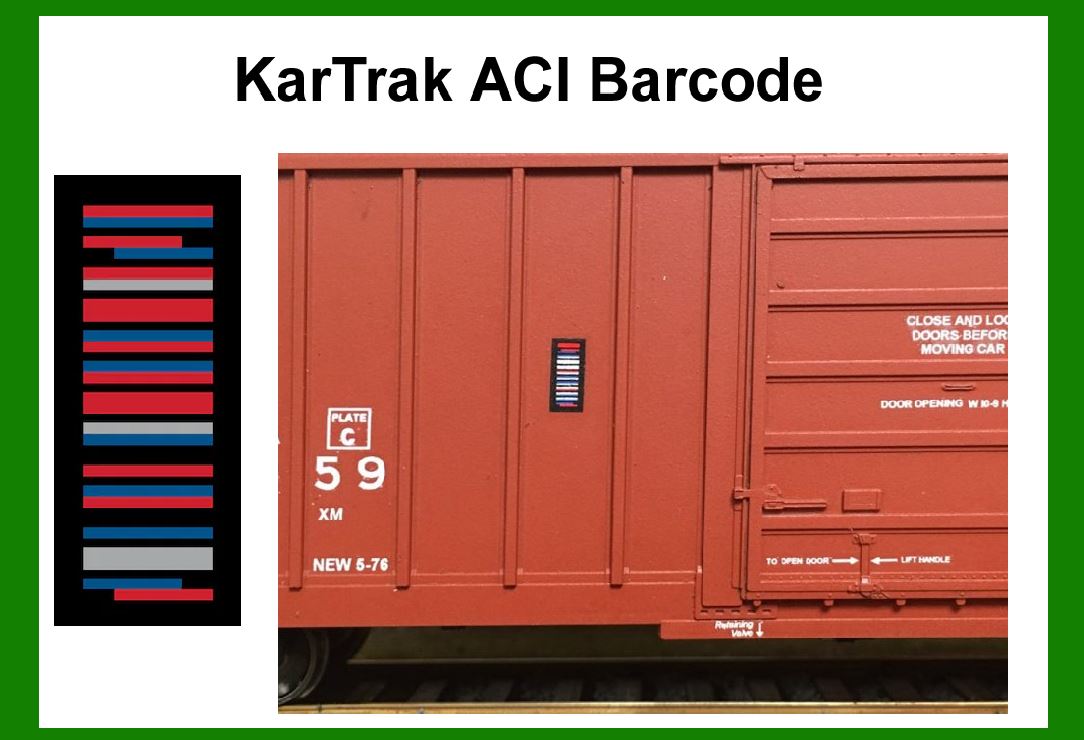
The KarTrak ACI (Automatic Car Identification) barcode system, developed in the late 1960s, was one of the earliest attempts to automate the identification of railroad rolling stock. It consisted of a series of colored stripes painted on steel plates, which were affixed to the sides of railcars. The stripes encoded data about the railcar in a binary format, which could be read by trackside scanners as the car passed by. |
Error correction in KarTrak ACI is crucial because the system had to function reliably in harsh outdoor environments with high speeds, dirt, and varying lighting conditions. Effective error correction ensures that even if parts of the barcode are damaged or obscured, the correct data can still be retrieved. |
|
2. Error Correction in KarTrak ACI Barcode |
2.1. Overview of Error Correction Mechanisms |
Error correction in the KarTrak ACI barcode is achieved through several methods, including redundancy, checksum calculations, and error-detecting codes. These mechanisms work together to ensure the accuracy and reliability of data encoded in the barcodes. |
2.1.1. Redundancy Redundancy involves duplicating certain pieces of data within the barcode. This way, if one part of the data is lost or damaged, the redundant data can be used to reconstruct the original information. In KarTrak ACI, redundancy is implemented by encoding the same information in multiple parts of the barcode. |
2.1.2. Checksum Calculations Checksum calculations are used to verify the integrity of the data encoded in the barcode. A checksum is a value derived from the data itself, and it is appended to the end of the data. When the barcode is read, the checksum is recalculated and compared with the original checksum. If the two checksums match, the data is considered valid; otherwise, an error is detected. |
2.1.3. Error-Detecting Codes Error-detecting codes, such as parity bits or more sophisticated codes like Hamming codes, are used to identify errors in the data. These codes add extra bits to the data that are calculated based on specific algorithms. When the barcode is read, the error-detecting code is checked to see if it matches the expected pattern. If it does not, an error is detected. |

|
2.2. Implementation of Error Correction Mechanisms |
The error correction mechanisms in KarTrak ACI are implemented through the following steps: |
2.2.1. Data Encoding The data to be encoded is first converted into a binary format. Each piece of data is assigned a unique binary code, which is then represented by a series of colored stripes on the barcode. The colors correspond to binary values, with each stripe representing a single bit. |
2.2.2. Adding Redundancy Redundant data is added to the barcode by duplicating certain sections of the binary code. This ensures that if one section is damaged or obscured, the redundant section can be used to reconstruct the original data. The placement and amount of redundancy can vary depending on the specific implementation of the KarTrak ACI system. |
2.2.3. Calculating and Appending Checksum A checksum is calculated based on the binary data and is appended to the end of the data. The checksum is typically a simple mathematical calculation, such as the sum of all the bits in the data, modulo a certain value. This provides a way to verify the integrity of the data when the barcode is read. |
2.2.4. Adding Error-Detecting Codes Error-detecting codes are added to the binary data by appending extra bits that are calculated based on the data. These codes can be simple parity bits, which ensure that the total number of 1s in the data is even or odd, or more complex codes like Hamming codes, which can detect and correct single-bit errors. |

|
2.3. Error Detection and Correction During Reading |
When a KarTrak ACI barcode is read by a scanner, the following steps are taken to detect and correct any errors: |
2.3.1. Reading the Barcode The scanner reads the colored stripes on the barcode and converts them back into binary data. This involves interpreting the colors and their positions to reconstruct the original binary code. |
2.3.2. Verifying Redundant Data The scanner checks the redundant data sections to see if they match. If one section is damaged or obscured, the scanner can use the redundant section to reconstruct the original data. If both sections are damaged, the scanner may be unable to correct the error. |
2.3.3. Checking the Checksum The scanner recalculates the checksum based on the binary data and compares it with the appended checksum. If the two checksums match, the data is considered valid. If they do not match, an error is detected. |
2.3.4. Using Error-Detecting Codes The scanner checks the error-detecting codes to see if they match the expected pattern. If an error is detected, the scanner can attempt to correct it using the information provided by the error-detecting code. For example, if a single-bit error is detected, a Hamming code can be used to identify and correct the erroneous bit. |

|
2.4. Examples of Error Correction |
2.4.1. Example 1: Single-Bit Error Detection and Correction Consider a simple example where the binary data to be encoded is '1101'. The system adds a parity bit to ensure that the total number of 1s is even. The encoded data becomes '11011'. When the barcode is read, the scanner interprets the colors and reconstructs the binary data. If a single-bit error occurs and the data is read as '11111', the scanner detects that the total number of 1s is odd, indicating an error. The scanner can then use the parity information to identify and correct the erroneous bit, restoring the original data '11011'. |
2.4.2. Example 2: Using Redundancy for Error Correction Suppose the binary data '1010' is encoded with redundancy by duplicating the data, resulting in '10101010'. If part of the barcode is damaged and the data is read as '10100010', the scanner can use the redundant section '1010' to identify the error and correct the damaged section, restoring the original data '10101010'. |
2.4.3. Example 3: Checksum Verification Assume the binary data '1001' has a checksum calculated as the sum of the bits modulo 2, which is 1. The encoded data with the checksum becomes '10011'. When the barcode is read, the scanner recalculates the checksum from the read data. If the data is read as '10010' (with an error in the last bit), the recalculated checksum is 0, which does not match the appended checksum 1. This indicates an error, and the scanner can flag the data as invalid. |

|
2.5. Limitations and Challenges |
2.5.1. Environmental Factors The KarTrak ACI system operates in harsh outdoor environments, which can introduce challenges such as dirt, weathering, and physical damage to the barcodes. These factors can obscure or damage the colored stripes, making error correction more difficult. |
2.5.2. Speed and Motion Railcars moving at high speeds can cause motion blur, which can affect the accuracy of barcode reading. The error correction mechanisms must be robust enough to handle the inaccuracies introduced by motion. |
2.5.3. Limited Redundancy While redundancy improves error correction, it also increases the size of the barcode. There is a trade-off between the amount of redundancy and the practical size of the barcode, which can limit the effectiveness of error correction. |

|
3. Conclusion |
Error correction in the KarTrak ACI barcode system is a critical component that ensures the reliability and accuracy of data encoded in the barcodes. The system employs multiple mechanisms, including redundancy, checksum calculations, and error-detecting codes, to detect and correct errors. These mechanisms work together to provide robust error correction, even in the challenging environments and conditions faced by railroad systems. By understanding and implementing these error correction techniques, the KarTrak ACI barcode system can achieve high levels of accuracy and reliability in automatic car identification. |

|
 cs@easiersoft.com